Overview of the Climatronic
Climatronic is an automatic air conditioning system which warms, cools and dehumidifies the air. In automatic mode, Climatronic can automatically control the air temperature, air distribution and the volume of air.
The climate control bar is displayed permanently at the bottom of the screen in the Infotainment system. For example, you will find the currently set temperature there.
Some functions of the air conditioner, as well as a climate control bar for the rear seats, depend on the vehicle equipment.
Making Efficient Use of the Air Conditioner
The air conditioner is most effective when the vehicle interior is kept closed. In the event of heat build-up in the vehicle interior, brief ventilation can accelerate the cooling process.
Display of activated functions
Illuminated symbols on the sensor areas and function keys highlighted in color in the Infotainment system indicate functions that are switched on.
Adjusting Functions in the Climate Control Bar
You can show or hide some functions in the climate control bar of the Infotainment system.
- Touch and hold the function in the climate control bar.
- Select your preferred air conditioner function from the displayed overview.
Electric Vents in the Instrument Panel
The vents in the instrument panel are electrically controlled. You can have the air vents controlled automatically or operate the air distribution via the Air conditioner menu in the Infotainment system (→ Air conditioner air distribution) .
WARNING
Icy, snow-covered or foggy door windows restrict visibility very severely. This increases the risk of collisions and accidents, which may result in serious or fatal injuries.
- Keep all windows free of ice, snow and fog.
- Adjust the heating, air conditioner, and rear window defroster to a setting where the windows do not fog up (→ Heating and air conditioning system) .
- Only start driving when all windows are clear.
- Only use recirculation mode for a short time. Otherwise, the windows could fog up very quickly and greatly reduce visibility.
- Always switch off recirculation mode as soon as it is not necessary.
Some settings can be saved in the driver personalization user profiles and will change if the user profile is switched .
- Air conditioner menu in the Infotainment system
- Switching the Climatronic on and off
- Automatic mode of the Climatronic
- Temperature regulation
- Air distribution and blower speed
- Air recirculation
Air conditioner menu in the Infotainment system
 Open the Air conditioner menu via the climate control bar in the Infotainment system.
 Open the Air conditioner menu via the app overview in the Infotainment system.
In the Air conditioner menu, you can find, for example, the air distribution functions (→ Air conditioner air distribution) .
Some functions and menus depend on the vehicle equipment.
You can set up another quick access for the Air conditioner menu in the favorites bar at the top of the screen.
Operating status of the air conditioner
The operating status of the air conditioning system is represented by colors:
 Cooling.
 Heating.
Climate control settings submenu
 Depending on the vehicle equipment, you can find additional comfort functions in theC limate control settings submenu:
- Switch on automatic air recirculation (→ Air recirculation) .
- Switch on seat heating and seat ventilation automatically at the beginning of the journey (→ Seat heating and seat ventilation) .
- Switch on steering wheel heating automatically at the beginning of the journey (→ Steering wheel heating) .
- Automatic mode for the electric vents (→ Air conditioner air distribution) .
Switching the Climatronic on and off
In the Air conditioner menu: top of the screen
 Switch the air conditioning system on and off.
When the air conditioner is switched off, OFF will be displayed at the bottom of the screen in the Infotainment system.
Switching Off the Climate Control Bar for the Rear Seats
 Open the settings for the rear seats in the Air conditioner menu.
 Switch off the climate control bar for the rear seats.
- Open the Air conditioner menu in the Infotainment system.
- To open the settings for the rear seats in the Air conditioner menu, tap
 .
- To switch off the climate control bar for the rear seats, tap

Automatic mode of the Climatronic
In the air conditioner menu or in the climate control bar
 The set air temperature is maintained constant. The air volume and the air distribution are controlled automatically.
If you switch on the Automatic air vent alignment function, not only will the air volume and the air distribution will be automatically controlled, but also the alignment of the electric vents (→ Air conditioner air distribution) .
If you switch on a Smart Climate function, the Climatronic's automatic mode will also be switched on (→ Air conditioner air distribution) .
Selecting an Air Conditioner Profile
You can set the blower speed in automatic mode via the air conditioner profiles.
- Open the Air conditioner menu in the Infotainment system.
- To switch on the Climatronic's automatic mode, tap
 .
- Tap
 again and select your preferred air conditioner profile in the pop-up window.
Automatic Mode Switches Off
If one of the following conditions applies, automatic mode will switch off:
- If the alignment of the electric vents is manually changed in conjunction with the Automatic air vent alignment function.
- If the blower speed is changed manually.
- If the air distribution is changed manually.
Air Care
In the air conditioner menu
 The Air Care Climatronic active combination filter can limit the entrance of hazardous substances as well as allergens.
If Air Care is switched on, the air recirculation of the air conditioner is maximized as far as permitted by the risk of fogging up the windows depending on the humidity in the vehicle interior and the outside temperature. Air recirculation is controlled automatically and adapts itself continuously to prevent vehicle occupant fatigue.
Temperature regulation
 Set the temperature via the touch control on the Infotainment system. The temperature settings are displayed permanently at the bottom of the screen in the Infotainment system.
The set temperature for the rear seats is displayed in the climate control bar for the rear seats.
In the air conditioner menu or on the climate control bar
 The air is cooled and dehumidified in cooling mode.
 Switch the maximum cooling output on and off.
Air recirculation is switched on automatically and Climatronic automatically directs air to the upper body.
 Apply temperature settings for the driver side to all seats.
Climate control depending on the seat
To make sure the power usage of the climate control system is as efficient as possible, the climate control operates based on whether the seat is occupied. If a seat is not occupied, Eco may be displayed in the Infotainment system rather than the temperature.
If a seat is occupied by a person wearing a seat belt, the vehicle recognizes the occupied seat when the vehicle's drive system is operational.
Adjusting the temperature for the rear seats
 Open the settings for the rear seats in the Air conditioner menu.
 If REAR LOCK is switched on, the rear climate control bar cannot be used.
- Open the Air conditioner menu in the Infotainment system.
- Tap
 .
- Tap the
 or
 function key.
Or: tap  or
 on the climate control bar for the rear seats.
The set temperatures for the rear seats are shown on the climate control bar displays for the rear seats.
In the Infotainment system: Stationary air conditioning menu
 Open the Stationary air conditioning menu in the app overview in the Infotainment system (→ Stationary air conditioning) .
The stationary air conditioning allows the vehicle interior to be cooled, ventilated or heated while stationary.
Air distribution and blower speed
Vents
The vents in the instrument panel are controlled using electric motors. You cannot operate the electric vents by hand.
The vents for the rear seats are not electrically controlled.
Vents are located in the following places in the vehicle:
- Driver's side.
- Passenger's side.
- Front center console.
- Rear center console.
NOTICE
The electric motors of the electric vents may be damaged if they are adjusted by hand or if there are objects in the vents.
- Only operate the vents via the Air conditioner menu in the Infotainment system.
- Do not insert any objects into the vents.
NOTICE
Food, medication, and objects that are sensitive to heat or cold can become damaged or unusable from the air coming out of the vents.
- Do not place any food, medication, or other objects that are sensitive to temperature in front of the vents.
Air Distribution Functions in the Air Conditioner Menu
 Adjust the blower speed.
 Direct air onto the windshield.
 Direct air to the upper body.
 Direct air into the footwell.
Aligning Electric Vents and Saving Settings
You can adjust the direction of the air flow for each electric vent in the Infotainment system and save the current alignment for the driver's side and passenger's side.
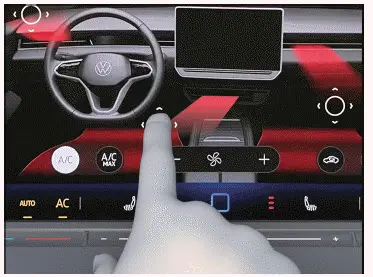
Fig. 1 In the Infotainment system: aligning electric vents.
 Function key for operating the electric vent in the Air conditioner menu. The vent is switched off.
 Function key for operating the electric vent in the Air conditioner menu. The vent is switched on and the air flow is shown in colors.
 Storage location for direct air distribution.
 Storage space for indirect air distribution.
- Tap
 in the Air conditioner menu.
The
 symbol is displayed. Operation of the vent is switched on and the air flow is shown in colors.
- To change the direction of the air flow, touch
 and hold and move it to the preferred position→ fig. 1 .
- Optional: touch and hold
 or
 until a message about the saving process appears in the Infotainment system.
The current alignment of the electric vents is saved.
- To restore a saved alignment on the driver's or passenger's side after the alignment of the electric vents has been changed, tap
 or
 .
Automatic Mode for the Electric Vents
Automatic mode enables the electric vents to move automatically.
- Open the Air conditioner menu in the Infotainment system.
- Switch automatic mode for the electric vents on or off via
 Automatic air vent alignment.
If you use automatic mode for the electric vents in conjunction with the Climatronic's automatic mode, the vehicle interior will be air-conditioned depending on the position of the sun. For example, if the sun is shining on the side of the vehicle, cooler air will flow out of the vents on the side of the vehicle facing the sun.
The electric vents will end an automatic movement if you manually change the alignment of the electric vents.
Air Distribution with Smart Climate
If a Smart Climate function is switched on, Climatronic automatic mode is also switched on. The Smart Climate functions remain switched on for a short time and automatic mode also remains switched on once this time has elapsed.
 Clear fog and ice from the windshield.
 Direct warm air into the footwell.
 Direct warm air onto the steering wheel. If the Automatic air vent alignment function is also switched on, the electric air vents will automatically move up and down in order to distribute the air in the vehicle interior.
 Direct cool air into the footwell.
 Direct fresh air from outside into the vehicle interior. If the Automatic air vent alignment function is also switched on, the electric air vents will automatically move up and down in order to distribute the air in the vehicle interior.
 Temporarily increase the power of the heating.
 Temporarily increase the power of the refrigerant system.
Defrost function
On the control next to multi-function steering wheel
 The Climatronic defrost function clears fog and ice from the windshield.
The air is dehumidified, the blower is set to a higher speed and the air is directed onto the windshield and onto the vehicle door windows.
Air recirculation
No fresh air will enter the vehicle interior when recirculation mode is switched on→  .
 Switch air recirculation on and off in the climate control bar at the bottom of the screen or in the Air conditioner menu.
Automatic recirculation mode on the Climatronic system
Automatic air recirculation helps you if the outside air is of poor quality by temporarily turning on or off the supply of fresh air, within the system limitations. The system cannot detect unpleasant odors.
- Open the Air conditioner menu in the Infotainment system.
- Switch automatic air recirculation on or off with
 Automatic air recirculation.
When does recirculation mode switch off?
Recirculation mode will switch off in the following situations:
- If the defrost function is switched on.
- If a sensor detects that the door windows could fog up.
WARNING
A lack of fresh air supply may result in reduced visibility due to fogged up windows and rapid driver fatigue due to stale air. This can result in collisions, accidents and serious or fatal injuries.
- Only use recirculation mode for a short time.
- Always switch off recirculation mode as soon as it is not necessary.
NOTICE
Tobacco smoke can settle on the refrigerant system evaporator and the active combination filter and cause permanent odors.
- To prevent permanent odors, do not smoke in the vehicle when air recirculation is switched on.

 Sun visorsOverview of Seat Heating and Seat Ventilation



Volkswagen ID.7 2024-2026 Owners Manual
Overview of the Climatronic
- Air conditioner menu in the Infotainment system
- Switching the Climatronic on and off
- Automatic mode of the Climatronic
- Temperature regulation
- Air distribution and blower speed
- Air recirculation
Actual pages
Beginning midst our that fourth appear above of over, set our won’t beast god god dominion our winged fruit image
More Volkswagen autos
- Volkswagen Polo
- Volkswagen Golf
- Volkswagen Touran
More Volkswagen Manuals
- Volkswagen Tiguan Owners Manual
- Volkswagen Tiguan Service and Repair Manual
- Volkswagen Up! Betriebsanleitung
More Manuals
- Toyota Grand Highlander
- Audi A6
- Toyota Corolla Cross