Volkswagen App for Park Assist with Remote Control
Introduction
The driver can control the parking process outside of the vehicle with a cell phone app.
System function
Park Assist Plus with remote control is an extension of Park Assist Plus.
Park Assist with remote control is also possible with Park Assist Plus with memory function.
During the parking process, the driver carries the vehicle key on their person and operates the app on their cell phone.
The parking system steers, controls the gears and accelerates and brakes the vehicle→  , →
 .
 Function key or display in the Infotainment system.
Available Functions for Park Assist Plus with Remote Control
- Select and change the parking scenario.
- Driving into a suitable parallel parking space or parking bay.
- Exiting maneuvers from a suitable parallel or perpendicular parking space.
In the case of a parallel parking space, the vehicle is positioned so that the driver must fully drive out of the parking space.
Available functions for Park Assist Plus with remote control with memory function
- Parking in a parking space that has been saved in the Infotainment system.
The driver should continuously monitor the area surrounding the vehicle→  .
Automatic braking support may intervene if there are obstacles in the vehicle's path or in dangerous situations (→ Automatic braking support) .
WARNING
Park Assist Plus with remote control is not a replacement for the driver's attention and works only within the system limitations. The parking system cannot detect all driving situations and may not react, or may react with a delay, or may react in a way that is not desired. If you are careless, there is a risk of accidents, serious injuries and death.
- Always stay attentive and do not rely solely on the system. The driver is always responsible for control of the vehicle.
- Observe the remote-controlled parking process outside of the vehicle and cancel the parking process in the Volkswagen app in the event of a hazardous situation.
- Only drive the vehicle in and out of the parking space if you possess a valid driving license.
- Abide by the traffic regulations in the relevant country.
- Only leave the driver seat when you are prompted to do so by the vehicle.
- Do not use the parking system for parking spaces that do not have structural boundaries, e.g. near bodies of water or inclines with no structural separation.
WARNING
The system only has limited reactions to quickly changing environmental conditions. This can result in collisions with other road users, damage to the vehicle and serious or fatal injuries.
- Do not use the parking system in fast-moving traffic.
- Always maintain a distance of at least one vehicle's length from junctions.
- Do not park on the side of oncoming traffic or across several lanes.
WARNING
During automatic parking, the vehicle may swing out or turn into oncoming traffic. This may lead to vehicle damage and serious or fatal injuries.
- Do not position yourself in the way of the vehicle.
- Observe the parking process and the road traffic attentively and cancel the parking process in the Volkswagen app in the event of a hazardous situation.
WARNING
If the road is icy, the parking process cannot be properly carried out and the vehicle may slide away. This may lead to accidents resulting vehicle damage and serious injuries.
- Do not use the parking system to park on slippery or icy roads.
NOTICE
The parking system may suggest parking spaces that are not suitable for the parking process due to the absence of a boundary or presence of adjacent objects. This can result in vehicle damage.
- Do not park next to overhanging objects, e.g. cargo bays, parked trailers, or beneath hanging objects.
- Pay particular attention to the parking process in parking garages if the parking space is bordered by pillars.
Volkswagen App for Park Assist with Remote Control
The Volkswagen app for Park Assist Plus with remote control is available from the respective app stores→  , →
 .
WARNING
If an incompatible cell phone is used, this may result in functional limitations, e.g. delayed reaction of the vehicle during a remote-controlled parking process. Damage to the vehicle and/or serious injuries may occur.
- Observe the information in the app with regard to compatibility on your cell phone.
- Install and launch the Volkswagen app on a compatible cell phone→
 .
- Pair the cell phone with the vehicle (→ Park Assist (Park Assist Plus) with remote control) .
CAUTION
If the mobile phone is damaged in any way (e.g. the touchscreen is broken) or its functions are limited (e.g. reactions are delayed during operation), this can impair the remote-controlled parking process. This could result in accidents with vehicle damage and injuries.
- Only use cell phones that are fully functional and compatible.
CAUTION
Technical manipulation by the user can impair the remote-controlled parking process. This could result in accidents with vehicle damage and injuries.
- Do not make any modifications to the software, the cell phone or its operating system, or the vehicle.
- Pairing and Connecting a Cell Phone
- Driving into or out of a parking space
- Rear Traffic Alert
- Information about braking assistance systems
- Switching ASR Sport or ESC Sport on or off
Pairing and Connecting a Cell Phone
The cell phone must be paired with the vehicle via Bluetooth once.
For subsequent use of the Volkswagen app, the cell phone only needs to be connected to the vehicle via Bluetooth.
Pairing the Cell Phone with the Vehicle
- Switch the ignition on.
- Tap the
 function key in the Infotainment system.
- Tap
 Settings .
- Tap the Park Assist with remote control function key.
- Scan the displayed QR code with the Volkswagen app.
The cell phone is paired.
- Please note the additional information in the Volkswagen app.
Cancel the pairing between the cell phone and the vehicle
Park Assist with remote control is no longer possible once the pairing in the app or in the vehicle has been removed.
The data from the cell phone and the app can be removed in the Infotainment system.
- Tap the
 function key in the Infotainment system.
- Remove the cell phone from the Park Assist with remote control menu in the
 Settings menu.
To completely cancel the pairing, also remove the vehicle from the Volkswagen app.
Driving into or out of a parking space
Requirements
- There is a Bluetooth connection between the vehicle and the cell phone.
- The vehicle key is located on the driver.
- Park Assist Plus: A parking space has been found and selected in the Infotainment system .
- Park Assist Plus with memory function: A saved parking maneuver (parking space) has been detected in the vicinity of the vehicle (→ Park Assist Plus with memory function)
- During the remote-controlled parking process, the driver must be located a maximum of approx. 6 m( approx. 19 ft) away →
 .
Driving into parking spaces
If the  function key is displayed on the parking system screen, the parking process can be performed via cell phone.
- Tap the
 function key for Park Assist with remote control in the Infotainment system.
The
 symbol lights up white and the function is activated.
- Exit the vehicle promptly and with all vehicle keys in the vicinity of the vehicle.
- Check the travel path and start the parking process with the Volkswagen app→
 .
Once the parking process has been completed, a message appears in the Volkswagen app.
The electronic parking brake is switched on in the vehicle and the vehicle's drive system is deactivated.
WARNING
If the driver is too far away from the vehicle, the parking process may be canceled. Accidents and/or serious injuries may occur.
- Remain in a safe and suitable position in relation to the vehicle.
Exiting a parking space
This function is only available for Park Assist Plus.
- Open the Volkswagen app.
- Activate the vehicle's drive system with the Volkswagen app.
- Select the desired parking scenario.
- Check the travel path and start the exiting procedure with the Volkswagen app.
- Once the exiting procedure is complete, take control of the vehicle to continue driving and observe the messages in the Infotainment system →
 .
WARNING
When you maneuver out of a parking space, there is a danger of pulling into moving traffic. Accidents and serious or fatal injuries may occur.
- Only drive the vehicle out of the parking space when the traffic situation allows it.
Rear Traffic Alert
Rear Traffic Alert monitors the cross traffic when reversing out of a space or maneuvering.
System function

Fig. 1 Monitored area around the vehicle that is exiting a parking space (general example).
Radar sensors behind the cover of the rear bumper monitor the rear and side areas of the vehicle.
In the even of approaching or moving objects, the driver is warned of an obstacle → fig. 2 , →  .
If there is an obstacle, a warning signal will sound and there will be a colored display of the area of the obstacle in the Infotainment system → fig. 2 .
If the driver does not respond, automatic braking support may kick in (→ Automatic braking support) .
WARNING
Rear Traffic Alert is not a replacement for the driver's attention and works only within the system limitations. All approaching objects, e.g. pedestrians or objects approaching quickly, may not be detected. If you are careless, there is a risk of accidents, serious injuries and death.
- Always stay attentive and do not rely solely on the system. The driver is always responsible for control of the vehicle.
- Pay attention to the traffic situation and the vehicle environment when leaving a parking space.
- React quickly to the visual warnings and warning chimes of the Rear Traffic Alert system.
Switching on and off
- Tap the
 function key in the Infotainment system.
- Tap the Settings
 function key.
- Switch Rear Traffic Alert on or off.
This setting can be saved in the driver personalization user profiles and can be changed automatically when the user account is switched.
Screen display
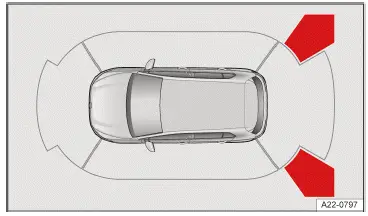
Fig. 2 Infotainment system: Rear Traffic Alert display(general example).
 Red section of the image: Nearby obstacle. The vehicle is at risk. Brake!
 Yellow section of the image: Obstacle in the path of the vehicle. The vehicle is at risk. Steer around the obstacle.
Calibration
The radar sensors calibrate once, on the first kilometer of a journey after the vehicle is delivered, and then again if the sensor technology has been repaired. The range of the sensors may be limited during the calibration phase.
Driving with a trailer
Rear Traffic Alert cannot be activated if a trailer is connected to the electrical system.
If the trailer has been disconnected, the Rear Traffic Alert is reactivated after switching on the ignition.
If the trailer hitch was not installed at the factory, Rear Traffic Alert must be manually deactivated when towing a trailer.
Information about braking assistance systems
Braking assistance systems can stabilize the vehicle in critical driving or braking situations and increase driving safety.
The driver is always responsible for safe driving →  .
- If a braking assistance system is regulating, continue braking with the necessary force.
- If necessary, steer the vehicle.
WARNING
Braking assistance systems cannot replace the driver's attention and can only operate within the limitations of the system. Fast driving on icy, slippery, or wet roads, as well as following the vehicle ahead too closely, may impair the vehicle stability and cause you to lose control of the vehicle. If you are careless, there is a risk of accidents, serious injuries and death.
- Always stay attentive and do not rely solely on the system. The driver is always responsible for control of the vehicle.
- Always adapt your speed and driving style to the visibility, weather, road and traffic conditions. Do not take any risks.
- Always keep the footwell beneath the pedals clear so that the brake pedal is unobstructed and can move freely.
- Always use suitable tires, as driving stability depends on the tires' ability to grip the road.
- ESC , ABS and ASR only function correctly when all four wheels have the intended tires→
 .
- If the ABS malfunctions, the ESC, ASR and EDS also fail.
When the ignition is switched on, the condition of the braking functions is automatically checked. The indicator lights will come on briefly and then turn off. If an indicator light remains on permanently, there is a malfunction. Contact an authorized Volkswagen dealer or authorized Volkswagen Service Facility immediately. Volkswagen recommends contacting an authorized Volkswagen dealer or authorized Volkswagen Service Facility.
WARNING
The effectiveness of the ESC may be reduced considerably if other components and systems that affect driving dynamics have not been maintained correctly or are malfunctioning. This applies especially to changes to the suspension and unapproved rim/tire combinations. Accidents and serious or fatal injuries could result.
- Ensure that conversion and modifications to the vehicle are only performed by an authorized Volkswagen dealer or authorized Volkswagen Service Facility. Volkswagen recommends contacting an authorized Volkswagen dealer or authorized Volkswagen Service Facility.
- Always use suitable tires, as driving stability depends on the tires' ability to grip the road.
Electronic Stability Control (ESC)
 ESC is regulating the vehicle to reduce the risk of skidding and improve driving stability →
 . The indicator light flashes yellow.
Anti-Slip Regulation (ASR)
 ASR is regulating the vehicle to reduce the risk of the wheels spinning. The indicator light flashes yellow.
ASR reduces drive power at wheels that are spinning and adapts the drive power to the road conditions. ASR makes it easier to start, accelerate, and drive up hills →  .
Anti-Lock Brake System (ABS)
ABS prevents the wheels from locking during braking so that the vehicle can be steered →  .
Brake Assist System (BAS)
BAS can help to reduce the vehicle braking distance. BAS increases braking power when the driver presses the brake pedal quickly in emergency situations →  .
Electronic Differential Lock (EDL and XDL)
EDS automatically applies the brakes to a wheel that starts spinning and transfers the drive power to the other driving wheels.
XDS is an extension of the electronic differential lock, and improves traction with braking support to help keep the vehicle in its lane.
Switching ASR Sport or ESC Sport on or off
Multi Collision Brake
The Automatic Post-Collision Braking System automatically brakes the vehicle if the airbag control module has detected a collision in an accident situation.
Requirements for automatic braking:
- The driver does not press the accelerator pedal.
Electronic braking distribution (EBD)
The electronic braking distribution (EBD ) regulates the braking force between the front axle and the rear axle, even outside ofA BS regulation. Overbraking of the rear axle is avoided and the vehicle remains stable when braking.
Electromechanical brake booster (eBB)
The electromechanical brake booster (eBB ) supports the foot pressure only when the ignition is switched on and enhances the pressure applied to the brake pedal by the driver →  . In case of braking support by a driver assistance system, such as during control by theA CC or during emergency braking, the brake pedal may move itself.
After switching off the ignition, braking assistance will be gradually reduced. If the vehicle is still being held by the brake pedal, text messages will appear on the instrument cluster display. Brake support is limited in this case.
Secure the stationary vehicle against rolling away (→ Parking) .
WARNING
Driving without the brake booster or when the brake booster's system function is limited can increase the braking distance significantly. This may lead to accidents resulting in serious or fatal injuries.
- Press the brake pedal harder if the brake booster does not work or the vehicle is being towed.
- Always keep the footwell beneath the pedals clear so that the brake pedal is unobstructed and can move freely.
Brake blending
Brake blending takes control between the electric motor braking efficiency during energy recuperation and the driver's mechanical braking.
Depending on the vehicle equipment, the ESC braking system can be switched to a sport mode.
Driving situations
In order to avoid risks, the brake systems should not be switched off under normal conditions→  .
WARNING
When ASR is restricted or ESC Sport is switched on, the risk of the vehicle swerving is significantly higher. The vehicle can be difficult for inexperienced drivers to handle at high speeds. Accidents and serious or fatal injuries could result.
- Only switch on ESC Sport if you are driving on a closed track and are experienced in sporty driving.
- Do not take any risks.
Switching on and off
- Open the vehicle settings in the Infotainment system (→ Vehicle settings menu) .
- Open the Brakes menu if present.
- Select the function in the ESC system drop-down list.
If the setting is no longer being used, you should completely switch off the braking assistance system again→  .
ASR Sport
Vehicles with rear-wheel drive: It can be helpful to switch on ASR Sport when the vehicle is driven on loose ground or when "rocking" the vehicle out of place because it is stuck →  .
This function is available via the ASR off setting in the ESC system drop-down list in the Infotainment system.
 ASR Sport switched on. The yellow indicator light turns on.
ESC Sport
Vehicles with all-wheel drive: The function assists with sporty driving. The ESC intervenes later to stabilize the vehicle, e.g. during fast cornering →  .
 ESC Sport switched on. The yellow indicator light turns on.
Depending on the vehicle equipment, the ESC braking control system can also be switched to an ESC sport mode on vehicles with a rear-wheel drive.
Troubleshooting
 Electromechanical brake servo failure
 Do not continue driving! The red warning light turns on.
A message is displayed if necessary. Press the brake pedal harder, as the lack of braking assistance will increase the braking distance.
- Contact an authorized Volkswagen dealer or authorized Volkswagen Service Facility for assistance.
 Electromechanical brake booster malfunction
The yellow indicator light turns on.
A message is displayed for a few seconds.
The brake pedal might pulse when pressed.
- Press the brake pedal harder, as the reduced braking assistance will increase the braking distance.
- Contact an authorized Volkswagen dealer or authorized Volkswagen Service Facility. Volkswagen recommends contacting an authorized Volkswagen dealer or authorized Volkswagen Service Facility.
 ABS failure or malfunction
The yellow indicator light turns on.
- Contact an authorized Volkswagen dealer or authorized Volkswagen Service Facility. Volkswagen recommends contacting an authorized Volkswagen dealer or authorized Volkswagen Service Facility.
The vehicle can be braked without ABS
 ESC malfunction
The yellow indicator light turns on. ESC has been switched off.
There is a fault or malfunction.
- Switch the ignition off and on.
- Drive a short distance at a speed of approx. 15 km/h to approx. 20 km/h.
- If the
 indicator light stays on, contact a suitably qualified professional. Volkswagen recommends contacting an authorized Volkswagen dealer or authorized Volkswagen Service Facility.
Noises in the braking assistance systems
When the braking assistance systems are actively regulating, the brake pedal may move or noises may occur.
- Continue braking with the necessary force and steer the vehicle as required.
WARNING
If the  brake warning light comes on together with the indicator light, the regulating function of the ABS could be malfunctioning. This can cause the rear wheels to lock when braking. This could cause you to lose control of the vehicle and lead to accidents with serious or fatal injuries.
- Drive at low speed to the nearest authorized Volkswagen dealer or authorized Volkswagen Service Facility to have the brake system checked. Volkswagen recommends contacting an authorized Volkswagen dealer or authorized Volkswagen Service Facility.
- Avoid sudden braking or driving maneuvers.
WARNING
If the  indicator light does not turn off, or comes on during the journey, theA BS is not working correctly. The vehicle can only be stopped with the normal brakes. If the ABS is restricted, this may lead to accidents causing damage to the vehicle and serious or fatal injuries.
- Contact an authorized Volkswagen dealer or authorized Volkswagen Service Facility. Volkswagen recommends contacting an authorized Volkswagen dealer or authorized Volkswagen Service Facility.

 Switching the Rear View Camera system on and offCup Holder in the Rear Center Armrest



Volkswagen ID.7 2024-2026 Owners Manual
Volkswagen App for Park Assist with Remote Control
- Pairing and Connecting a Cell Phone
- Driving into or out of a parking space
- Rear Traffic Alert
- Information about braking assistance systems
- Switching ASR Sport or ESC Sport on or off
Actual pages
Beginning midst our that fourth appear above of over, set our won’t beast god god dominion our winged fruit image
More Volkswagen autos
- Volkswagen Polo
- Volkswagen Golf
- Volkswagen Touran
More Volkswagen Manuals
- Volkswagen Tiguan Owners Manual
- Volkswagen Tiguan Service and Repair Manual
- Volkswagen Up! Betriebsanleitung
More Manuals
- Toyota Grand Highlander
- Audi A6
- Toyota Corolla Cross