Opening and closing the windows
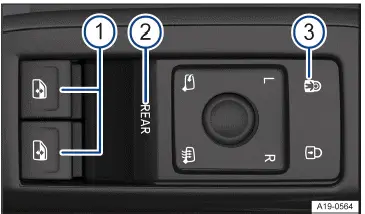
Fig. 1 In the driver door: Buttons for the front and rear power windows.
- Buttons for the power windows.
- Control
 for activating the rear power windows and convenience opening and closing.
- Control for deactivating the power window buttons in the rear doors and for switching on the electric child safety lock.
As standard, the  → fig. 1 1 buttons can be used to operate the power windows in the front doors.
Opening the windows
- Press the
 button.
Closing the windows
- Pull the
 switch.
Deactivating the power window buttons in the rear doors
- Press the control panel
 → fig. 1 3 .
The electric child safety lock is switched on at the same time. If the power window buttons in the rear doors are deactivated and the child safety lock is switched on, the yellow indicator light in the control will come on.
The windows can still be opened or closed using the switches in the doors for a brief period after the ignition has been switched off, as long as the driver's or front passenger door is not opened.
Using the Control 
- Briefly press the control
 → fig. 1 (2) to activate operation of the power windows in the rear doors.
If operation of the power windows in the rear doors is activated, the control function light comes on.
- Briefly press the control
 → fig. 1 (2) again to activate operation of the power windows in the front doors.
If, after operation is activated, the power windows in the rear doors are not used, operation of the power windows in the front doors is reactivated after around ten seconds.
One-touch opening and closing function
The one-touch opening and closing function allows the windows to be completely opened or closed. To use this feature, do not hold the window switch up or down.
One-touch closing function
- Pull the window button upward briefly to the second level.
One-touch opening function
- Press the window button downward briefly to the second level.
Stopping the automatic closing/opening
- Pull or press the button for the window again.
Convenience opening and closing
Press and hold the  control to activate convenience opening and closing of the power windows in all doors. If the function is activated, the function light in the control blinks. Both of the buttons
 can now simultaneously open or close all four windows.
If, after activation of the convenience opening and closing, the power windows are not used, the operation of the power windows in the front doors is reactivated after around ten seconds.
Briefly press and hold the control  again to deactivate the function.
The windows can be opened and closed from outside the vehicle using the vehicle key when the ignition is switched off.
- Press and hold the unlock or lock button on the vehicle key.
Or: On vehicles with Keyless Access with push-button start: hold your finger on the unlock sensor in the door handle for several seconds until the windows are closed . The vehicle key must be in the unlocking area to use this feature.
- To stop the function, release the unlock or lock button.
Or: remove your finger from the sensor.
A valid vehicle key must be in the unlocking area to use this feature. When all of the windows are closed, the turn signals will flash once as a confirmation.
You can select the convenience opening settings in the Vehicle menu in the Infotainment system.
WARNING
Careless or unintended use of the power windows can cause serious injuries.
- Do not open or close the power windows if anyone is in the way.
- Always take all vehicle keys with you when leaving the vehicle.
- Note that the windows can still be opened or closed using the door buttons for a brief period after the ignition has been switched off, as long as the driver's or front passenger door is not opened.
- When driving with children seated on the rear bench seat, always disable the rear power windows so that the windows cannot be opened or closed.
WARNING
If the vehicle is locked, the windows can no longer be opened and will prevent people from escaping from the vehicle interior. In an emergency, this could cause serious or fatal injuries.
- Never leave children or people requiring assistance unattended in the vehicle when the vehicle is locked.
NOTICE
If the windows are open, precipitation can enter the vehicle and soak the interior equipment, which could restrict the function of the controls or damage them.
- Close all windows if there is precipitation.
If the power windows are malfunctioning, the one-touch opening and closing function and the pinch protection may not function correctly. Contact a suitably qualified professional. Volkswagen recommends contacting an authorized Volkswagen dealer or authorized Volkswagen Service Facility.
Convenience opening and closing only functions if the one-touch opening and closing function is activated for all the power windows.
Power window pinch protection
The power window pinch protection can reduce the risk of being pinched and injured when the windows are closing.
If the window cannot close due to resistance or an obstacle, then the window will reopen immediately→  .
- Check why the window did not close.
- Try again to close the window.
If the window will not close again, then the pinch protection will be disabled for several seconds.
If the window still cannot close, then the window will stop at the place where it meets resistance. If you press the switch again within several seconds, the window will close without pinch protection →  .
Closing windows without pinch protection
- Try to close the windows again within a few seconds by holding the switch. This will disable the pinch protection.
If the closing process takes longer than several seconds, then pinch protection will be enabled again. If there is resistance to the window moving or an obstacle is blocking the window, then the window will reopen automatically.
- If the window still cannot close, then contact a suitably qualified professional. Volkswagen recommends contacting an authorized Volkswagen dealer or authorized Volkswagen Service Facility.
WARNING
Closing the window when pinch protection is disabled can result in serious injuries.
- Always be careful when closing the windows.
- Do not close windows if anyone is in the way.
- Note that the pinch protection does not prevent fingers or body parts from being trapped against the window frame.
Pinch protection also occurs when using the convenience closing function with the vehicle key.
Troubleshooting
One-touch up/down feature
If the 12 V vehicle battery is disconnected or drained when the windows are not completely closed, then the onetouch up/down feature will not work. It must be reprogrammed using the following steps:
- Switch the ignition on.
- Close all windows and doors.
- Pull the switch for the desired window and hold it in that position for several seconds.
- Release the switch, then pull it upward again and hold it.
The one-touch up and down features will then be fully functional.
The automatic power windows can be reprogrammed individually, or multiple windows can be reprogrammed at the same time.
Controls are responding differently than expected
Moisture, dirt and grease may limit the functioning of the controls.
- Always keep the control panels clean and dry.

 Opening and closing the trunk lidAdjusting the steering wheel position mechanically



Volkswagen ID.7 2024-2026 Owners Manual
Actual pages
Beginning midst our that fourth appear above of over, set our won’t beast god god dominion our winged fruit image
More Volkswagen autos
- Volkswagen Polo
- Volkswagen Golf
- Volkswagen Touran
More Volkswagen Manuals
- Volkswagen Tiguan Owners Manual
- Volkswagen Tiguan Service and Repair Manual
- Volkswagen Up! Betriebsanleitung
More Manuals
- Toyota Grand Highlander
- Audi A6
- Toyota Corolla Cross