Charging cable for charging stations with alternating current (AC)
Introduction
Instructions for the charging cable
The charging cable delivered with the vehicle depends on the scope of supply and the country-specific technical specifications, for example charging plug connectors for mains sockets.
Volkswagen recommends only using the charging cable supplied and observing the following information→  , →
 .
- Handle with care.
- Roll out or roll in completely.
- Do not fold or bend over sharp edges.
- Do not allow to become trapped or run over.
- Only pull on the charging connectors.
- Children must not use the charging cable.
- Keep animals away.
- Stow away safely and without kinks after use.
DANGER
Using a charging cable that has been damaged or tampered with can lead to an electric shock. This will result in serious or fatal injuries.
- Check the charging connectors and the charging cable for damage, e.g. cracks, before every use.
- Never open the charging cable and its components.
- Never use a charging cable that has been damaged or tampered with.
- In the event of a malfunction, have the charging cable checked by suitably qualified professionals. Volkswagen recommends contacting an authorized Volkswagen dealer or authorized Volkswagen Service Facility.
WARNING
Charging a high-voltage battery with an unsuitable charging cable can cause short circuits and electric shocks. This could result in damage to the charging cable and serious or fatal injuries.
- Always take note of the information on the charging cable.
- Before traveling abroad, find out about the electrical installations available locally.
- Before traveling abroad, make sure you know which is the correct, country-specific charging cable and what the maximum permitted charging current is.
Stowing the charging cable away
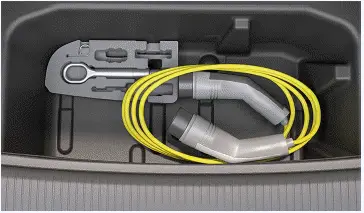
Fig. 1 Under the luggage compartment floor: Storage compartment for the charging cable (general example).
WARNING
An unsecured or incorrectly secured charging cable can be thrown around the inside of the vehicle during sudden driving and braking maneuvers. This can cause accidents and serious injuries.
- Stow the charging cable in the storage compartment under the luggage compartment floor→ fig. 1 .
- Or: stow the charging cable under the height-adjustable upper luggage compartment floor.
- If the rear seat backrest has been folded down, stow the charging cable in the footwell in front of the rear seat.
Instructions for the charging connectors and the protective device of the charging cable
- Do not reach into the contacts of the charging connector.
- Keep away from intense sunlight. The outside temperature must be no higher than 50 ºC(1 22 ºF).
- Do not drop.
- Protect against immersion in liquids, e.g. rainwater.
- Replace the protective cap after use.
WARNING
Connecting or using the charging cable for GFI outlets incorrectly can cause a serious malfunction. This may result in damage to the electrical installation and charging cable and cause a fire and serious injuries.
- Never connect the charging cable to an extension cable, a cable reel, a socket strip or an adapter, such as a travel adapter or timer.
As a portable piece of operating equipment, the charging cable may be subject to regular testing obligations.
A test adapter is required for this.
Note the maximum load for the fuse circuit in use. If the charging cable is connected to a mains socket on the same electrical circuit as other consumers, the circuit fuse may be tripped.
Charging cables must be disposed of in an environmentally friendly manner and may not be included with household waste.
Cleaning the charging cable
- Wipe the surface of the charging cable with a dry or only slightly damp cloth→
 , →
 .
DANGER
Cleaning a connected charging cable creates a danger of coming into contact with live voltage from the highvoltage system. This can cause an electric shock, resulting in burns and serious injuries or death.
- Only clean the charging cable when it is unplugged.
NOTICE
Improperly cleaning the charging cable could result in damage.
- Only use water and no additional cleaning agents when cleaning the surface.
- Ensure that no water enters the contacts of the charging cable.
Charging cable for charging stations with alternating current (AC)
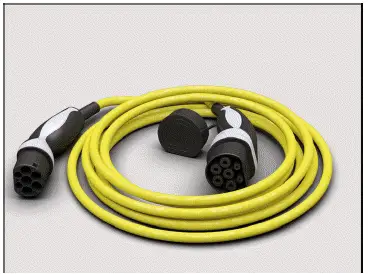
Fig. 1 Charging cable for charging stations with alternating current (AC).
The maximum charging current is 16 A or 32 A and is dependent on the infrastructure used, the charging cable and the equipment of the battery charger.
NOTICE
Improper use of the charging station could damage the high-voltage system of the vehicle.
- Observe the manufacturer's instructions and information when operating the charging station.
The charging cable is not suitable for use as an extension cable.
Electrical installation may be carried out according to different technical rules in countries other than your own.
Therefore, a charging cable with a wire size of 5 x 6 mm2 may be required locally to achieve the maximum available charging power.
Charging with a 16 A charging cable is not possible at charging stations that support 32 A charging. It all depends on the charging station equipment.
- Before charging, find out about the charging technology provided.

 Warning signs for the high-voltage systemCharging cable for mains sockets



Volkswagen ID.7 2024-2026 Owners Manual
Actual pages
Beginning midst our that fourth appear above of over, set our won’t beast god god dominion our winged fruit image
More Volkswagen autos
- Volkswagen Polo
- Volkswagen Golf
- Volkswagen Touran
More Volkswagen Manuals
- Volkswagen Tiguan Owners Manual
- Volkswagen Tiguan Service and Repair Manual
- Volkswagen Up! Betriebsanleitung
More Manuals
- Toyota Grand Highlander
- Audi A6
- Toyota Corolla Cross