Switching the ignition on and off
Some vehicle functions are activated as soon as the driver approaches the vehicle with the vehicle key.
Switching on the ignition

Fig. 1 On the right side of the steering column: starter button.
- Press the starter button once → fig. 1 .
Or: Press the brake pedal.
The ignition can only switch on and the vehicle's drive system can only be activated if there is a valid vehicle key in the vehicle.
Switching off the ignition
- If the ignition is active and the vehicle is stationary, press the starter button once.
Or: with the vehicle stationary and the electronic parking brake activated, leave the vehicle.
If the vehicle is stationary and the brake is not pressed and the driver opens the driver seat belt buckle with the electronic parking brake switched on, the ignition is also switched off.
Automatic ignition switch off
If the driver moves away from the vehicle with the vehicle key when the ignition is switched on, the ignition will switch itself off automatically after a certain time.
If no valid remote control vehicle key is detected in the vehicle interior after the ignition has been switched off, the vehicle's drive system cannot be activated again without a valid vehicle key. A corresponding message is shown in the ID. display.
If the hood is opened while the ignition is switched on, the ignition does not switch off automatically.
WARNING
If the driving mode selector is moved when the ignition is switched on, the vehicle's drive system is activated immediately under certain conditions. This can cause unintentional vehicle movement and serious injuries.
- Do not operate the driving mode selector when switching on the ignition if drive-ready mode is not intended to be active.
WARNING
If you leave vehicle keys unattended in the vehicle, children or unauthorized people could lock the doors and/or the trunk lid, activate drive-ready mode, or switch on the ignition and thereby activate electrical equipment, such as the power windows. This can cause accidents and serious or fatal injuries.
- Always take all vehicle keys with you when leaving the vehicle.
WARNING
If you leave children, people requiring assistance or animals unattended in the vehicle, they may accidentally set the vehicle in motion or be subjected to very high or low temperatures. There is a risk of accidents and serious or fatal injuries.
- Never leave children, people requiring assistance or animals unattended in the vehicle.
- Activating the vehicle's drive system
- Electronic engine sound
- Exiting a vehicle while the vehicle's drive system is active
- Deactivating the vehicle's drive system
Activating the vehicle's drive system
Prerequisites for activating the vehicle's drive system
If the following conditions are met, the vehicle's drive system can be activated:
- The high-voltage battery has a sufficient charge level.
- The vehicle is not connected to a charging cable.
- The high-voltage battery temperature is within the operating range.
- A valid remote control vehicle key is present in the vehicle.
Activating the vehicle's drive system
- With the brake pedal pressed, engage the
 or
 gear.
The
 indicator light in the instrument cluster display lights up and a chime sounds.
- If the vehicle's drive system cannot be activated, repeat the process. Perform an emergency start if necessary.
WARNING
An electric vehicle generates very little stationary, driving or operating noise. As a result, when your vehicle is being driven, other road users such as pedestrians and children may have difficulty hearing your vehicle or may not notice it at all in traffic-calmed zones and when maneuvering or reversing. This may cause accidents and serious injuries.
- Always bear in mind that other road users may not notice the driving noise.
Electronic engine sound
The electronic engine sound warns other road users of an approaching electric vehicle.
After activating the vehicle's drive system, the electronic engine sound is switched on.
When driving faster, the electronic engine sound will fade out slowly.
WARNING
The electronic engine sound may be quieter and/or more difficult to hear if there is snow around the front grille or if the area is very dirty. If the sound of the vehicle is not heard by other road users, this can lead to accidents and serious injuries.
- Before starting a journey, check the area around the front grille for heavy dirt and clean it if necessary.
- You should always assume that your vehicle will not be heard by other road users.
Exiting a vehicle while the vehicle's drive system is active
The ignition and the drive switch off automatically under certain conditions if the vehicle is exited after stopping with the drive system active and with a selector position engaged (→ Starter button) .
This prevents unauthorized use of the vehicle.
Before you leave the vehicle, you must secure it against rolling away .
If you need to drive again immediately afterwards, the ignition must be switched back on, for example by pressing the brake pedal, and the vehicle's drive system must be reactivated. If necessary, read the notes in the ID. display.
WARNING
An unattended vehicle which is ready to drive can move unintentionally. This can cause accidents and serious injuries.
- Never leave a vehicle which is ready to drive unattended.
- Before leaving the vehicle, make sure that the electromechanical parking brake is switched on.
- When leaving the vehicle, always make sure that all doors, windows, the trunk lid and the hood are closed completely and locked.
Troubleshooting
Valid vehicle key cannot be detected
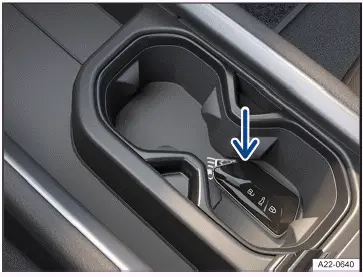
Fig. 1 In the center armrest: Emergency start function.
A corresponding indicator appears in the ID. display.
If the remote control vehicle key has a weak or drained button cell battery, the vehicle key may not be able to be detected.
An emergency start must be performed:
- Place the vehicle key in the cup holder or the storage compartment in the center console→ fig. 1 (arrow).
- Press the brake pedal or the starter button. The ignition is switched on.
Vehicle's drive system cannot be connected
If an unauthorized vehicle key is used or the system is malfunctioning, a corresponding indicator appears in theI D.
display.
- Use an authorized vehicle key.
- If the malfunction persists, contact an authorized Volkswagen dealer or authorized Volkswagen Service Facility.
Deactivating the vehicle's drive system
Only perform these steps in the specified order:
- Bring the vehicle to a stop.
- Park the vehicle.
- Set the electronic parking brake.
- Pay attention to the messages in the ID. display.
WARNING
An unattended vehicle which is ready to drive can move unintentionally. This can cause accidents and serious injuries.
- Never leave a vehicle which is ready to drive unattended.
- Before leaving the vehicle, make sure that the electromechanical parking brake is switched on.
- When leaving the vehicle, always make sure that all doors, windows, the trunk lid and the hood are closed completely and locked.
Troubleshooting
The vehicle's drive system cannot be deactivated
The vehicle's drive system cannot be deactivated.
An emergency stop must be performed:
- Bring the vehicle to a stop.
- Press the starter button twice within several seconds or press and hold one time.
The vehicle's drive system is deactivated and the ignition is switched off.

 Information on the brakesDriving mode selector



Volkswagen ID.7 2024-2026 Owners Manual
Switching the ignition on and off
- Activating the vehicle's drive system
- Electronic engine sound
- Exiting a vehicle while the vehicle's drive system is active
- Deactivating the vehicle's drive system
Actual pages
Beginning midst our that fourth appear above of over, set our won’t beast god god dominion our winged fruit image
More Volkswagen autos
- Volkswagen Polo
- Volkswagen Golf
- Volkswagen Touran
More Volkswagen Manuals
- Volkswagen Tiguan Owners Manual
- Volkswagen Tiguan Service and Repair Manual
- Volkswagen Up! Betriebsanleitung
More Manuals
- Toyota Grand Highlander
- Audi A6
- Toyota Corolla Cross