Opening and closing the trunk lid
Introduction
The trunk lid is unlocked and locked together with the doors.
On vehicles with Keyless Access, the trunk lid is automatically unlocked when opening .
If individual door opening or the opening of one side of doors is activated in the Infotainment system settings for opening and closing, you must press the  button on the remote control vehicle key twice to unlock the trunk lid.
On vehicles with Keyless Access with push-button start, you must press the sensor on the inside of the driver's or front passenger's door handle, depending on the setting, twice to do this.
WARNING
Uncontrolled or unintentional release: opening and closing the trunk lid can cause accidents and serious injuries.
- Do not open or close the trunk lid if anyone is in the way.
- Always keep the trunk lid closed while driving.
- Close and lock the trunk lid and all doors when the vehicle is not in use.
- Check that, when closed, the trunk lid is flush with the areas of the vehicle body around it.
WARNING
Depending on the season, the temperature inside the vehicle could become very high or low, which can lead to serious injuries, illness or death, especially for very young children.
- Make sure that no one remains in the vehicle.
- Never let children play in or on the vehicle unattended, especially when the trunk lid is open. Children could enter the luggage compartment, close the lid, and then lock themselves in.
WARNING
The vehicle may not always detect when the trunk lid is not latched if a cargo rack that is carrying cargo is mounted on the trunk lid. If the trunk lid is not latched, it may open suddenly while driving. This may cause serious injuries.
- Check that, when closed, the trunk lid is flush with the areas of the vehicle body around it.
WARNING
If there is a heavy load of snow or cargo on the trunk lid, the additional weight may cause the lid to lower, which can result in serious injuries.
- Never open the trunk lid if there is a heavy load of snow or cargo such as a cargo rack on it.
- Remove the snow or cargo before opening the trunk lid.
- If necessary, support the trunk lid or remove the cargo and/or snow before opening the trunk lid.
WARNING
Closing the trunk lid incorrectly may lead to the rear window shattering and cause serious injuries.
- Do not push the trunk lid closed with your hand on the rear window.
NOTICE
Using the opening mechanism incorrectly may damage the component and could prevent the trunk lid from closing.
- Never attach or secure cargo on the opening mechanism.
NOTICE
Using the trunk lid incorrectly may damage the component and result in it breaking off.
- Never attach or secure cargo on the trunk lid.
Opening and closing the trunk lid
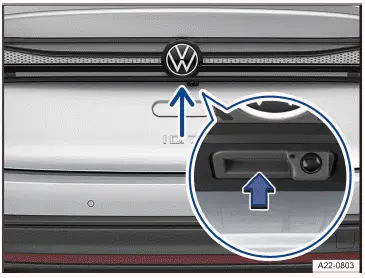
Fig. 1 In the trunk lid: button to open the trunk lid.
Opening the trunk lid
- To unlock the trunk lid, press the
 or
 button on the vehicle key.
- Raise the trunk lid using the button → fig. 1 .
Closing the trunk lid
- Pull the trunk lid downward firmly using the handle in the interior trim panel until it latches shut in the lock →
 .
An image in the instrument cluster display indicates if the trunk lid has not opened or closed correctly.
The trunk lid locks automatically while driving.
WARNING
Closing the trunk lid incorrectly or carelessly may lead to serious injuries.
- When opening the trunk lid, take care to pull it all the way up.
- When closing the trunk lid, make sure your hands are not within the closing range of the lid.
If the trunk lid is not opened within several minutes after unlocking, it will lock again automatically.
- Power opening and closing the trunk lid
- Trunk lid with Easy Open motion sensor
- Automatic trunk lid closing Easy Close
Power opening and closing the trunk lid
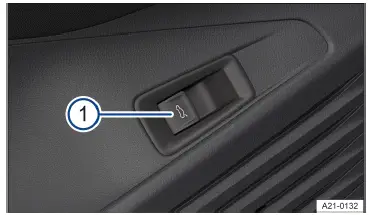
Fig. 1 In the driver's door: unlock button for the trunk lid.
- Release button.
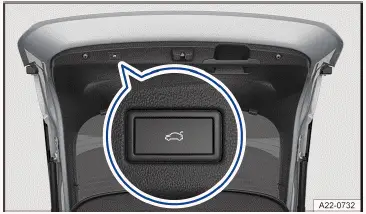
Fig. 2 In the open trunk lid: Button for power closing the trunk lid (general example).
Power opening the trunk lid
- Briefly press and hold the
 or
 button on the remote control vehicle key.
Or: pull the  button in the driver door upward → fig. 1 1 .
Or: press the button to open the trunk lid (→ Mechanical trunk lid) .
The trunk lid will open automatically.
Power closing the trunk lid
- Press the button in the trunk lid when it is open→ fig. 2 .
Or: pull the  button in the driver door upward when the ignition is switched on until the trunk lid is closed → fig. 1 1 .
Or: On vehicles with Keyless Access with push-button start: briefly press and hold the  button on the vehicle key. The vehicle key must be nearby to use this feature.
Or: Begin closing the trunk lid by hand until it closes by itself.
The trunk lid is closed.
Interrupting the opening or closing process
- Press the
 or
 button on the vehicle key while the lid is opening or closing.
Or: press the button on the trunk lid while the lid is opening or closing→ fig. 2 .
The trunk lid can now be moved by hand. It is necessary to use more force when doing this.
Pressing the  button again moves the trunk lid back to the original position.
Chimes
When the trunk lid is opened or closed from inside the vehicle or using the vehicle key, chimes will sound.
Changing and saving the opening angle
If the space behind or above the vehicle is not large enough to allow the trunk lid to open completely, you can change how far the trunk lid opens.
- Interrupt the opening process at the preferred open position.
The trunk lid must be at least half open.
- Press and hold the
 button in the trunk lid until the emergency flashers start flashing→ fig. 2 .
The adjusted opening angle is saved.
There will be an audible signal and the emergency flashers will flash to indicate that the setting was saved.
WARNING
Closing the trunk lid incorrectly or carelessly may lead to serious injuries.
- When closing the trunk lid, make sure your hands are not within the closing range of the lid.
NOTICE
If you open or close the trunk lid when there is not enough space, this may cause damage.
- Before opening or closing the trunk lid, check whether there is enough room, e.g. in garages.
Trunk lid with Easy Open motion sensor

Fig. 1 General example of the sensor-controlled luggage compartment opener (Easy Open).
If a valid vehicle key is located near the trunk lid, the trunk lid can be unlocked and opened with foot motion.
- Position your foot behind the middle of the bumper.
- Quickly swing the lower part of your leg close to the bumper → fig. 1 .
- Quickly remove the lower part of your leg once more from the bumper.
Visual feedback is given via the turn signals. The trunk lid will open.
Activating or deactivating the Easy Open function
The Easy Open function can be activated and deactivated in the Infotainment system:
- Select the Vehicle menu.
- Swipe to the side and activate or deactivate Easy Open.
Or:
- Swipe to the side and select the Central locking menu item.
- Scroll down the list and activate or deactivate Easy Open.
If Easy Open is activated, Easy Close is also active (→ Automatic trunk lid (easy close)) .
The Easy Open function is only available when Keyless Access is activated .
The sensor-controlled luggage compartment opener (Easy Open) function may be triggered inadvertently in the following situations:
- During charging operations in which a charging cable is brought to the lower rear area of the vehicle.
- If there is a sweeping motion under the rear bumper.
- If a strong stream of water or steam passes.
- During maintenance and repair work in the area of the rear bumper.
- If there are moving gates in the vicinity of the bumper.
CAUTION
If a valid vehicle key is detected near the trunk lid, the sensor-controlled luggage compartment opener( Easy Open) function may trigger unintentionally and open the trunk lid in some cases. If the trunk lid opens unintentionally, it may cause injuries to people and/or damage to objects within the trunk lid's range of motion.
- After parking the vehicle, switch off the sensor-controlled luggage compartment opener( Easy Open) function via the Infotainment system if you park close to obstacles, e.g. street lamps, posts and garage doors, or if you park in an underground car park with a low ceiling.
- Always make sure that no valid vehicle keys are left unattended near the trunk lid.
- Always turn off the sensor-controlled luggage compartment opener( Easy Open) function via the Infotainment system before any and all maintenance and repair work is performed on the vehicle.
- Always turn off the sensor-controlled luggage compartment opener( Easy Open) function via the Infotainment system before washing the vehicle.
- Always switch off the sensor-controlled luggage compartment opener( Easy Open) function via the Infotainment system before mounting a bicycle rack or hitching a trailer (→ Trailer towing) .
Automatic trunk lid closing Easy Close
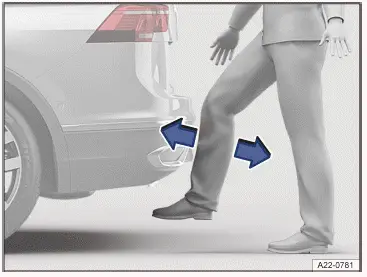
Fig. 1 General example of the trunk lid with sensorcontrolled closing (Easy Close).
You can only activate the Easy Close function if a valid remote control vehicle key is detected near the trunk lid.
- Position your foot behind the middle of the bumper.
- Quickly swing the lower part of your leg close to the bumper → fig. 1 .
- Quickly remove the lower part of your leg once more from the bumper.
Easy Close is activated for approx. 20 seconds. A chime will confirm successful activation.
The trunk lid is closed as soon as all valid vehicle keys are removed from the area near the trunk lid.
The trunk lid will lock automatically after it closes if the vehicle was previously locked and there is not a valid vehicle key inside the vehicle.
Easy Close permits locking a maximum of one vehicle key in the luggage compartment.
The locking procedure is interrupted as soon as a vehicle key returns nearby. The trunk lid re-opens.
Activating or deactivating the Easy Close function
The function Easy Close can be activated or deactivated together with the sensor-controlled luggage compartment opener (Easy Open) function in the Vehicle menu in the Infotainment system (→ Automatic trunk lid (easy open)) .
The Easy Close function is only available when Keyless Access is activated .
The Easy Close function may be triggered inadvertently in the following situations:
- During charging operations in which a charging cable is brought to the lower rear area of the vehicle.
- If there is a sweeping motion under the rear bumper.
- If a strong stream of water or steam passes.
- During maintenance and repair work in the area of the rear bumper.
- If there are moving gates in the vicinity of the bumper.
CAUTION
If a valid vehicle key is detected near the trunk lid, the Easy Close function may trigger unintentionally and close the trunk lid in some cases. If the trunk lid closes unintentionally, it may cause injuries to people and/or damage to objects within the trunk lid's range of motion.
- After parking the vehicle, switch off the Easy Close function via the Infotainment system if you park close to obstacles, e.g. street lamps, posts and garage doors, or if you park in an underground car park with a low ceiling.
- Always make sure that no valid vehicle keys are left unattended near the trunk lid.
Always make sure that there are no people in the swivel range of the trunk lid.
- Do not hold on to anything in the path of the trunk lid.
- Always turn off the Easy Close function via the Infotainment system before any and all maintenance and repair work is performed on the vehicle.
- Always switch off the Easy Close function via the Infotainment system before washing the vehicle.
- Always switch off the Easy Close function via the Infotainment system before mounting a bicycle rack or hitching a trailer (→ Trailer towing) .
If another trunk lid function is activated while closing the trunk lid or objects are detected in the area of the trunk lid, the closing process is automatically interrupted.
If the vehicle is locked and the Easy Close function is started, the trunk lid will lock automatically once it is closed.
If the vehicle is completely unlocked and the Easy Close function is started, the trunk lid will not lock automatically once it is closed.
Troubleshooting
If the trunk lid will not open or close
- Check if the trunk lid is being blocked by an object.
The trunk lid can be moved by hand. It is necessary to use more force when doing this.
- If the trunk lid is operated too frequently within a short period of time, then the lid motor will automatically switch off to reduce the risk of overheating. Until the lid motor has cooled down, the trunk lid can be opened and closed by hand using extra force.
- When in trailer mode, the power trunk lid can only be opened and closed at the trunk lid.
- If the 12 V vehicle battery is disconnected or the fuse is malfunctioning, the trunk lid must be closed by hand.
If all turn signals flash four times
The vehicle key that was last used is still in the vehicle.
- Remove the key and lock the vehicle.
If the trunk lid is difficult to move
The mechanism for opening the trunk lid may not always work automatically when the outside temperatures are around the freezing point.
- Guide the trunk lid farther upward by hand.
The Easy Open sensor function is not working
- Easy Open only works when the ignition is switched off.
- Clean the sensors in the rear bumper.
- The trailer hitch is extended.
- The vehicle was retrofitted with a trailer hitch.
- Easy Open may be deactivated in heavy precipitation to reduce the risk of false activation.

 Interior monitoring and towing protectionOpening and closing the windows



Volkswagen ID.7 2024-2026 Owners Manual
Opening and closing the trunk lid
- Power opening and closing the trunk lid
- Trunk lid with Easy Open motion sensor
- Automatic trunk lid closing Easy Close
Actual pages
Beginning midst our that fourth appear above of over, set our won’t beast god god dominion our winged fruit image
More Volkswagen autos
- Volkswagen Polo
- Volkswagen Golf
- Volkswagen Touran
More Volkswagen Manuals
- Volkswagen Tiguan Owners Manual
- Volkswagen Tiguan Service and Repair Manual
- Volkswagen Up! Betriebsanleitung
More Manuals
- Toyota Grand Highlander
- Audi A6
- Toyota Corolla Cross