Warning levels and braking support
Speed ranges
Autonomous Emergency Braking (Front Assist) provides maximum support within these speed ranges:
- Response to vehicles: Approx. 5 km/h to approx. 250 km/h.
- Response to bikes: Approx. 5 km/h to approx. 250 km/h.
- Response to pedestrians: Approx. 5 km/h to approx. 85 km/h.
The support system can involve an advance warning, an immediate warning, automatic braking or braking support. A distance warning may also be displayed.
Influencing factors
Whether and in which speed range Autonomous Emergency Braking (Front Assist) reacts to the named objects is dependent on the following factors:
- Type of object.
- Movement direction of the object.
- Speed of the object.
- Speed of the vehicle.
The work area can therefore be limited if the vehicle approaches an object very quickly and thus has little time to react.
Furthermore, not all warning levels are passed through in all situations. Depending on the speed, there may not be, for example, an advance warning or immediate warning, but rather an automatic braking maneuver that occurs straight away, so as to best protect the detected object.
Distance warning
 Front Assist detects if there is a safety hazard from following the vehicle ahead too closely.
The indicator light turns on. Increase the distance.
Advance warning
 Front Assist detects a possible collision and prepares the vehicle for possible emergency braking.
A warning tone sounds and the warning light turns on. Apply the brakes or maneuver to avoid the collision.
Immediate warning
If you do not respond to the advance warning, the brakes may be applied briefly to indicate the increasing risk of a collision. Apply the brakes or maneuver to avoid the collision.
Automatic braking
Autonomous Emergency Braking (Front Assist) can brake the vehicle automatically in several stages of increasing braking force. Reducing the vehicle speed may help to reduce the damage resulting from a collision.
Braking support
If the system detects that you are not braking enough before an impending collision, Front Assist can increase the braking force and thus help to reduce the risk of a collision. The braking support is only active as long as you are firmly pressing the brake pedal.
- Front Assist system limitations
- Oncoming vehicle braking when turning
- Using Front Assist
- Lane Assist system limitations
- Driving with Lane Assist
Front Assist system limitations
Limits of the sensor system
Front Assist detects driving situations using a radar sensor in the front of the vehicle and the camera behind the windshield.
Note the limitations of the sensor system (→ Sensor system) . Always be attentive and intervene yourself if necessary!
After starting the vehicle
 Front Assist is not available or its availability is limited immediately after starting the vehicle. During this time, the white indicator light in the instrument cluster display comes on.
Unrecognizable objects
Autonomous Emergency Braking (Front Assist) may not react or may react with a delay to the following objects:
- Stationary cyclists.
- Pedestrians and cyclists who are not detected as such, for example because they are fully or partially hidden.
- Animals
In addition, depending on the vehicle equipment and country, Autonomous Emergency Braking( Front Assist) may not react or may react with a delay to the following objects:
- Oncoming vehicles.
- Vehicles crossing the street.
- Oncoming pedestrians or cyclists.
Functional limitations
In addition to the situations specified in the sensor system limitations, Front Assist may not react, may react with a delay, or may react in a way that is not desired in the following situations, among others:
- When driving in reverse
- If ESC is regulating or is malfunctioning.
- If multiple brake lights on the vehicle are malfunctioning.
- If multiple brake lights are malfunctioning on a trailer or bicycle rack that is connected to the vehicle electrical system.
- If the vehicle is accelerating very quickly or the accelerator pedal is pressed all the way down
- In unclear traffic situations, for example if vehicles driving ahead are braking quickly or are turning
- When entering or exiting a tunnel.
- If Front Assist is malfunctioning
Switching off Front Assist
Depending on the system, Front Assist may not be suitable in the following situations and must be switched off if they occur →  :
- If the vehicle is not being driven on public roads, for example during off-road driving or on a racetrack.
- If the vehicle is being towed or transported
- If add-ons cover the radar sensor or camera.
- If the camera or radar sensor is malfunctioning.
- Following a violent impact affecting components within the range of the radar sensor, e.g. following a rear-end collision.
- If the windshield is damaged in the camera field of view.
- If there are multiple unwanted activations
WARNING
Using Front Assist in these situations may result in accidents and serious or fatal injuries.
- Switch off Front Assist in the specified situations.
Swerve support
The swerve support can help to steer the vehicle around an obstacle in a critical driving situation.
If you steer to swerve around an obstacle after an urgent warning, the swerve support can help. Swerve support slows individual wheels and helps you by making a corrective steering intervention while you are steering.
Speed range
The swerve support is available in a speed range from approx. 30 km/h to a maximum of approx.
150 km/h.
Limits
The swerve support does not respond to objects crossing the street. Also observe the system limitations of Front Assist (→ Autonomous Emergency Braking (Front Assist)) .
Oncoming vehicle braking when turning
Oncoming vehicle braking when turning can prevent the vehicle from colliding with an oncoming object when turning.
If there is a danger that the vehicle can collide with an oncoming vehicle in an adjacent lane when turning, the oncoming vehicle braking when turning function brakes your vehicle. This also applies to oncoming pedestrians and cyclists, depending on the vehicle equipment and country. This may prevent a collision.
Speed range
The oncoming vehicle braking when turning function is available up to approx. 20 km/h.
Limits
The oncoming vehicle braking when turning function is only available if you activate the turn signal, have turned the steering wheel and have thereby started the turning maneuver. However, after switching from driving on the right to driving on the left or vice versa, the oncoming vehicle braking when turning function will only be available after some time.
Also observe the system limitations of Front Assist (→ Autonomous Emergency Braking (Front Assist)) .
Using Front Assist
When you switch on the ignition, Front Assist with all of its equipment- and country-dependent functions is automatically switched on.
 However, Front Assist is not available or its availability is restricted while the white indicator light is turned on.
Volkswagen recommends always leaving Front Assist and all of its equipment- and country-dependent functions switched on. Exceptions (→ Autonomous Emergency Braking (Front Assist)) .
Switching on and off
If the vehicle is stationary, you can manually switch Autonomous Emergency Braking( Front Assist) on and off. You can also view the switched on condition.
In the Infotainment system:
- Open the Assistance systems menu.
- Switch Autonomous Emergency Braking on or off in the corresponding submenu.
 If you switch off Front Assist, all of its equipment- and country-dependent functions are also switched off. The yellow indicator light turns on in the instrument cluster display.
If Front Assist was automatically deactivated, e.g. if towing is detected, the yellow indicator light also comes on.
Setting Up Equipment- and Country-dependent Functions
If Front Assist is switched on, you can set the following settings in the assistance systems menu of the Infotainment system depending on the equipment and country:
- Switch on and off distance warning.
- Switch on and off swerve support.
- Switching on and off oncoming vehicle braking when turning.
Troubleshooting
 Front Assist starts
The white indicator light comes on.
- Autonomous Emergency Braking (Front Assist) is temporarily not available or has limited availability. After driving straight for a short distance, Autonomous Emergency Braking is available again and the indicator light goes out. If the vehicle does not drive, the indicator light stays on.
 Front Assist has limited availability or is not available
The yellow indicator light turns on. In addition, a message is shown in the instrument cluster display.
- The radar sensor or camera field of view is dirty. Clean the radar sensor and windshield (→ Vehicle care) .
- The visibility of the radar sensor or camera is limited due to weather conditions, such as snow, or from soap residue or coatings. Clean the radar sensor and windshield (→ Vehicle care) .
- Radar sensor visibility is limited by attachments, decorative frames on license plate holders, or stickers. Clear the area around the radar sensor (→ Accessories and replacement parts) .
- The camera's view is limited by attachments or stickers. Keep the area around the camera field of view clear (→ Accessories and replacement parts) .
- The radar sensor or the camera is misaligned or damaged, for example as a result of damage to the front of the vehicle or the windshield. Check if there is noticeable damage (→ Accessories and replacement parts) .
- The camera was automatically deactivated due to a high ambient temperature or long exposure to direct sunlight.
Front Assist will be available once the camera is available again.
- Painting work was carried out on or structural modifications were made to the front of the vehicle (→ Repairs and technical modifications) .
- If the problem persists, turn off Autonomous Emergency Braking and contact suitably qualified professionals.
Volkswagen recommends contacting an authorized Volkswagen dealer or authorized Volkswagen Service Facility.
Front Assist is not functioning as expected or has been triggered multiple times unnecessarily
- The radar sensor or camera field of view is dirty. Clean the radar sensor and windshield (→ Vehicle care) .
- The system limitations are not adhered to (→ Autonomous Emergency Braking (Front Assist)) .
- Low-lying sun or darkness.
- If the problem persists, turn off Autonomous Emergency Braking and contact suitably qualified professionals.
Volkswagen recommends contacting an authorized Volkswagen dealer or authorized Volkswagen Service Facility.
Lane Assist system limitations
Limits of the sensor system
Lane Assist detects lane markings with the camera behind the windshield.
Observe the limits of the camera (→ Sensor system) . Always be attentive and intervene yourself if necessary!
Lane markings not detected or not correctly recognized
Lane Assist does not correctly detect all lane markings. If lane markings are not detected or if markings are incorrectly detected as lane markings, Lane Assist may fail to intervene when it should or may intervene when not desired. In addition to the situations specified in the camera limitations, this may also occur in the following situations, among others:
- If lane markings are not present.
- When the driving style is very dynamic.
- When not on highways or well-developed roads.
- On poor road surfaces, road structures or objects.
- In the event of reflections or dazzling effects.
Always be attentive and intervene yourself if necessary by overriding unwanted interventions by the system immediately. Temporarily switch off Lane Assist if required.
Lane Assist not ready to take control
Lane Assist is not ready to take control (system status inactive) under the following conditions:
- The vehicle speed is less than around 60 km/h.
- Lane Assist has not detected a lane marking.
- If lanes and curves are too narrow.
- Temporarily, when the driving style is very dynamic.
- When the driver oversteers during a system intervention.
- During an intervention by Autonomous Emergency Braking (Front Assist).
Lane Assist is not ready to take control on at least one side in the following situations:
- When the turn signals are switched on in the direction of the intended lane change.
- On the inside of a bend that you are deliberately driving around well on the inside.
Driving with Lane Assist
Switching on and off
Depending on the country, Lane Assist always switches on after switching on the ignition. In this case, the Infotainment system automatically displays an overview of individual systems and functions in the entry menu (→ Entry menu) . If necessary, you can switch off Lane Assist directly.
You can also switch Lane Assist on and off in the Infotainment system at any time and view the switched on condition.
- Open the Assistance systems menu.
- Switch Lane Assist on or off in the corresponding submenu.
 Depending on the country, if you switch off Lane Assist, the yellow indicator light will come on in the instrument cluster.
If there is a system malfunction, Lane Assist may turn off automatically.
Displays
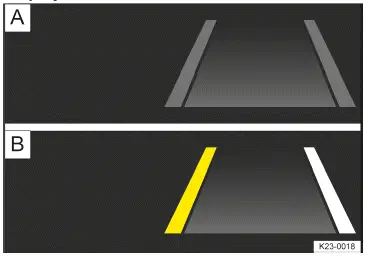
Fig. 1 In the head-up display: Lane Assist display indicators (general example).
- Grey line: lane marking detected. The system is not ready to monitor on the indicated side.
- Yellow line: Lane marking detected. The system is monitoring on the indicated side.
White line: Lane marking detected. The system is ready to monitor on the indicated side.
Additional details of the lane marking can also be shown, for example, dashed road markings.
Depending on the driving situation, one of the following indicator lights will light up in the instrument cluster:
 System switched on, inactive and not ready to take control.
 System active and ready to take control on at least one side.
 System taking action on the side shown (corrective steering intervention).
If Travel Assist is actively controlling, there will not be any steering intervention and no Lane Assist display.
Driver intervention request
If there is no steering activity, an indicator in the instrument cluster display will be displayed and audible warnings will sound.
If you do not respond to this, Emergency Assist will be activated, depending on the vehicle equipment.
If a corrective steering intervention is performed for an extended period, an indicator will be displayed in the instrument cluster display and audible warnings will also be sound regardless of the steering activity.
Steering wheel vibration
You can select the Steering wheel vibration option in the Assistance systems menu in the Infotainment system. If you select this option, the steering wheel will vibrate if Lane Assist is active and you drift onto a road lane marking that the system has detected.
Troubleshooting
 Lane Assist not available
The yellow indicator light turns on. In addition, a message is shown in the instrument cluster display.
- The camera field of view is dirty. Clean the windshield (→ Vehicle care) .
- The camera's view is limited due to weather conditions, such as snow, or from soap residue or coatings. Clean the windshield (→ Vehicle care) .
- The camera's view is limited by attachments or stickers. Keep the area around the camera field of view clear (→ Accessories and replacement parts) .
- The camera is misaligned or damaged, for example as a result of damage to the windshield. Check if there is noticeable damage (→ Accessories and replacement parts) .
- The camera was automatically deactivated due to a high ambient temperature or long exposure to direct sunlight.
Lane Assist will be available once the camera is available again. Deactivate the vehicle's drive system and activate it again.
- Malfunction or fault. Deactivate the vehicle's drive system and activate it again.
- If the problem persists, contact an authorized Volkswagen dealer or authorized Volkswagen Service Facility.
Volkswagen recommends contacting an authorized Volkswagen dealer or authorized Volkswagen Service Facility.
It can take a few seconds once the ignition has been switched on for a system fault to be recognized.
If Lane Assist is not available, Travel Assist is not available either.
The system is functioning differently than expected
- Do not mount any objects on the steering wheel.

 Eco assistOperating Travel Assist



Volkswagen ID.7 2024-2026 Owners Manual
Warning levels and braking support
- Front Assist system limitations
- Oncoming vehicle braking when turning
- Using Front Assist
- Lane Assist system limitations
- Driving with Lane Assist
Actual pages
Beginning midst our that fourth appear above of over, set our won’t beast god god dominion our winged fruit image
More Volkswagen autos
- Volkswagen Polo
- Volkswagen Golf
- Volkswagen Touran
More Volkswagen Manuals
- Volkswagen Tiguan Owners Manual
- Volkswagen Tiguan Service and Repair Manual
- Volkswagen Up! Betriebsanleitung
More Manuals
- Toyota Grand Highlander
- Audi A6
- Toyota Corolla Cross