Interior rearview mirror
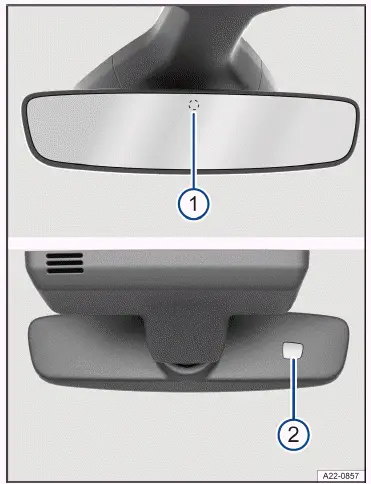
Fig. 1 On the windshield: automatic dimming interior rearview mirror.
- Sensor for light entering from the rear.
- Sensor for light entering from the front.
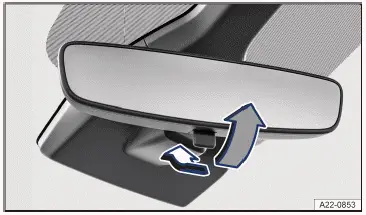
Fig. 2 On the windshield: manual dimming interior rearview mirror.
Automatic dimming interior rearview mirror
When the ignition is on, the sensors measure the amount of light entering from the rear→ fig. 1 (1) and from the front (2 ).
Depending on the measured values, the interior rearview mirror will dim automatically.
If the amount of light entering the sensors is limited or interrupted, for example by a sunshade or attachment, the automatic dimming interior rearview mirror may not function or may malfunction. Mobile navigation devices on the windshield or near the automatic dimming interior rearview mirror can also affect the sensors →  .
Automatic dimming will be deactivated in some situations, for example when reverse gear is engaged.
Manual dimming interior rearview mirror
- Base position: lever on the lower edge of the mirror points forward toward the windshield.
- To dim, pull the lever back → fig. 2 .
WARNING
The illuminated display of a mobile navigation system may interfere with the automatic dimming interior rearview mirror. This may stop you from using the interior rearview mirror to accurately determine the distance from vehicles or other objects behind you. Accidents and serious or fatal injuries could result.
- Switch the mobile navigation system off in such cases.
- Outside mirrors
- Opening the front passenger outside mirror settings for driving in reverse
Outside mirrors
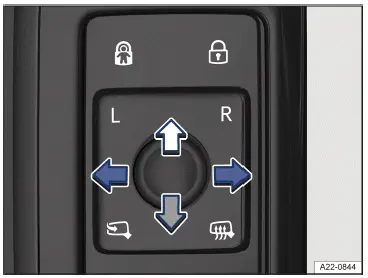
Fig. 1 In the driver door: knob for the outside mirrors.
The following information describes the outside mirror functions for left-hand drive vehicles. Position corresponds to the outside mirror on the driver's side, and position  corresponds to the outside mirror on the passenger's side.
For right-hand drive vehicles, proceed in the reverse order.
Adjusting outside mirrors
- Switch the ignition on.
- Turn the knob in the driver door until the desired symbol lights up→ fig. 1 .
- To adjust the outside mirror, push the knob forward, back, right or left in the direction of the arrow.
The corresponding symbol remains lit while the selected function is active.
 Fold the outside mirror in towards the vehicle body→
 .
 Switch on the outside mirror heating. The exterior mirror heating only works when the ambient temperature is below approx. 20 ºC (around 68 ºF) and provides the most heat when it first turns on. After about two minutes, the mirrors will be heated depending on the ambient temperature.
 Adjusts the left outside mirror.
 Adjusts the right outside mirror.
Activating outside mirror functions
The following outside mirror functions must be activated in the vehicle settings in the Infotainment system before they are used for the first time (→ Vehicle settings menu) .
Synchronized mirror adjustment
The synchronized mirror adjustment feature simultaneously adjusts the right-side outside mirror to match adjustments to the left-side outside mirror.
- Turn rotary knob to position .
- Adjusts the left outside mirror. The right outside mirror will be adjusted the same way(s ynchronized).
- To correct the adjustment of the right outside mirror, if necessary, turn the knob to the position and adjust the right outside mirror.
Folding the outside mirrors in while parking
If the vehicle is locked or unlocked from the outside, the outside mirrors can automatically fold in or out, depending on the vehicle equipment. For this to happen, the knob must be in the  position.
If the knob for power exterior mirrors is in the position, the outside mirrors will remain folded in.
Save the passenger-side outside mirror settings when reversing
- Unlock the vehicle using the key, to which the setting is allocated.
- Select the reverse gear.
- Adjust the front passenger outside mirror so that, for example, the edge of the curb can be seen clearly.
- Shift the transmission to neutral.
- Switch the ignition off.
The selected mirror position will be stored and assigned to the vehicle key.
Opening the front passenger outside mirror settings for driving in reverse
- Turn rotary knob for the outside mirrors to the relevant position for adjusting the front passenger outside mirror.
- With the ignition switched on, select reverse gear.
The front passenger outside mirror will adjust to the stored position.
The front passenger outside mirror will exit the position stored for driving in reverse when you begin driving forward faster than about 15 km/h or when the knob is turned to any other position.
WARNING
If you fold the outside mirrors against the vehicle or back without taking care, you could get your fingers jammed between the outside mirror and the mirror base. This can cause severe injuries.
- Do not fold the outside mirrors out or in if there are any obstacles in the path.
NOTICE
If outside mirrors are not folded in when driving through a car wash, they can get damaged.
- Always fold in the outside mirrors.
NOTICE
Folding in the power exterior mirror manually can worsen wear and tear or damage the mirror motor.
- Do not fold power exterior mirrors in or out by hand.
Leave the outside mirror heating on only as long as it is needed. Otherwise power will be used unnecessarily.
If there is a malfunction in the power outside mirror, you can adjust the position of the mirror manually by hand by pushing on the edge of the mirror surface.
Some settings can be saved in the driver personalization user profiles and will change when the user profile is switched.

 Operating the windshield wiper leverSun visors



Volkswagen ID.7 2024-2026 Owners Manual
Interior rearview mirror
- Outside mirrors
- Opening the front passenger outside mirror settings for driving in reverse
Actual pages
Beginning midst our that fourth appear above of over, set our won’t beast god god dominion our winged fruit image
More Volkswagen autos
- Volkswagen Polo
- Volkswagen Golf
- Volkswagen Touran
More Volkswagen Manuals
- Volkswagen Tiguan Owners Manual
- Volkswagen Tiguan Service and Repair Manual
- Volkswagen Up! Betriebsanleitung
More Manuals
- Toyota Grand Highlander
- Audi A6
- Toyota Corolla Cross