Using assisted lane changing
When you activate the 3-blink turn signal, the vehicle can assist with lane changing on multi-lane highways within the system limitations, as long as sufficient space is detected around the vehicle.
Assisted lane changing uses the same sensor technology as the Lane Change System( Side Assist) and the parking systems. Therefore carefully read all information on Side Assist and the notes on the parking systems. Also observe the system limitations and information there.
Requirements
Assisted lane changing is only available during a forwards journey on multi-lane highways which are included in the navigation data of the Infotainment system, and only at speeds above approximately 90 km/h.
Travel Assist and Side Assist must also be switched on.
Displays
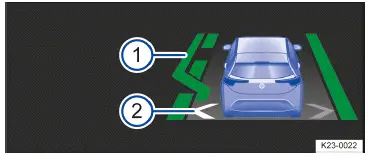
Fig. 1 In the head-up display: displays for assisted lane changing (general example).
- Indicated lane changing (green), assisted lane changing is carried out.
- Arrows on your own lane show the status of assisted lane changing.
- Grey arrow: assisted lane changing not possible on the relevant side.
- White arrow: assisted lane changing possible on the relevant side.
Depending on the driving situation, one of the following indicator lights will also light up in the instrument cluster:
 Assisted lane changing switched on, lane changing not possible.
 White arrow: assisted lane changing possible on the highlighted side( white arrow).
 Assisted lane changing is performed for the side shown.
Switching assisted lane changing on and off
You can switch assisted lane changing on and off in the Infotainment system.
- Open the Assistance systems menu.
- Select Travel Assist.
- Switch assisted lane changing on or off as a sub-function of Travel Assist.
If there is a system malfunction, assisted lane changing can be switched off automatically or be interrupted during lane changing.
If Side Assist is not available, assisted lane changing is not available either.
Activating assisted lane changing
If you started the regulation function of Travel Assist away from a highway, you must activate assisted lane changing separately.
- Press the
 button while driving.
Changing lanes
If the system has not detected any objects in the detection zone of the sensors and assisted lane changing to a neighboring lane is possible, a white arrow is shown on the relevant lane → fig. 1 (2) .
- Activate the 3-blink turn signal on the respective side.
The vehicle changes lane. A message is also displayed in the instrument cluster display and the lane change indicated → fig. 1 (1) .
During lane changing, the vehicle activates the turn signal automatically on the relevant vehicle side. When lane changing has been completed, the turn signal is automatically switched off.
WARNING
Assisted lane changing is not a replacement for the driver's attention and works only within the system limitations.
Assisted lane changing cannot detect all driving situations or all objects in the surrounding area and may not react, or may react with a delay, or may react in a way that is not desired. If you are careless, there is a risk of accidents, serious injuries and death.
- Before changing lanes, always make sure that it is safe to do so. In particular, objects approaching quickly may not be detected in good time.
- Always keep your hands on the steering wheel and be ready to change the speed and/or direction of travel yourself.
Deactivating assisted lane changing
- Press the
 button briefly.
Or: Press the brake pedal.
Assisted lane changing and Travel Assist are deactivated.
Troubleshooting
 Travel Assist is not available or is not functioning as expected
The yellow indicator light turns on. In addition, a message is shown in the instrument cluster display.
- There is a malfunction in the sensor system. Check the causes and troubleshooting measures described in the information on ACC and Lane Assist.
- Malfunction or fault. Deactivate the vehicle's drive system and activate it again.
- The system limitations are not adhered to.
- If the problem persists, contact an authorized Volkswagen dealer or authorized Volkswagen Service Facility.
Volkswagen recommends contacting an authorized Volkswagen dealer or authorized Volkswagen Service Facility.
 Take over the steering
The white warning light will come on and a message will be shown in the instrument cluster display.
You have let go of the steering wheel for a few seconds.
- Take hold of the steering wheel and take over steering the vehicle.
 Take over the steering immediately
The red warning light will come on and a message will be shown in the instrument cluster display. An audible warning will sound or the steering wheel will vibrate, depending on the driving situation.
You have let go of the steering wheel for a long period of time or the system limits have been reached.
- Immediately take hold of the steering wheel and take over steering the vehicle.
Comfort drive Travel Assist switches off automatically
- Vehicles without Emergency Assist: You have let go of the steering wheel for a long period of time.
- Malfunction or fault. Deactivate the vehicle's drive system and activate it again.
- If the problem persists, contact an authorized Volkswagen dealer or authorized Volkswagen Service Facility.
Volkswagen recommends contacting an authorized Volkswagen dealer or authorized Volkswagen Service Facility.
The regulation function is canceled unexpectedly
Vehicle without assisted lane changing:
- You have operated the turn signal.
 Assisted lane changing not available
The yellow indicator light turns on. In addition, a message is shown in the instrument cluster display.
- There is a malfunction in the sensor system. Check the causes and corrective measures described in the information on the Lane Change System (Side Assist) and in the notes on the parking systems.
- If the problem persists, contact an authorized Volkswagen dealer or authorized Volkswagen Service Facility.
Volkswagen recommends contacting an authorized Volkswagen dealer or authorized Volkswagen Service Facility.
Assisted lane changing is interrupted or is not available
A message is shown in the instrument cluster display.
- The vehicle can no longer detect any lane markings.
- You have let go of the steering wheel.
- You were steering too strongly with or against the movement.
- You activated the turn signal multiple times or the turn signal and high beam lever is locked in place.
- The vehicle speed is less than around 85 km/h.
- The vehicle detected objects in the area which prevent assisted lane changing.
- You are not on a multi-lane highway.

 Operating Travel AssistDriving with Emergency Assist



Volkswagen ID.7 2024-2026 Owners Manual
Actual pages
Beginning midst our that fourth appear above of over, set our won’t beast god god dominion our winged fruit image
More Volkswagen autos
- Volkswagen Polo
- Volkswagen Golf
- Volkswagen Touran
More Volkswagen Manuals
- Volkswagen Tiguan Owners Manual
- Volkswagen Tiguan Service and Repair Manual
- Volkswagen Up! Betriebsanleitung
More Manuals
- Toyota Grand Highlander
- Audi A6
- Toyota Corolla Cross