P0794 Intermediate Speed Sensor a
DTC DETECTION LOGIC
| DTC | CONSULT screen terms (Trouble diagnosis content) |
DTC detection condition | |
| P0794 | INTERMEDIATE SPEED SENSOR A (Intermediate Shaft Speed Sensor "A" Circuit Intermittent) |
Diagnosis condition | TCM power supply voltage: More than 11 V |
| Signal | — | ||
| Threshold | Primary pulley speed: more than 11820 rpm | ||
| Diagnosis delay time | Maintained 2 seconds | ||
POSSIBLE CAUSE
Harness or connector (Primary speed sensor circuit is open or shorted)
Primary speed sensor
TCM
FAIL-SAFE
Start is slow
Acceleration is slow
Lock-up is not performed
Manual mode is not activated
DTC CONFIRMATION PROCEDURE
PRECONDITIONING
If “DTC CONFIRMATION PROCEDURE” is previously conducted, always turn ignition switch OFF and wait at least 10 seconds before performing the next test.
>>GO TO 2.
CHECK DTC DETECTION
Start the engine.
Shift the selector lever to D position.
Fully depress the acceleraor pedal and accelerate by reaching 100 km/h.
And then release the accelrator pedal.
Stop the Nissan Murano vehicle.
Check the first trip DTC.
Is “P0794” detected?
YES>>Go to Diagnosis Procedure.
NO-1>>To check malfunction symptom before repair: Refer to Intermittent Incident.
NO-2>>Confirmation after repair: INSPECTION END
CHECK PRIMARY SPEED SENSOR POWER CIRCUIT
Turn ignition switch OFF.
Disconnect primary speed sensor connector.
Turn ignition switch ON.
Check voltage between primary speed sensor harness connector terminal and ground.
+ − Voltage Primary speed sensor Connector Terminal F35 3 Ground 10 – 16 V
Is the inspection result normal?
YES>>GO TO 2.
NO>>GO TO 6.
CHECK PRIMARY SPEED SENSOR GROUND CIRCUIT
Check continuity between primary speed sensor harness connector terminal and ground.
| Primary speed sensor | — | Continuity | |
|---|---|---|---|
| Connector | Terminal | ||
| F35 | 1 | Ground | Existed |
Is the inspection result normal?
YES>>GO TO 3.
NO>>Repair or replace malfunctioning parts.
CHECK CIRCUIT BETWEEN PRIMARY SPEED SENSOR AND TCM (PART 1)
Turn ignition switch OFF.
Disconnect TCM connector.
Check continuity between primary speed sensor harness connector terminal and TCM harness connector terminal.
Primary speed sensor TCM Continuity Connector Terminal Connector Terminal F35 2 F25 35 Existed
Is the inspection result normal?
YES>>GO TO 4.
NO>>Repair or replace malfunctioning parts.
CHECK CIRCUIT BETWEEN PRIMARY SPEED SENSOR AND TCM (PART 2)
Check continuity between primary speed sensor harness connector terminal and ground.
| Primary speed sensor | — | Continuity | |
|---|---|---|---|
| Connector | Terminal | ||
| F35 | 2 | Ground | Not existed |
Is the inspection result normal?
YES>>GO TO 5.
NO>>Repair or replace malfunctioning parts.
CHECK TCM INPUT SIGNALS
Connect all of disconnected connectors.
Lift the Nissan Murano vehicle.
Start the engine.
Check frequency of primary speed sensor.
+ − Condition Frequency
(Approx.)TCM Connector Terminal F25 35 Ground Selector lever: “M1” position
Nissan Murano Vehicle speed: 20 km/h
600 Hz
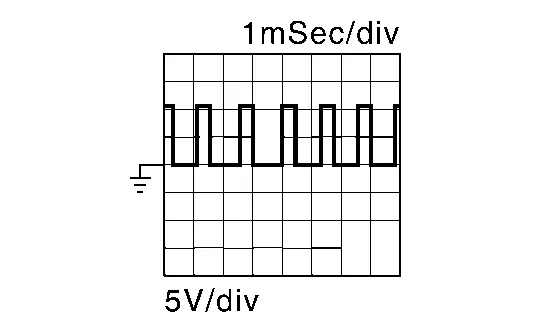
Is the inspection result normal?
YES>>Check intermittent incident. Refer to Intermittent Incident.
NO>>Replace primary speed sensor. Refer to Removal and Installation.
DETECT MALFUNCTIONING ITEMS
Check the following items:
Harness open circuit or short circuit between ignition switch and IPDM E/R. Refer to Wiring Diagram - IGNITION POWER SUPPLY -.
Harness open circuit or short circuit between IPDM E/R connector terminal 61 and primary speed sensor connector terminal 3.
10A fuse (No.43, located in the IPDM E/R). Refer to IPDM E/R Terminal Arrangement .
IPDM E/R
Is the check result normal?
YES>>Check intermittent incident. Refer to Intermittent Incident.
NO>>Repair or replace malfunctioning parts.