Registration
REGISTRATION
PROCEDURE
1. PRECAUTIONS FOR ELECTRICAL INTERFERENCE
CAUTION:
- Persons with an implanted cardiac pacemaker, cardiac resynchronization therapy defibrillator (CRT-D) or implantable cardioverter defibrillator (ICD) must keep away from the smart key system antennas. Radio waves may affect the proper operation of these devices. If necessary, the entry function can be deactivated. Ask your dealer for information, in particular about the radio wave frequency and the radio wave emission duration. Then consult your doctor to find out whether the entry function should be deactivated.
- Users of electrical medical equipment other than an implanted cardiac pacemaker, CRT-D or ICD must consult the equipment manufacturer for information on its operation under the influence of radio waves. Radio waves may have unexpected effects on the operation of such equipment.
- Ask the dealer for information on deactivating the entry function.
2. CODE REGISTRATION DESCRIPTION
HINT:
- Registering an ID code enables the smart key system function, the remote centralized door lock function and the immobilizer function.
- Code registration is required when the certification ECU (smart key ECU assembly), ID code box (immobilizer code ECU), main body ECU (multiplex network body ECU), steering lock ECU (steering lock actuator assembly or upper support) or electronic key transmitter sub-assembly is replaced with a new part.
- This vehicle does not have a key cylinder. Therefore, while pointing the logo side of the key transmitter sub-assembly toward the engine switch, hold the transmitter near the engine switch as shown in the illustration to register the electronic key transmitter sub-assembly.
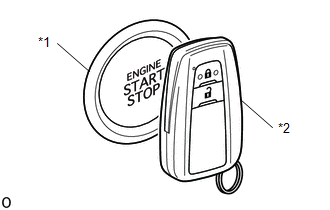
*1 |
Engine Switch |
*2 |
Electronic Key Transmitter Sub-assembly |
3. KEY REGISTRATION PROCEDURES WHEN ADDING OR REPLACING A KEY OR WHEN A KEY IS LOST
HINT:
- The procedures described below require the use of Techstream:
- - Registering the ID of a new key
- - Registering the ID of an additional key
- - Deleting the ID of a key
- - Deleting the IDs of all keys
- A maximum of 7 electronic key transmitter sub-assemblies can be registered (this includes all electronic key transmitter sub-assemblies registered at the time the vehicle was purchased).
- In the table below, the numbers in the "Procedure" column (1, 2, 3, etc.) indicate the step numbers. Perform the steps in numerical order.
Customer request / Condition | Registration procedure status | Procedure | Refer to items |
|---|---|---|---|
Registering an additional electronic key transmitter sub-assembly |
Customer must bring at least 1 electronic key transmitter sub-assembly |
1. Register additional electronic key transmitter sub-assemblies if necessary (registering the ID of an additional key) |
PROCEDURE "C" |
NOTICE: If the customer brings at least 1 electronic key transmitter sub-assembly, these procedures can be performed. However, if additional electronic key transmitter sub-assemblies are registered before the customer's electronic key transmitter sub-assemblies are re-registered, the customer's electronic key transmitter sub-assemblies cannot be re-registered and will be deactivated. Therefore, if the customer does not bring all of their electronic key transmitter sub-assemblies, explain to them that all electronic key transmitter sub-assemblies not brought in will be deactivated after the additional electronic key transmitter sub-assemblies are registered. HINT: After deleting the ID of an electronic key transmitter sub-assembly, any remaining electronic key transmitter sub-assemblies that are not re-registered at this stage cannot be used. Therefore, immediately after deleting the ID of an electronic key transmitter sub-assembly, make sure to re-register all remaining available electronic key transmitter sub-assemblies. |
Customer must bring at least 1 electronic key transmitter sub-assembly |
1. Using the remaining electronic key transmitter sub-assembly, delete all registered electronic key transmitter sub-assemblies except one (deleting the ID of a key) |
PROCEDURE "D" |
2. Register additional electronic key transmitter sub-assemblies if necessary (registering the ID of an additional key) |
PROCEDURE "C" |
||
All electronic key transmitter sub-assemblies are lost |
- |
1. Reset all electronic key transmitter sub-assemblies (deleting the IDs of all keys (key code reset)) |
PROCEDURE "E" |
2. Register all electronic key transmitter sub-assemblies (registering the ID of a new key) |
PROCEDURE "A" |
4. PART REPLACEMENT AND REGISTRATION PROCEDURES
(a) If a faulty ECU is identified through troubleshooting of the smart key system, use the ECU replacement and electronic key transmitter sub-assembly registration procedures described in the table below.
NOTICE:
Do not use a main body ECU (multiplex network body ECU) that has already been registered on another vehicle.
HINT:
- The procedures described below require the use of Techstream:
- - Registering the ID of a new key
- - Registering the ID of an additional key
- - Deleting the ID of a key
- - Registering the ECU code
- A maximum of 7 electronic key transmitter sub-assemblies can be registered (this includes all electronic key transmitter sub-assemblies registered at the time the vehicle was purchased).
- Immediately after replacing the certification ECU (smart key ECU assembly), the "Number of Registered Codes" item on the Techstream must display "0". If this item does not display "0", the certification ECU (smart key ECU assembly) may be registered to another vehicle. A certification ECU (smart key ECU assembly) registered to another vehicle cannot be used.
- In the table below, the numbers in the "Procedure" column (1, 2, 3, etc.) indicate the step numbers. Perform the steps in numerical order.
ECU malfunction | Condition | Procedure | Refer to items |
|
|---|---|---|---|---|
Certification ECU (Smart Key ECU Assy) |
Customer has brought all electronic key transmitter sub-assemblies |
1. Replace certification ECU (smart key ECU assembly) |
- |
|
2. Re-register all of the customer's electronic key transmitter sub-assemblies |
PROCEDURE "B" |
|||
Some electronic key transmitter sub-assemblies are lost |
Key ID codes can be registered and deleted |
1. Erase key codes (delete key ID) |
PROCEDURE "D" |
|
2. Perform additional electronic key transmitter sub-assembly registration procedure (register additional key ID) HINT:
|
PROCEDURE "C" |
|||
3. Replace certification ECU (smart key ECU assembly) |
- |
|||
4. Re-register all electronic key transmitter sub-assemblies |
PROCEDURE "B" |
|||
Key ID codes cannot be registered or erased |
1. Replace certification ECU (smart key ECU assembly) |
- |
||
2. Replace ID code box (immobiliser ECU) |
- |
|||
3. Re-register all electronic key transmitter sub-assemblies (register new key ID) HINT: If any electronic key transmitter sub-assemblies are not registered in the previous step, they will be disabled because they cannot be registered later. |
PROCEDURE "A" |
|||
4. ECU communication ID registration |
PROCEDURE "G" |
|||
Certification ECU (Smart Key ECU Assy) |
All electronic key transmitter sub-assemblies are lost |
1. Replace certification ECU (smart key ECU assembly) |
- |
|
2. Replace ID code box (immobiliser ECU) |
- |
|||
3. Register all electronic key transmitter sub-assemblies (register new key ID) |
PROCEDURE "A" |
|||
4. ECU communication ID registration |
PROCEDURE "G" |
|||
ID Code Box (Immobilizer ECU) |
Customer has brought at least 1 electronic key transmitter sub-assembly |
1. Replace ID code box (immobiliser ECU) |
- |
|
2. Register ID codes in ECUs (ECU code registration) |
PROCEDURE "F" |
|||
3. ECU communication ID registration |
PROCEDURE "G" |
|||
All electronic key transmitter sub-assemblies are lost |
1. Replace certification ECU (smart key ECU assembly) |
- |
||
2. Replace ID code box (immobiliser ECU) |
- |
|||
3. Register all electronic key transmitter sub-assemblies (register new key ID) HINT: If any electronic key transmitter sub-assemblies are not registered in the steps above, they will be disabled because they cannot be registered later. |
PROCEDURE "A" |
|||
4. ECU communication ID registration |
PROCEDURE "G" |
|||
Steering lock ECU (steering lock actuator or upper bracket assembly) |
Customer has brought at least 1 electronic key transmitter sub-assembly |
1. Replace steering lock ECU (steering lock actuator or upper bracket assembly) |
- |
|
2. Register ID codes in ECUs (ECU code registration) |
PROCEDURE "F" |
|||
All electronic key transmitter sub-assemblies are lost |
1. Replace certification ECU (smart key ECU assembly) |
- |
||
2. Replace ID code box (immobiliser ECU) |
- |
|||
3. Replace steering lock ECU (steering lock actuator or upper bracket assembly) |
- |
|||
4. Register all electronic key transmitter sub-assemblies (register new key ID) |
PROCEDURE "A" |
|||
5. ECU communication ID registration |
PROCEDURE "G" |
|||
ECM |
When replacing the ECM with a new part |
Replace ECM |
- |
|
When replacing the ECM with a used part |
1. Replace ECM |
- |
||
2. ECU communication ID registration |
PROCEDURE "G" |
|||
Main body ECU (multiplex network body ECU) |
Using a new part |
1. Replace main body ECU (multiplex network body ECU). |
- |
|
2. Register ID codes in ECUs (ECU code registration) |
PROCEDURE "F" |
|||
Using a used part |
NOTICE: Do not use a main body ECU (multiplex network body ECU) that has already been registered on another vehicle. |
- |
||
5. KEY REGISTRATION (PROCEDURE "A")
(a) Register new key ID:
HINT:
In the table below, the numbers in the "Procedure" column (1, 2, 3, etc.) indicate the step numbers. Perform the steps in numerical order.
Procedure | Procedure |
|---|---|
1. Start registration |
|
2. ECU code confirmation |
HINT: The mode is automatically selected by the Techstream (new key registration mode or add mode) |
3. Check unregistered electronic key transmitter sub-assembly* |
|
4. ID code registration |
|
5. End registration |
|
- *: Repeat this procedure for each electronic key transmitter that must be registered to the vehicle. Perform the procedure for each electronic key transmitter within 30 seconds. If the procedure for any electronic key transmitter is not completed within the specified time, restart the registration from step 1.
- If the "Smart Key System" is cancelled, registration cannot be performed.
Click here

6. KEY REGISTRATION (PROCEDURE "B")
(a) Register new key ID:
HINT:
In the table below, the numbers in the "Procedure" column (1, 2, 3, etc.) indicate the step numbers. Perform the steps in numerical order.
Procedure | Procedure |
|---|---|
1. Start registration |
|
2. ECU code confirmation |
HINT: The mode is automatically selected by the Techstream (new key registration mode or add mode) |
3. Confirmation of all registered electronic key transmitters*1 |
|
4. Confirmation of the ECU code |
|
5. Check of the unregistered electronic key transmitter*2 |
|
6. Registration of the ID code |
|
7. End of registration |
|
- *1: Repeat this procedure for each registered electronic key transmitter in the vehicle. Perform the procedure for each electronic key transmitter within 30 seconds. If the procedure for any electronic key transmitter is not completed within the specified time, restart the registration from step 1. When performing the confirmation procedure for an electronic key transmitter, the security indicator light comes on and stays on until all electronic key transmitters have been confirmed.
- *2: Repeat the procedure for each vehicle key to be registered. Perform the procedure within 30 seconds maximum for each key. If the procedure for any electronic key transmitter is not completed within the specified time, restart the registration from step 1.
- If the "Smart Key System" is cancelled, registration cannot be performed.
Click here
7. KEY REGISTRATION (PROCEDURE "C")
(a) Registering the ID of an additional key:
NOTICE:
If an electronic key transmitter has been registered recently, the new key registration warning message is displayed on the multi-information display and cannot be cleared for 10 days.*
This message is displayed to inform the user that an electronic key transmitter has been registered and to prevent the vehicle from being stolen if the registration was not authorized.
- *: The display of the warning message will be suspended if any of the following conditions is met:
- The warning message has been displayed for 60 seconds.
- All doors are closed and locked.
- The engine switch has been turned to ON (IG).
HINT:
In the table below, the numbers in the "Procedure" column (1, 2, 3, etc.) indicate the step numbers. Perform the steps in numerical order.
Procedure | Procedure |
|---|---|
1. Start registration |
|
2. Confirmation of a registered electronic key transmitter*1 |
|
3. Confirmation of the ECU code |
|
4. Check of the unregistered electronic key transmitter*2 |
|
5. Registration of the ID code |
|
6. End of registration |
|
- *1: Follow this procedure for one of the electronic key transmitters already registered to the vehicle. Perform the procedure within 30 seconds. If the procedure is not completed within the specified time, restart the registration from step 1.
- *2: Repeat this procedure for each electronic key transmitter that must be registered to the vehicle. Perform the procedure for each electronic key transmitter within 30 seconds. If the procedure for any electronic key transmitter is not completed within the specified time, restart the registration from step 1.
- If the "Smart Key System" is cancelled, registration cannot be performed.
Click here
8. KEY REGISTRATION (PROCEDURE "D")
(a) Erasing a key ID:
HINT:
- This procedure erases all registered key codes except for the code of one main electronic key transmitter.
- In the table below, the numbers in the "Procedure" column (1, 2, 3, etc.) indicate the step numbers. Perform the steps in numerical order.
Procedure | Procedure |
|---|---|
1. Start of erasure |
|
2. Confirmation of a registered electronic key transmitter* |
|
3. Confirmation of the ECU code |
|
4. Erasing the ID code |
|
5. End of erasure |
|
- *: Follow this procedure for one of the electronic key transmitter assemblies already registered in the vehicle. Perform the procedure within 30 seconds. If the procedure is not completed within the specified time, restart the erasure from step 1.
- If "Smart Key System" is cancelled, the erasure cannot be performed.
Click here
9. KEY REGISTRATION (PROCEDURE "E")
(a) Erasing the ID of all keys:
HINT:
In the table below, the numbers in the "Procedure" column (1, 2, 3, etc.) indicate the step numbers. Perform the steps in numerical order.
Procedure | Procedure |
|---|---|
1. Start of erasure |
|
2. ECU code confirmation |
|
3. Erasing the ID Code |
|
4. Completing the Erasure |
|
- If "Smart Key System" is cancelled, the erasure cannot be performed.
Click here
10. KEY REGISTRATION (PROCEDURE "F")
(a) Registering the ECU code:
HINT:
In the table below, the numbers in the "Procedure" column (1, 2, 3, etc.) indicate the step numbers. Perform the steps in numerical order.
Procedure | Procedure |
|---|---|
1. Start registration |
|
2. Confirmation of a registered electronic key transmitter* |
|
3. Erasing the ECU Code |
|
4. Completing the Registration |
|
- *: Follow this procedure for one of the electronic key transmitter assemblies already registered in the vehicle. Perform the procedure within 30 seconds. If the procedure is not completed within the specified time, restart the registration from step 1.
- If the "Smart Key System" is cancelled, registration cannot be performed.
Click here
- If other electronic devices that may cause radio wave interference, such as mobile phones, computers, portable music players, or other electronic key transmitters, are placed near the driver's seat, turn them off or move them away from the driver's seat.
11. KEY REGISTRATION (PROCEDURE "G")
SST: 09843-18040
(a) Registering the ECU communication ID code:
NOTICE:
- The ECU communication ID code must be registered when the ID code box (immobiliser ECU) is replaced.
- The ECU communication ID code must be registered when the main body ECU (multiplex network body ECU) is replaced.
- The engine will not start if the ECU communication ID code is not registered.
- After registration, the engine may not start on the first attempt when the engine switch is pressed. If this occurs, press the engine switch again.
- Once the engine has started, erase DTC B2799 (ECM immobiliser communication error code) using one of the following methods:
- Use the Techstream.
- Disconnect the negative (-) battery terminal cable for 30 seconds.
(1) Using the SST, connect terminals 13 (TC) and 4 (CG) of the DLC3. HINT: The security indicator flashes. |
|
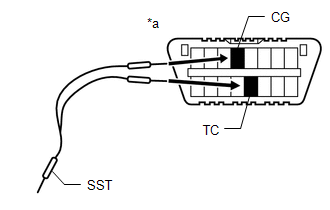
(2) Set the engine switch to ON (IG) (do not start the engine) and leave it in this state for 30 minutes.
HINT:
The security indicator light goes off.
(3) Set the engine switch to OFF and disconnect terminals 13 (TC) and 4 (CG).
(4) Set the engine switch to ON (IG).*
(5) Check whether the engine starts and runs for more than 3 seconds.*
NOTICE:
*: Do not open or close any door. If any door is opened and then closed, restart the registration from step 4.