Touch screen buttons do not operate
PRECAUTION / NOTICE / HINT
NOTICE:
- Depending on the parts replaced during inspection or maintenance of the vehicle, initialization, registration or calibration may be required. Refer to the precautions for the audio and visual system.
Click here

- When replacing the radio and display receiver assembly, always replace it with a new one. If a radio and display receiver assembly that was installed in another vehicle is reused, the following may occur:
- A communication malfunction DTC may be stored.
- The radio and display receiver assembly may not operate normally.
PROCEDURE
CHECK MULTI-DISPLAY
(a) Make sure that no foreign matter is caught between the screen and the outer frame of the multi-display.
OK:
No foreign matter is caught between the screen and the outer frame of the multi-display.
HINT:
If foreign matter is caught between the screen and the outer frame of the multi-display, the touch screen remains stuck, preventing touch switch operation.
| NG |  |
REMOVE THE FOREIGN MATTER |
|

CHECK TOUCH SCREEN
(a) Check that there is no foreign matter on the display.
OK:
The screen is clean.
| NG | |
CLEAN THE SCREEN AND CHECK THE TOUCH SWITCHES AGAIN |
|
CHECK TOUCH SWITCH (FUNCTION CHECK)
(a) Select the "Touch Switch Check" screen. Refer to Touch Switch Check in the Function Check. Click here |
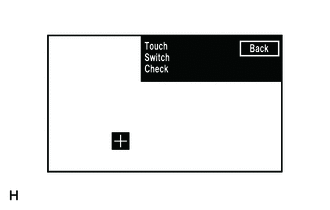 |
(b) Touch the screen where the defective switch is located.
OK:
A "+" mark appears at the touched location.
| OK | |
REPLACE RADIO AND DISPLAY RECEIVER ASSEMBLY |
| NG | |
GO TO APPLICABLE SYSTEM AS INDICATED IN THE PROBLEM SYMPTOMS TABLE |