System Description
SYSTEM DESCRIPTION
USB AUDIO SYSTEM FUNCTION DESCRIPTION
(a) The No. 1 Stereo Jack Adapter Assembly is equipped with a USB port. Connecting a USB device or "iPod" to the No. 1 Stereo Jack Adapter Assembly allows music files to be played. Not only can music be played from a USB device with audio functions, but MP3, WMA, AAC, WAV (LPCM), FLAC, ALAC or OGG Vorbis files stored on a USB device can also be played. In addition, the "iPod" software is installed, allowing files to be selected from playlists and the shuffle play mode to be used.
HINT:
Operations using the controls of a connected USB device or "iPod" cannot be performed while it is connected.
(b) USB Audio System Compatible Devices
(1) USB Device
The following device formats can be used:
Compatible USB Device Formats |
|
MP3, WMA, AAC, WAV (LPCM), FLAC, ALAC or OGG Vorbis files stored on a USB device in a format other than those listed above may not be played correctly, and their file names and folder names may not be displayed correctly.
The standards and limitations are as follows:
- Maximum directory tree depth: 8 levels
- Maximum number of folders on the device: 3000 (including the root folder)
- Maximum number of files on the device: 9999
- Maximum number of files per folder: 255
(2) "iPod"
"iPhone", "iPod", "iPod classic", "iPod nano" and "iPod touch" are trademarks of Apple Inc., registered in the U.S. and other countries.
"iPod", "iPod nano", "iPod classic", "iPod touch" and "iPhone" devices can be used with this system.
Compatible with:
- "iPod touch" (6th generation)
- "iPod touch" (5th generation)
- "iPod nano" (7th generation)
- "iPhone 7 Plus"
- "iPhone 7"
- "iPhone SE"
- "iPhone 6s Plus"
- "iPhone 6s"
- "iPhone 6 Plus"
- "iPhone 6"
- "iPhone 5s"
- "iPhone 5c"
- "iPhone 5"
- "iPhone 4s"
HINT:
- Depending on differences between models or software versions, some models may not be compatible with this system.
- "iPod video" is not supported.
USB VIDEO SYSTEM FUNCTION DESCRIPTION
(a) Video file standards that can be played
File Extension | Compatible Resolution |
|---|---|
.avi |
128x96 / 160x120 / 176x144 (QCIF) / 320x240 (QVGA) / 352x240 (SIF) / 352x288 (CIF) / 640x480 (VGA) / 720x480 (NTSC) / 720x576 (PAL) |
.wmv |
|
.mp4 |
HINT:
- Only files with the extension ".wmv", ".avi" or ".mp4" are recognized.
- If a file that is not WMV, AVI or MP4 is saved with the extension ".wmv", ".avi" or ".mp4", the file may not play.
HIGH-RESOLUTION AUDIO SOURCE FUNCTION DESCRIPTION
(a) This unit supports high-resolution audio sources.
(b) The definition of high resolution is based on standards set by groups such as the CTA (Consumer Technology Association).
(c) The following formats and media can be used:
Supported formats |
WAV, FLAC, ALAC, OGG Vorbis |
Usable media |
USB |
DESCRIPTION OF FILE INFORMATION
(a) Playable MP3 file standards
Compatible standard |
MPEG1 LAYER3, MPEG2 LSF LAYER3 |
Compatible sampling rate |
|
Compatible bit rate |
|
Compatible channel mode |
Stereo, joint stereo, dual channel, mono |
(b) Playable WMA file standards
Compatible standard |
WMA version 7, 8 and 9 |
Compatible sampling rate |
32, 44.1, 48 (kHz) |
Compatible bit rate (compatible with dual channel playback only) |
|
- *1: Compatible only with the WMA standard
(c) Playable AAC file standards
Compatible standard |
MPEG4/AAC-LC |
Compatible sampling rate |
11.025, 12, 16, 22.05, 24, 32, 44.1, 48 (kHz) |
Compatible bit rate |
|
(d) Usable WAV (LPCM) file standards*
| *: Files with a sampling rate higher than 48 kHz are converted to 48 kHz/24 bit. | |
Compatible sampling rate |
8/11.025/12/16/22.05/24/32/44.1/48/88.2/96/176.4/192 (kHz) |
Compatible bit rate |
16/24 (bit) |
(e) Usable FLAC file standards*
| *: Files with a sampling rate higher than 48 kHz are converted to 48 kHz/24 bit. | |
Compatible sampling rate |
8/11.025/12/16/22.05/24/32/44.1/48/88.2/96/176.4/192 (kHz) |
Compatible bit rate |
16/24 (bit) |
(f) Usable ALAC file standards*
| *: Files with a sampling rate higher than 48 kHz are converted to 48 kHz/24 bit. | |
Compatible sampling rate |
8/11.025/12/16/22.05/24/32/44.1/48/64/88.2/96 (kHz) |
Compatible bit rate |
16/24 (bit) |
(g) Usable OGG Vorbis file standards*
| *: Files with a sampling rate higher than 48 kHz are converted to 48 kHz/24 bit. | |
Compatible sampling rate |
8/11.025/16/22.05/32/44.1/48 (kHz) |
Compatible bit rate |
|
(h) ID3 tag, WMA tag, AAC tag, TAG and Vorbis comment
(1) Additional text information, called ID3 tags, can be entered into MP3 files. Information such as song titles and artist names can be stored.
HINT:
This player is compatible with ID3 tags of versions ID3 1.0 and 1.1, and ID3 Ver. 2.2 and 2.3 (number of characters conforming to ID3 versions 1.0 and 1.1).
(2) Additional text information, called WMA tags, can be entered into WMA files. Information such as song titles and artist names can be stored.
(3) Additional text information, called AAC tags, can be entered into AAC files. Information such as song titles and artist names can be stored.
(4) Additional text information called TAGs can be entered into WAV (LPCM), FLAC and ALAC files. Information such as song titles and artist names can be stored.
(5) Additional text information called Vorbis comments can be entered into OGG Vorbis files. Information such as song titles and artist names can be stored.
(i) Usable media
(1) Only USB devices can be used to play WAV (LPCM)/FLAC/ALAC/OGG Vorbis files.
(j) Usable media format
(1) Standards and restrictions
Maximum folder levels |
8 levels |
Maximum number of characters for a folder/file name |
32 characters |
Maximum number of folders |
192 (including empty folders, root folders and folders not containing MP3/WMA/AAC files) |
Maximum number of files on a disc |
255 (including non-MP3/WMA/AAC files) |
(k) File names
(1) Only files with the extension ".mp3", ".wma", ".m4a", ".wav", ".flac", ".alac", ".ogg" and ".oga" can be recognized and played as MP3, WMA, AAC, WAV (LPCM), FLAC, ALAC or OGG Vorbis files.
(2) Save MP3, WMA, AAC, WAV (LPCM), FLAC, ALAC or OGG Vorbis files with the extension ".mp3", ".wma", ".m4a", ".wav", ".flac", ".alac", ".ogg" or ".oga".
NOTICE:
If files other than MP3, WMA, AAC, WAV (LPCM), FLAC, ALAC or OGG Vorbis files are saved with the extension ".mp3", ".wma", ".m4a", ".wav", ".flac", ".alac", ".ogg" or ".oga", these files may be incorrectly recognized as MP3, WMA, AAC, WAV (LPCM), FLAC, ALAC or OGG Vorbis files and played incorrectly. In this case, loud noise may occur and the speakers may be damaged.
GENERAL DESCRIPTION OF "Bluetooth" TECHNOLOGY
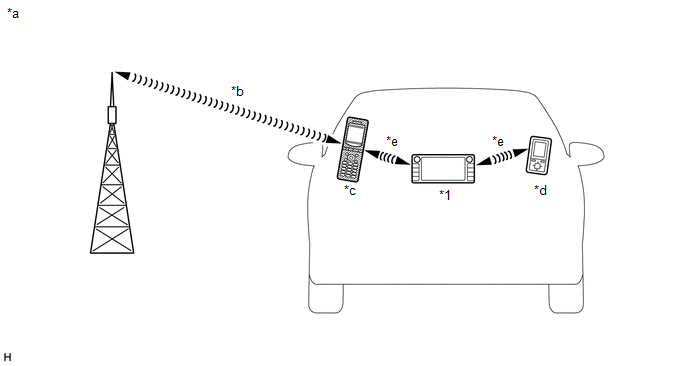
*1 |
Radio and Display Receiver Assembly (Built-in "Bluetooth" antenna) |
- |
- |
*a |
Example |
*b |
Mobile network |
*c |
Mobile phone (Bluetooth compatible) |
*d |
Bluetooth compatible (Bluetooth compatible) |
*e |
Bluetooth wireless connection |
- |
- |
(a) "Bluetooth" is a registered trademark owned by Bluetooth SIG, Inc.
(b) "Bluetooth" is a wireless connection technology that uses the 2.4 GHz frequency band.
HINT:
Communication performance of "Bluetooth" technology varies depending on obstacles or conditions in which radio waves travel between communication devices, electromagnetic waves, the sensitivity of the communication devices, or the capacity of the antenna.
(c) Hands-free function
(1) The built-in "Bluetooth" radio receiver and display unit and a "Bluetooth" compatible mobile phone* can be connected using a "Bluetooth" wireless connection. This feature allows you to use the hands-free function of the mobile phone even if the phone is in a pocket or bag. Therefore, no connector or cable is needed to connect the mobile phone.
- *: Some versions of "Bluetooth" compatible mobile phones may not operate correctly.
(2) The hands-free function uses a "Bluetooth" wireless connection. A "Bluetooth" wireless connection can be affected by factors with uncertain effects, such as the vehicle location, time of day, etc. Therefore, connection problems may temporarily be caused by "Bluetooth" connection conditions. When performing diagnostic procedures, it is necessary to check the transmission frequency, the connection status using another mobile phone, etc.
(3) Compatible hands-free devices
Required "Bluetooth" specifications |
Ver. 2.0 or later (Ver. 4.1+EDR recommended) |
Supported profiles |
|
Maximum number of hands-free devices that can be registered (including audio devices) |
5 |
- *1: This profile is required when using the hands-free function.
- *2: This profile is required when using the message function (with SMS/MMS/e-mail function).
HINT:
- Mobile phones compatible with "Bluetooth" technology can be checked at http://www.toyota.com/entune/.
- The remaining battery charge level displayed on the radio and display receiver assembly may differ from that of the "Bluetooth" device.
(d) "Bluetooth" audio function
(1) The radio and display receiver assembly with built-in "Bluetooth" and a "Bluetooth"-compatible portable audio player* can be connected via a wireless "Bluetooth" connection. Files stored on the portable audio player can thus be played through the vehicle speakers. In addition, functions such as play/stop can be operated directly from the radio and display receiver assembly.
- *: Some versions of "Bluetooth"-compatible audio players may not connect via "Bluetooth", or music may play but the functions accessible through the audio system may be limited.
(2) "Bluetooth"-compatible audio devices
Required "Bluetooth" specifications |
Ver. 2.0 or later (Ver. 4.1+EDR recommended) |
Supported profiles |
|
Maximum number of audio devices that can be registered (including hands-free devices) |
5 |
HINT:
The remaining battery charge level displayed on the radio and display receiver assembly may differ from that of the "Bluetooth" device.
RADIO DESCRIPTION
(a) Radio frequency band
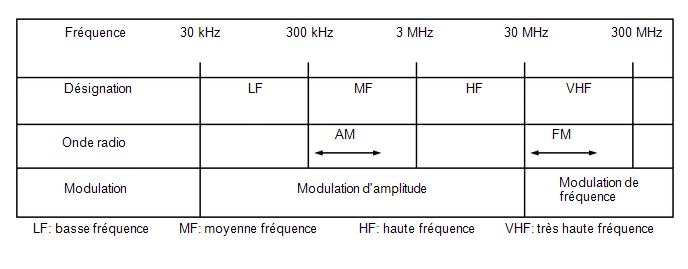
(1) Radio broadcasts use the frequency bands shown in the table below.
(b) Reception area
(1) The reception areas for AM and FM broadcasts differ greatly. Sometimes an AM broadcast can be received much more clearly than a stereo FM broadcast. Stereo FM has the smallest reception area and tends to pick up static and other interference such as noise.
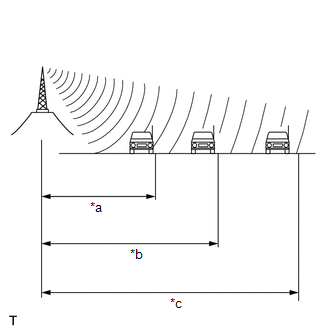
*a |
FM (stereo) |
*b |
FM (mono) |
*c |
AM |
(c) Radio reception problems
HINT:
In addition to static interference, other problems exist such as "phasing", "multipath interference" and "signal fading". These problems are not caused by electrical noise but by the very method of radio signal propagation.
(1) Phasing
AM broadcasts are subject to electrical interference and to another type of interference called "phasing". Occurring only at night, phasing is interference created when a vehicle receives 2 radio wave signals from the same transmitter. One of the signals is reflected by the ionosphere and the other is received directly from the transmitter.
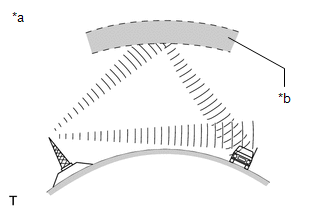
*a |
Phasing |
*b |
Ionosphere |
(2) Multipath interference
Multipath interference occurs when a vehicle receives 2 radio wave signals from the same transmitter. One of the signals is reflected by buildings or mountains and the other is received directly from the transmitter.
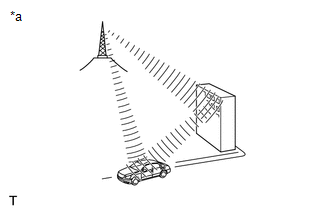
*a |
Multipath interference |
(3) Signal fading
Signal fading is caused by obstacles (buildings, mountains or other large obstructions) that deflect part of the signal, resulting in a drop in signal strength when the obstacle is between the transmitter and the vehicle. High-frequency radio waves, such as FM broadcasts, are easily deflected by obstacles. Low-frequency radio waves, such as AM broadcasts, are less likely to be deflected.
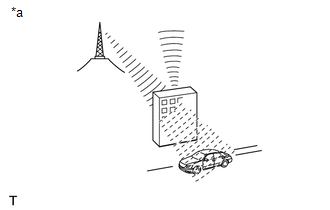
*a |
Signal fading |
(d) Noise problems
Technicians must pay particular attention to noise problems reported by the customer. Use the following table to diagnose noise problems.
Radio frequency | Noise occurrence condition | Probable cause |
|---|---|---|
AM |
Noise occurs at certain locations |
External noise |
Noise occurs when listening to an intermittent broadcast |
The same program broadcast from several transmitters may cause noise when the signals interfere with each other |
|
Noise occurs only at night |
Signal phasing |
|
FM |
Noise occurs at certain locations while driving |
Multipath interference resulting from an FM frequency change |
GENERAL DESCRIPTION OF "HD Radio" FUNCTION (with HD Radio function)
(a) The "HD Radio" system is a radio system that broadcasts in IBOC (In-Band On-Channel) format, developed by iBiquity Co. By widening the bandwidth per channel of conventional FM/AM bands, digital audio and data signals are transmitted simultaneously.
"HD Radio" technology is manufactured under license from iBiquity Digital Corporation. U.S. and foreign patents. "HD Radio", and the HD and HD Radio logos are trademarks owned by iBiquity Digital Corporation. Traffic and weather information displayed on the navigation screen can also be received.
GENERAL DESCRIPTION OF VEHICLE CUSTOMIZATION
(a) Function customization can be performed on the multi-information display. Refer to the owner's manual for further information on the customizable items of the audio and visual system.
HINT:
- Customization of items available through the audio and visual system can be performed using the Techstream.
- Some customization settings displayed on the Techstream will also appear on the vehicle customization screen of the audio system. Users can customize these items.
GENERAL DESCRIPTION OF SiriusXM FUNCTION (with SXM function)
(a) SiriusXM (SXM) Satellite Radio is a digital satellite radio broadcast offered by SiriusXM Radio Inc. The subscription-based broadcast is transmitted via satellites and terrestrial repeater networks. Several unique channels are available, and the same information can be received without interruption even while the vehicle is moving. Information such as song titles and station names can be received.
NOTICE:
To receive subscription-based broadcasts, the customer must sign a subscription contract with SiriusXM Satellite Radio Inc. After the contract is signed, the Radio ID must be registered. In addition, if any parts are replaced, the Radio ID must be registered again.
HINT:
When the cable is disconnected from the negative (-) battery terminal, the radio station logo data will be initialized. It takes some time for the broadcast station logo data to be updated.
DESCRIPTION OF ASL (AUTOMATIC SOUND LEVELIZER) FUNCTION
(a) The Automatic Sound Levelizer (ASL) function automatically adjusts the audio system volume level to compensate for increasing vehicle noise (vehicle noise tends to increase as vehicle speed increases). The ASL adjusts the volume level based on the vehicle speed signals sent from the combination meter assembly.
GENERAL DESCRIPTION OF "Wi-Fi" HOTSPOT (with "Wi-Fi" hotspot function)
HINT:
- To use the "Wi-Fi" hotspot function, the initial setup of the Toyota Entune App Suite function must be performed.
- To perform the initial setup, go to http://www.toyota.com/entune/.
(a) "Wi-Fi" is a widely used global wireless communication standard for short-range communication.
(b) "Wi-Fi" is a registered trademark of the Wi-Fi Alliance, a non-profit industry association.
(c) The radio and display assembly uses the 2.4 GHz frequency band for "Wi-Fi" communication.
HINT:
The "Wi-Fi" communication performance varies depending on obstacles or conditions between the communication devices, radio wave propagation, the sensitivity of the communication devices, or the antenna capability.
COMMUNICATION SYSTEM
(a) CAN Communication System Description
(1) The audio and video system uses CAN communication between the radio and display assembly and the ECUs.
(b) Local Bus Communication General Description
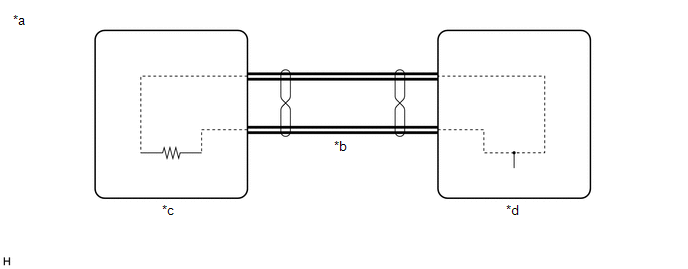
*a |
Example |
*b |
Local Bus Communication Line |
*c |
Main Unit |
*d |
Sub Unit |
(1) The components of the audio and video system communicate with each other via the local bus circuit.
(2) The local bus uses a twisted wire pair for its communication lines.
(3) The main unit of the local bus is the radio and display receiver assembly.
HINT:
- The radio and display receiver assembly has the resistance (108 to 132 Ω) required for communication.
- If there is an open or short circuit in the local bus circuit, communication is interrupted and the system does not operate normally.
GENERAL DESCRIPTION OF DIAGNOSTIC FUNCTION
(a) The audio and video system has a diagnostic function (the results are displayed on the main unit).
GENERAL DESCRIPTION OF DYNAMIC VOICE RECOGNITION FUNCTION (with manual switch (SOS))
(a) There are two types of voice recognition. The voice recognition function uses voice recognition data stored in the onboard device. The other is communication-based and uses voice recognition data sent to the center via the DCM (Data Communication Module) as audio signals through communication.
HINT:
Refer to the TOYOTA ENTUNE SYSTEM for more information about communication-based voice recognition.
Click here
GENERAL DESCRIPTION OF APP LINK FUNCTION
(a) The App Link function allows the main unit to use smartphone applications by connecting the smartphone to the main unit with a dedicated cable.
HINT:
Some applications have display restrictions to ensure safe driving.