Tire pressure monitor system reminder
NOTE: If a tire pressure has been adjusted, or a wheel or tire has been changed or replaced, or repairs have been made to air spring suspension, the TPM system must be reinitialized. System must be reinitialized both before and after pulling a trailer.
CAUTION: When driving with snow chains or a space-saver spare tire, DO NOT initialize the system.
NOTE: To determine the appropriate reset procedure, refer to TIRE PRESSURE MONITOR SYSTEM REMINDER INDEX. Only vehicles listed in this index have a TPMS reset.
TIRE PRESSURE MONITOR SYSTEM REMINDER INDEX
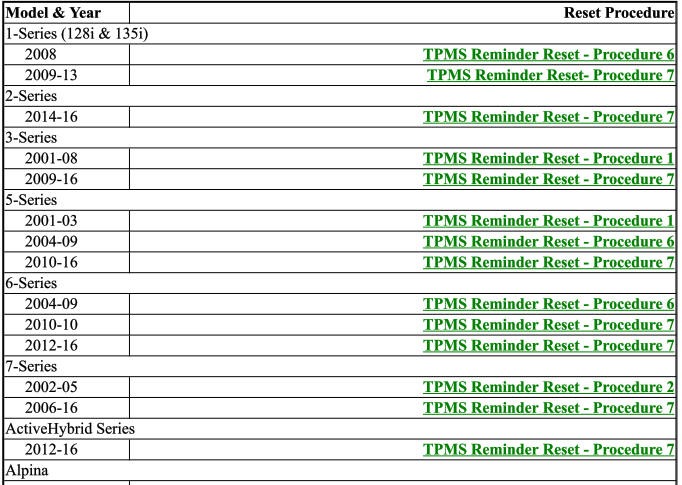
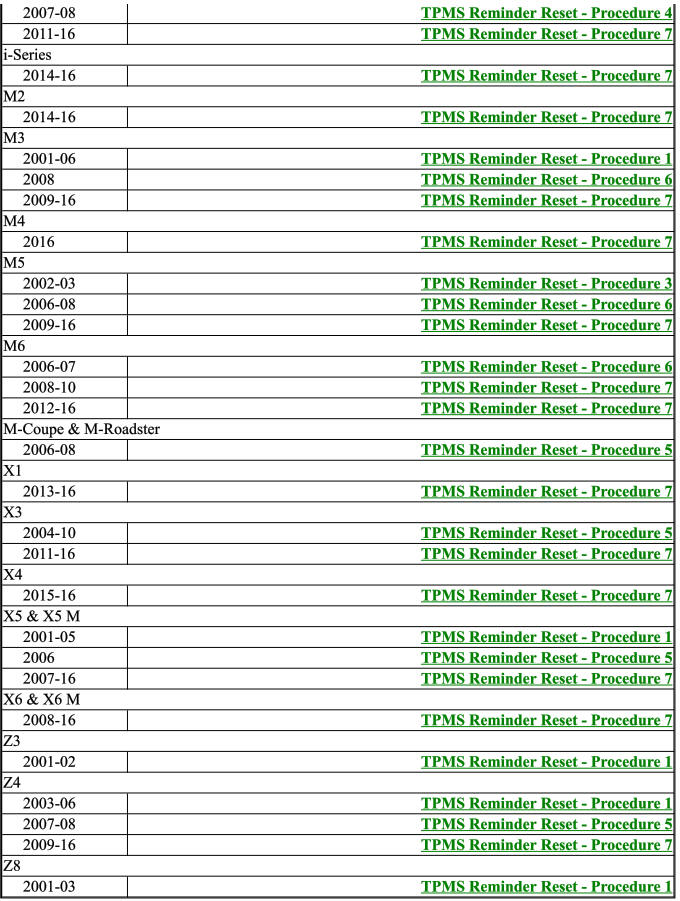
- Tpms reminder reset - procedure 1
- Tpms reminder reset - procedure 2
- Tpms reminder reset - procedure 3
- Tpms reminder reset - procedure 4
- Tpms reminder reset - procedure 5
- Tpms reminder reset - procedure 6
- Tpms reminder reset - procedure 7
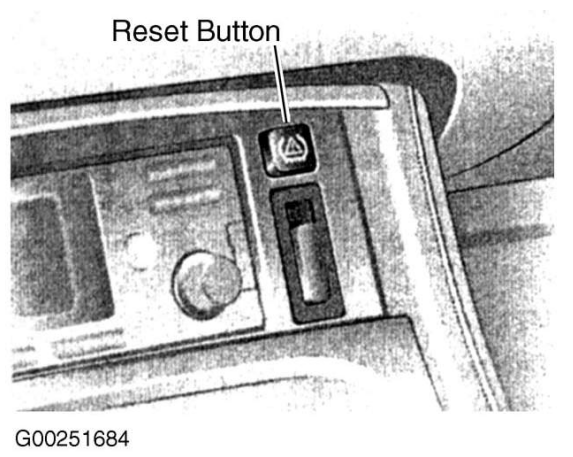
Tpms reminder reset - procedure 1
1. Set the tire pressure on all wheels to specification.
2. Turn ignition switch to ON position, with engine off.
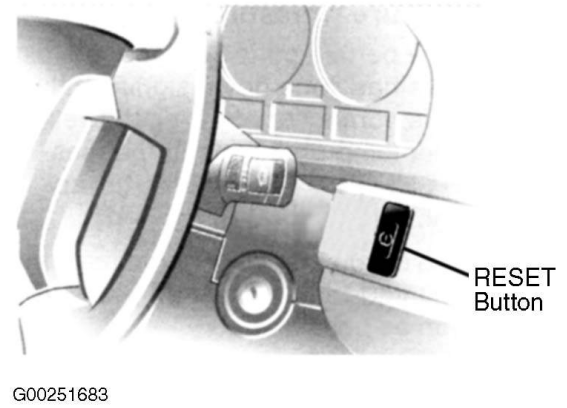
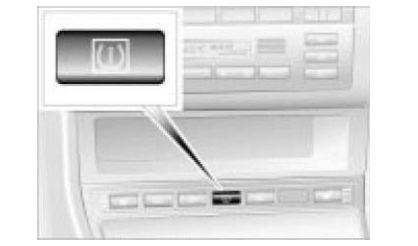
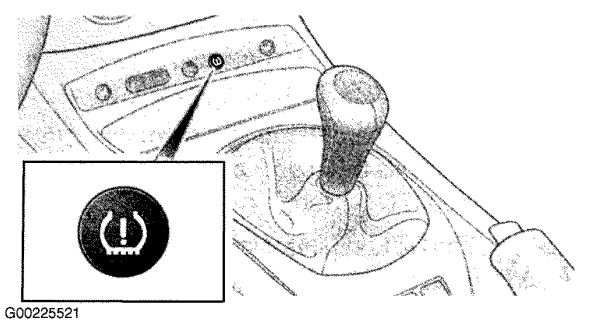
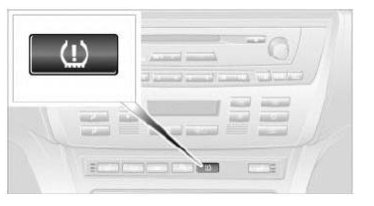
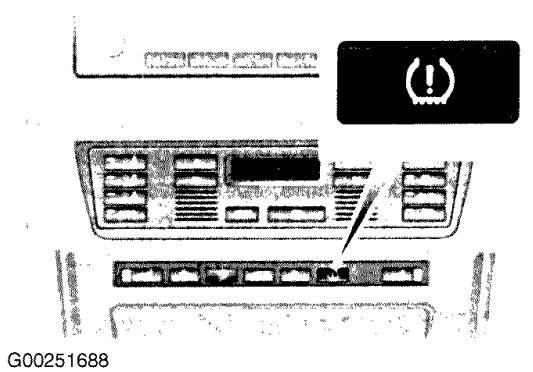
3. Press reset button (for no longer than 10 seconds) until tire pressure warning light illuminates Yellow for a few seconds.
NOTE: On some X5 models, the reset button is marked "RDC".
4. Drive vehicle. Initialization is automatically completed during the drive, without any feedback issued.
Tpms reminder reset - procedure 2
NOTE: The initialization finishes during driving, which can be interrupted at any time.
When driving resumes, the initialization is continued automatically.
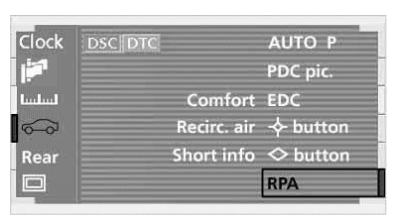
1. Set the tire pressure of all wheels to specification.
2. Start engine, but do not start driving.
3. On Control Center, select "RPA" from the "SETTINGS" menu and confirm selection. The initialization menu will appear.
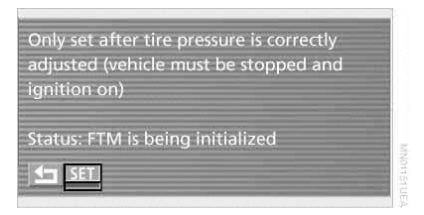
4. Select "SET" and confirm selection.
5. Drive vehicle. The message "FTM IS BEING INITIALIZED" will be displayed.
NOTE: It takes at least 10 minutes before the TPM system can detect and report a flat tire.
6. Select counterclockwise left arrow button and confirm to exit from menu.
Tpms reminder reset - procedure 3
NOTE: The initialization finishes during driving, which can be interrupted at any time.
When driving resumes, the initialization is continued automatically.
- Set the tire pressure of all wheels to specification.
- Start the engine.
- Press iDrive knob down once to enter Vehicle Info.
- Select Settings.
- Select Vehicle Tires.
- Select TPM.
- Select Reset.
- Scroll to Yes.
- Select "YES" and press the controller.
- After selecting Yes, drive vehicle until tires on iDrive screen turn green.
Tpms reminder reset - procedure 4
NOTE: The initialization finishes during driving, which can be interrupted at any time.
When driving resumes, the initialization is continued automatically.
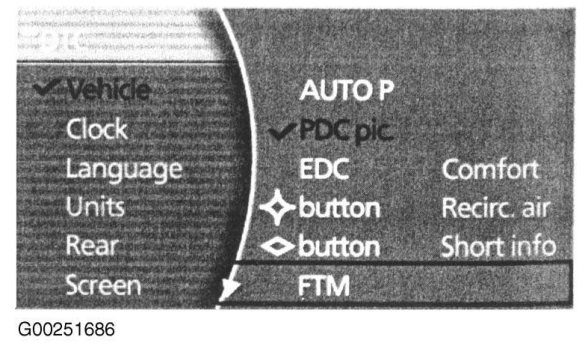
- Set the tire pressure of all wheels to specification.
- Press "MENU" button to open start menu.
- Open the i-menu of the Control Center.
- Select "SETTINGS" and press the controller.
- Select "VEHICLE" and press the controller.
- Select "TIRES: TPM" and press controller.
- Start engine, but do not start driving.
- Select "RESET" and press the controller.
- Select "YES" and press the controller.
- Drive vehicle. The message "RESETTING TPM...." will be displayed. Initialization is automatically completed during the drive. When initialization is complete, "STATUS: TPM ACTIVE" message will be displayed.
Tpms reminder reset - procedure 5
CAUTION: When driving with snow chains or a space-saver spare tire, DO NOT initialize the system.
1. Set the tire pressure of all wheels to specification.
2. Start engine, but do not start driving.
3. Press reset button (for no longer than 10 seconds) until tire pressure warning light illuminates Yellow for a few seconds.
4. Drive vehicle. Initialization is automatically completed during the drive, without any feedback issued.
Tpms reminder reset - procedure 6
Resetting TPM With iDrive
- Set the tire pressure of all wheels to specification.
- Turn ignition switch ON.
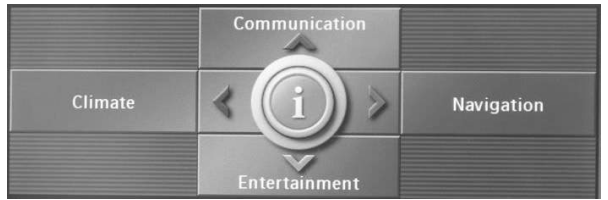
- Press controller to call up I menu.
- Select SETTINGS and press controller.
- Select CAR/TIRES and press controller.
- If necessary, switch to top field and select TIRES/RDC and press controller.
- Start engine.
- Select CONFIRM TIRE PRESSURE and press controller.
- Drive vehicle. Initialization is automatically completed during the drive, without any feedback issued.
Resetting TPM Without iDrive
- Set the tire pressure of all wheels to specification.
- Start engine.
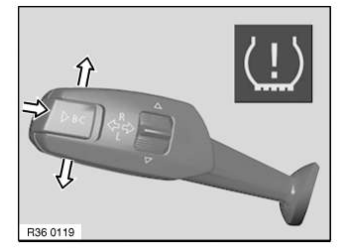
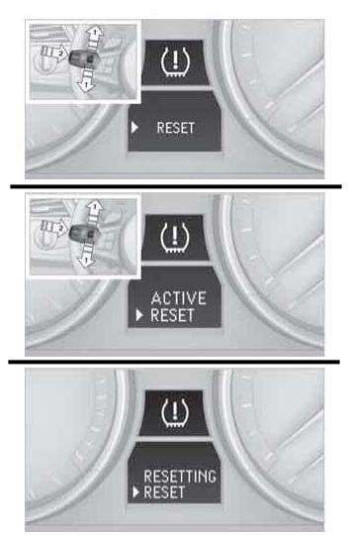
- Move turn signal lever up or down until TPM warning symbol and RESET appears.
- Press BC button on end of turn signal lever to confirm selection.
- Press and hold BC button for approximately 5 seconds until a CHECK/TICK appears after RESET.
- Drive vehicle. Initialization is automatically completed during the drive, without any feedback issued.
Tpms reminder reset - procedure 7
With iDrive
Indirect System (Flat Tire Monitor)
CAUTION: Do not initialize the system while snow chains are attached.
NOTE: Each time a tire inflation pressure has been corrected or a wheel or tire has been changed, reset the system.
Initialization:
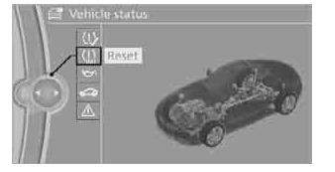
- Using the iDrive MENU button, choose:
- "Vehicle Info"
- "Vehicle status"
- "Reset"
- Start the engine.
- Start the initialization using "Reset".
- Start to drive.
The initialization is completed during driving, which can be interrupted at any time. When driving resumes, the initialization is continued automatically.
Checking FTM Status:
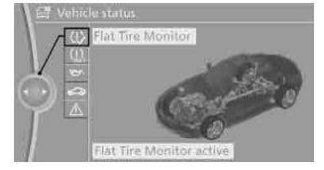
- Using the iDrive MENU button, choose:
- "Vehicle Info"
- "Vehicle status"
- "Flat Tire Monitor"
- The status will be diplayed.
Direct System (Tire Pressure Monitor)
NOTE: Each time a tire inflation pressure has been corrected or a wheel or tire has been changed, reset the system.
TPMS Status indicator on the Control Display:
The color of the tires represents the status of the tires and the system. TPM takes into account that tire pressures change while the vehicle is being driven. The tire pressures do not need to be corrected unless the TPM instructs you to do so by means of color indicators.
- Green: The tire inflation pressure corresponds to the established target value. "TPM active" appears on the Control Display.
- One Wheel Yellow: There is a flat tire or substantial loss of tire pressure in the indicated tire. A message appears on the Control Display.
- All Wheels Yellow: There is a flat tire or substantial loss of tire pressure in several tires. A message appears on the Control Display.
- Gray: The system cannot detect a puncture. Possible reasons for this:
- TPM is being reset.
- Temporary malfunction caused by systems or devices using the same radio frequency.
- Malfunction.
Reset Procedure:
- Using the iDrive MENU button, choose:
- "Vehicle Info"
- "Vehicle status"
- "Perform Reset"
- Start the engine (or switch to Drive Readiness position). Do not begin driving.
- Start the reset using "Perform Reset".
- Start to drive.
- The tires are shown in gray and "Resetting TPM..." is displayed.
After driving a few minutes, the set inflation pressures in the tires are accepted as the target values to be monitored. The system reset is completed during your drive, and can be interrupted at any time. When driving resumes, the reset is continued automatically. On the Control Display, the tires are shown in green and "TPM active" is displayed again.
IMPORTANT: If a flat tire is detected while the system is resetting and determining the inflation pressures, all tires on the Control Display are displayed in yellow. The message "Low tire!" is shown.
System Reset Failure:
- Message For Unsuccessful System Reset: The warning lamp lights up yellow. A message will appear on the Control Display. Check the tire inflation pressure and reset the system.
- Malfunction: The small warning lamp flashes in yellow and then lights up continuously; the larger warning lamp comes on in yellow. On the Control Display, the tires are shown in gray and a message appears. No punctures can be detected. This type of message is shown in the following situations:
- If there is a malfunction. Have the system checked.
- If a wheel without TPM electronics has been mounted.
- If TPM is temporarily malfunctioning due to other systems or devices using the same radio frequency.
Without iDrive
Indirect System (Flat Tire Monitor)
CAUTION: Do not initialize the system while snow chains are attached.
NOTE: Each time a tire inflation pressure has been corrected or a wheel or tire has been changed, reset the system.
Reset:
- Start the engine.
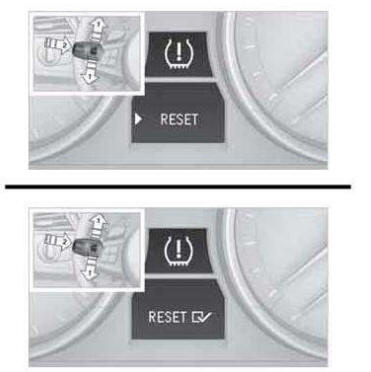
- Lightly push button 1 on the turn indicator.
- Lever the turn indicator up or down repeatedly until the tire monitor symbol appears in the display, accompanied by the word "RESET".
- Press button 2 to confirm your choice of the Flat Tire Monitor.
- Press button 2 for approx. 5 seconds until the a check mark is shown next to the "RESET" display.
- Drive the vehicle.
The initialization is completed during driving, which can be interrupted at any time. When driving resumes, the initialization is continued automatically.
Direct System (Tire Pressure Monitor)
CAUTION: Do not initialize the system while snow chains are attached.
NOTE: Each time a tire inflation pressure has been corrected or a wheel or tire has been changed, reset the system.
IMPORTANT: The system does not work correctly if it has not been reset; for example, a flat tire may be indicated even though the tire inflation pressures are correct. The system is inactive and cannot indicate a flat tire if a wheel without TPM electronics, such as a compact spare wheel, has been mounted, or if TPM is temporarily malfunctioning due to other systems or devices using the same radio frequency.
Reset:
- Start the engine.
- Lightly push button 1 on the turn indicator.
- Lever the turn indicator up or down repeatedly until the tire monitor symbol appears in the display, accompanied by the word "RESET".
- Press button 2 to confirm your choice of the Tire Pressure Monitor. In the display, "ACTIVE" will appear above "RESET".
- Press button 2 for approx. 5 seconds. In the display, "RESETTING" will now appear above "RESET".
- Drive the vehicle.
After driving a few minutes, the set inflation pressures in the tires are accepted as the target values to be monitored. The system reset is completed during your drive, and can be interrupted at any time. When driving resumes, the reset is continued automatically. The indicator lamp goes out after the system reset is completed.
System Reset Failure:
- Message For Unsuccessful System Reset: The warning lamp lights up yellow. The system was not reset. Check the tire inflation pressure and reset the system.
- Malfunction: The small warning lamp flashes in yellow and then lights up continuously; the larger warning lamp comes on in yellow. On the Control Display, the tires are shown in gray and a message appears. No punctures can be detected. This type of message is shown in the following situations:
- If there is a malfunction. Have the system checked.
- If a wheel without TPM electronics has been mounted.
- If TPM is temporarily malfunctioning due to other systems or devices using the same radio frequency.
Test yourself
A quick BMW X3 quiz: every answer comes with an explanation and a link to the manual page.