Television Camera(for Rear)
Components
COMPONENTS
ILLUSTRATION
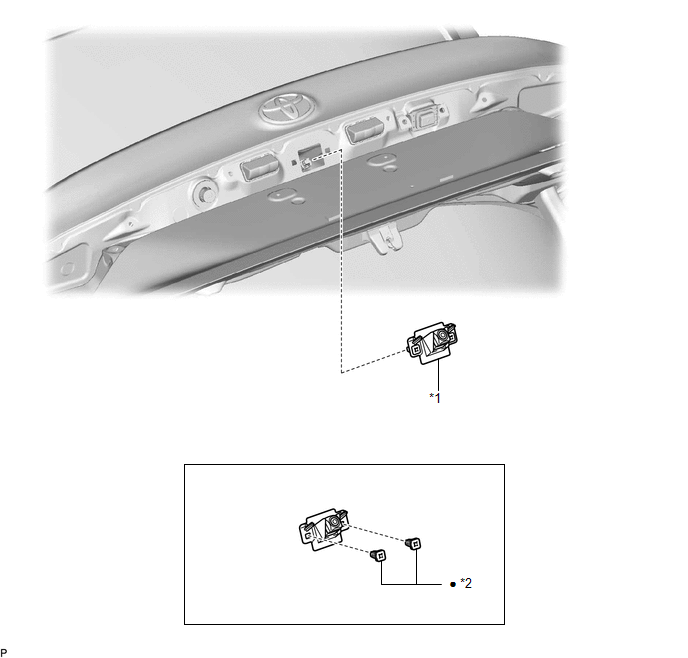
*1 |
TELEVISION CAMERA ASSEMBLY |
*2 |
GROMMET |
● |
Non-reusable part |
- |
- |
Installation
INSTALLATION
PROCEDURE
1. INSTALL TELEVISION CAMERA ASSEMBLY
(a) When reusing the television camera assembly:
(1) Engage the 4 claws to install 2 new grommets as shown in the illustration.
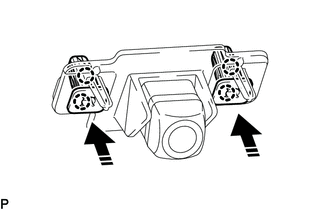
 |
Install in this Direction |
(b) Connect the connector. |
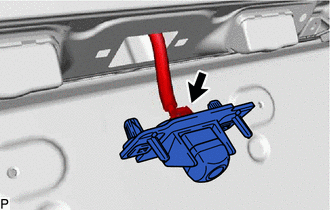 |
(c) Engage the 4 claws to install the television camera assembly as shown in the illustration.
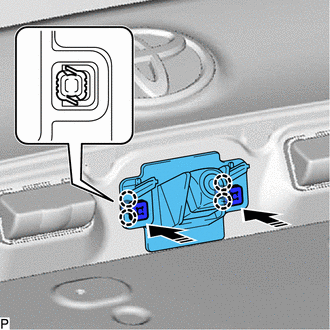
|
Install in this Direction |
2. INSTALL LUGGAGE COMPARTMENT DOOR OUTSIDE GARNISH SUB-ASSEMBLY
Click here 
3. PERFORM CALIBRATION (w/ Parking Assist Monitor System)
for Gasoline Model: Click here
for HV Model: Click here
4. PERFORM CALIBRATION (w/ Panoramic View Monitor System)
for Gasoline Model: Click here
for HV Model: Click here
Removal
REMOVAL
The necessary procedures (adjustment, calibration, initialization, or registration) that must be performed after parts are removed and installed, or replaced during television camera assembly removal/installation are shown below.
Necessary Procedure After Parts Removed/Installed/Replaced (for Gasoline Model)Replaced Part or Performed Procedure | Necessary Procedure | Effect/Inoperative Function When Necessary Procedures are not Performed | Link |
|---|---|---|---|
Television camera assembly (w/ Parking Assist Monitor System) |
|
Parking Assist Monitor System |
 |
Television camera assembly (w/ Panoramic View Monitor System) |
|
Panoramic View Monitor System |
|
Replaced Part or Performed Procedure | Necessary Procedure | Effect/Inoperative Function When Necessary Procedures are not Performed | Link |
|---|---|---|---|
Television camera assembly (w/ Parking Assist Monitor System) |
|
Parking Assist Monitor System |
|
Television camera assembly (w/ Panoramic View Monitor System) |
|
Panoramic View Monitor System |
|
PROCEDURE
1. REMOVE LUGGAGE COMPARTMENT DOOR OUTSIDE GARNISH SUB-ASSEMBLY
Click here
2. REMOVE TELEVISION CAMERA ASSEMBLY
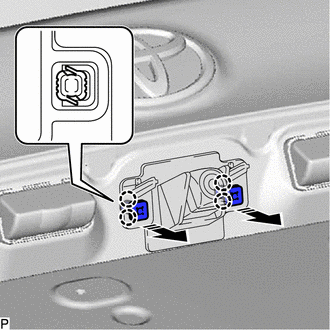
(a) Disengage the 4 claws to remove the 2 grommets as shown in the illustration.
 |
Remove in this Direction |
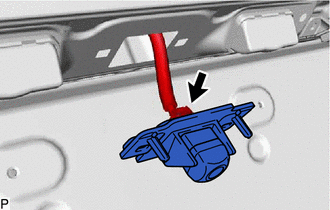
(b) Disconnect the connector to remove the television camera assembly. |
 |