Dcm Activation
DCM ACTIVATION
DCM ACTIVATION
This function must be used to activate the DCM (telematics transceiver) after a new DCM (telematics transceiver) is installed. During the DCM activation process, the Techstream automatically provides the telematics service provider with the information of the new DCM (telematics transceiver) and deletes the information of the old DCM (telematics transceiver) associated with the vehicle. The DCM (telematics transceiver) that was replaced must be returned to the parts return service.
(a) Connect the Techstream to the DLC3.
(b) Turn the ignition switch to ON.
(c) Press the SOS button once to confirm that the replacement part is defective (the voice guidance "Safety Connect is not initialized." is heard).
(d) Turn on the Techstream.
(e) Select "Telematics" on the System Selection Menu screen, then click "Utility".
(f) Click "DCM Service" on the Utility Selection Menu screen.
Body Electrical > Telematics > UtilityDCM Service
(g) Select "Activate DCM", then click "Next" on the DCM Service Utility screen.
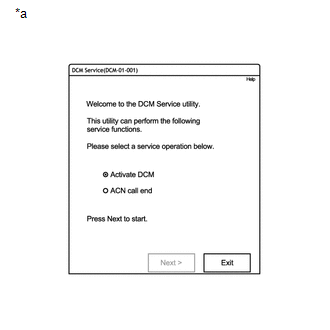
*a |
Example |
(h) Follow the instructions on the Techstream.
HINT:
- If a malfunction occurs during DCM activation, a specific malfunction message is displayed together with the procedure instructions.
- The green indicator on the manual SOS switch lights up if activation is completed successfully.
Malfunction Code | Cause |
|---|---|
20 |
System pause. |
61 |
The DCM (telematics transceiver) has been identified as a part that has already been used. |
62 |
VIN not recognized by the telematics service provider. |
63 |
The DCM (telematics transceiver) is already associated with a vehicle. Use another approved replacement part. |
64 |
DCM (telematics transceiver) not recognized. |
66 |
The DCM (telematics transceiver) is not a replacement part. Use only an approved replacement part. |
67 |
Activation not possible at this stage. |
HINT:
If any of these malfunction codes are present, follow the procedure indicated in the following list.
- Malfunction 20: Try activating the DCM again.
- Malfunction 61: Replace the DCM (telematics transceiver) with a new replacement part and perform DCM activation.
- Malfunction 62*: Check whether the Vehicle Identification Number is correct in the ECM. Perform the "Run Vehicle Inquiry" and "Verify VIN" procedures. Confirm the replacement part by pressing the SOS button once and hearing the message "Safety Connect is not initialized.", then try activating again.
- Malfunction 63: Replace the DCM (telematics transceiver) with a new replacement part and perform DCM activation.
- Malfunction 64*: Make sure the DCM (telematics transceiver) is a new replacement part.
- Malfunction 66*: Replace the DCM (telematics transceiver) with a new replacement part and perform DCM activation.
- Malfunction 67: Try activating the DCM again. If the malfunction occurs again, wait and try later.
*: Since the malfunction may also be caused by a communication problem with the call center, before replacing the DCM (telematics transceiver), check with the call center whether there is a communication or database problem.
(i) Press the manual SOS switch to contact an operator and confirm that the DCM (telematics transceiver) is activated.