DCM Operation History
DCM OPERATION HISTORY
DCM OPERATION HISTORY
This function shows the status of the telematics network when the DCM (Data Communication Module) was activated. Use this function when no DTC is present but the telematics system was unable to connect to the call center. This symptom may occur if the mobile phone signal strength is very weak.
(a) Connect the Techstream to the DLC3.
(b) Turn the ignition switch to ON.
(c) Turn on the Techstream.
(d) Select "Telematics" on the System Selection Menu screen, then click "Utility".
(e) Click "DCM Operation History" on the Utility Selection Menu screen.
Body Electrical > Telematics > UtilityDCM Operation History
(f) Follow the instructions on the Techstream.
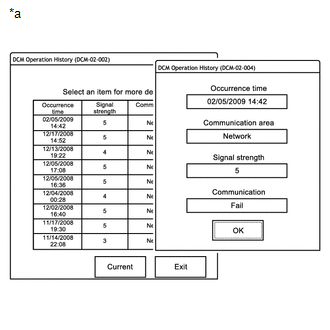
*a |
Example |
HINT:
- "Occurrence Time" shows the date and time of the DCM (Data Communication Module) operation.
- "Communication area" shows the communication network used: Network (Verizon) or Roaming.
- "Signal strength" shows the mobile signal strength received by the vehicle: 0 (no signal) to 5 (strong signal).
- "Communication" shows the connection to the call center: Success or Failure*2.
Result
Description
Success
A successful call made using the manual SOS switch or the navigation system (if the destination assist is available)
Failure*1
Call failed.
NOTICE:
*1: A failure may also be caused by manually ending an emergency call and does not necessarily indicate a device malfunction.
HINT:
*2: If communication with the call center fails, the message "Echec" is displayed.