Voice guidance does not work
WIRING DIAGRAM
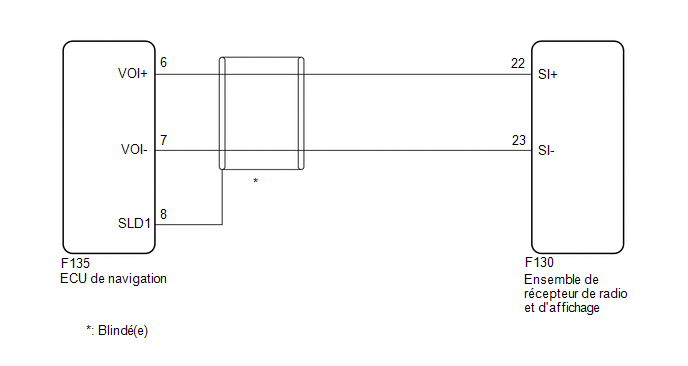
PROCEDURE
CHECK VOICE GUIDANCE SETTING
(a) Check that the voice guidance setting is not set to OFF.
OK:
The voice guidance setting is not set to OFF.
| NG |  |
SET VOICE GUIDANCE SETTING TO ON |
|

CHECK WIRE HARNESS AND CONNECTOR (RADIO AND DISPLAY RECEIVER ASSEMBLY - NAVIGATION ECU)
(a) Disconnect the F130 radio receiver and display assembly connector.
(b) Disconnect connector F135 from the navigation ECU.
(c) Measure the resistance according to the value(s) in the table below.
Standard resistance:
Tester Connection | Condition | Specified Condition |
|---|---|---|
F130-22 (SI+) - F135-6 (VOI+) |
Always |
Below 1 Ω |
F130-23 (SI-) - F135-7 (VOI-) |
Always |
Below 1 Ω |
F130-22 (SI+) or F135-6 (VOI+) - Body ground |
Always |
10 kΩ minimum |
F130-23 (SI-) or F135-7 (VOI-) - Body ground |
Always |
10 kΩ minimum |
F135-8 (SLD1) - Body ground |
Always |
10 kΩ minimum |
| OK | |
GO TO APPLICABLE SYSTEM AS INDICATED IN THE PROBLEM SYMPTOMS TABLE |
| NG | |
REPAIR OR REPLACE HARNESS OR CONNECTOR |