Navigation / Multi-Display
Panel keys do not work
In this manual: Navigation / Multi-Display
~1min read
PRECAUTION / NOTICE / HINT
NOTICE:
- Depending on the parts replaced during vehicle inspection or maintenance, initialization, registration or calibration may be required. Refer to the precautions for the navigation system.
Click here

- When replacing the radio and display receiver assembly, always replace it with a new one. If a radio and display receiver assembly that was installed in another vehicle is reused, the following may occur:
- A communication malfunction DTC may be stored.
- The radio and display receiver assembly may not operate normally.
PROCEDURE
CHECK PANEL SWITCHES
(a) Make sure that no foreign matter is preventing the keys from operating.
OK:
No foreign matter.
| NG |  |
REMOVE ANY FOREIGN MATTER |
|

CHECK STEERING WHEEL AND PANEL SWITCHES (OPERATION CHECK)
(a) Select the "Panel & Steering Switch Check Mode" screen. Refer to Panel & Steering Switch Check in the Function Check. Click here |
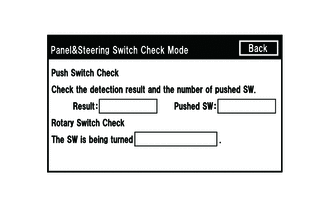 |
(b) Operate the defective switch and check that its status is displayed correctly.
OK:
The switch status is correctly displayed as operating.
| OK | |
REPLACE RADIO AND DISPLAY RECEIVER ASSEMBLY |
| NG | |
GO TO APPLICABLE SYSTEM AS INDICATED IN THE PROBLEM SYMPTOMS TABLE |
Was this page helpful?