Customizable Parameters
CUSTOMIZABLE PARAMETERS
CUSTOMIZE LIGHTING SYSTEM (EXT)
NOTICE:
- When the customer requests a change to a function, first make sure that the function can be customized.
- Be sure to record the initial settings before customizing.
- When troubleshooting a function, first make sure that the function is set to its default value.
HINT:
The following items can be customized:
(a) Customizing using the Techstream
(1) Connect the Techstream to the DLC3.
(2) Turn the ignition switch ON.
(3) Turn on the Techstream.
(4) Select the following menus: Body Electrical / Main Body / Utility / Customize / Light Control, Illuminated Entry or Warning.
(5) Select the setting by referring to the table below.
Light controlTester display | Description | Default setting | Setting | ECU |
|---|---|---|---|---|
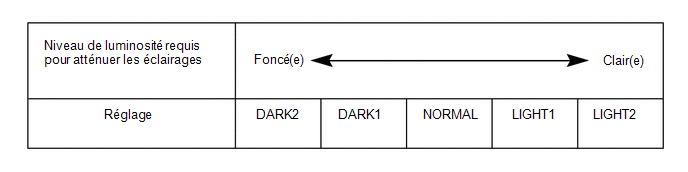
Disp Ex ON Sen |
Changes the ambient light level at which the instrument cluster indicators, A/C indicator and clock dimming is applied.*A |
NORMAL |
000: NORMAL, 001: DARK2, 010: DARK1, 011: LIGHT1, 100: LIGHT2 |
Main body ECU (multiplex network body ECU) |
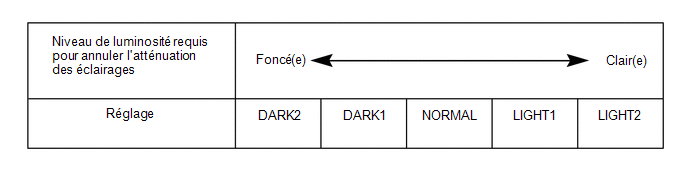
Disp Ex OFF Sen |
Changes the ambient light level required to cancel dimming of lights such as the instrument cluster indicators, A/C indicator and clock.*B |
NORMAL |
000: NORMAL, 001: DARK2, 010: DARK1, 011: LIGHT1, 100: LIGHT2 |
Main body ECU (multiplex network body ECU) |
Light Auto OFF Delay |
Keeps the headlights on for a set time after the ignition switch is turned OFF and all doors are closed.*1 Low beam headlights ON |
30 s |
00:OFF, 01:30 s, 10:60 s, 11:90 s |
Main body ECU (multiplex network body ECU) |
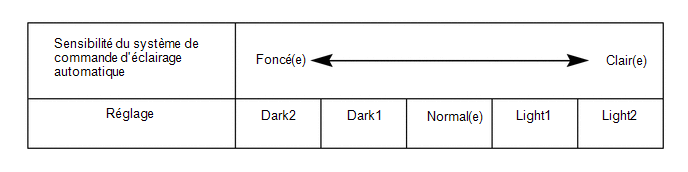
Sensitivity |
Adjusts the sensitivity of the automatic light control system.*C |
Normal |
000:Normal, 001:Dark2, 010:Dark1, 011:Light1, 100:Light2 |
Main body ECU (multiplex network body ECU) |
DRL Function |
Enables/disables the DRL function. |
ON |
0 : OFF, 1 : ON |
Main body ECU (multiplex network body ECU) |
Follow Me Home Lighting Time |
Sets the headlight lighting duration after the ignition switch is turned OFF. *2 |
30 s |
00: 30 s, 01: 60 s, 10: 90 s, 11: 120 s |
Main body ECU (multiplex network body ECU) |
- *1: with Toyota Safety Sense P system
- *2: without Toyota Safety Sense P system
Tester display | Description | Default setting | Setting | ECU |
|---|---|---|---|---|
Lane Change Flashing Times Setting |
Function to change the number of lane change turn signal flashes. |
3 |
000:OFF,001:3 010:4 011:5 100:6 101:7 |
Combination meter assembly |
HINT:
The sensitivity setting is difficult to confirm. Check by driving the vehicle.
- *A
- *B
- *C
(b) Customization using the multi-information display (with Toyota Safety Sense P).
(1) Turn the ignition switch to ON.
(2) Select the following menus: MENU / Setup / Vehicle / Vehicle customization / Lights Settings.
(3) Select the setting by referring to the table below.
Light adjustmentTester display | Description | Default setting | Setting | ECU |
|---|---|---|---|---|
Headlights Auto-on Sensitivity |
Adjusts the sensitivity of the automatic headlight control system. |
0 |
-2, -1, 0, +1 or +2 |
Main body ECU (multiplex network body ECU) |
Headlights Auto-off Timer |
Keeps the headlights on for a set time after the ignition switch is turned to OFF, when all doors are closed and the headlight switch is in the ON position. |
30 s |
Off, 30 s, 60 s or 90 s |
Main body ECU (multiplex network body ECU) |
Daytime Running Lights |
Enables/disables the DRL function. |
ON |
ON or OFF |
Main body ECU (multiplex network body ECU) |