Digital key system allows a driver to lock or unlock the vehicle doors with smartphone app or a NFC key card without a smart key. Main features of digital key system
"A smartphone key can be issued from the digital key server and a NFC key card can be registered through a separate process."
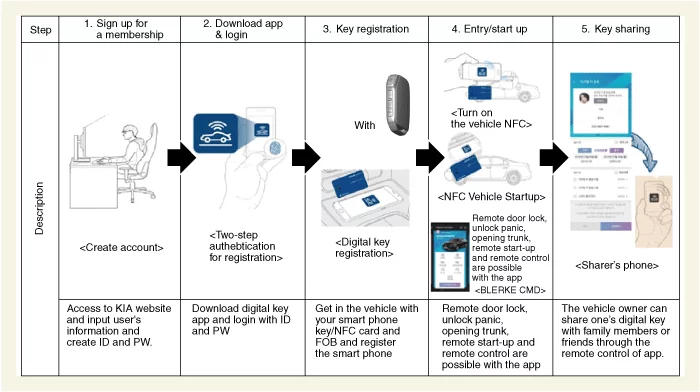
After signing up for a membership in KIA website and downloading app, you can register it through AVN or USM.
"In case of NFC key card, it requires a separate authentication procedure and you can register it through AVN or USM after the procedure." "(The separate authentication procedure is available with the digital key app or selecting “key card Registration Mode Activation” on the KDS.)"
3 drivers can share a smartphone key at maximum but one NFC key card is provided.
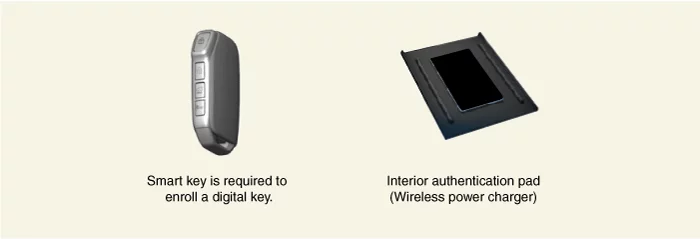
You should have the smart key on you while registering a smartphone key or a NFC key card. Once it is registered, you can lock or unlock the door and operate the engine without the smart key.
"After the smartphone is set to interwork with driver’s profiles (profile 1, profile 2 and guest) through USM on AVN or the cluster, the vehicle automatically recognizes and activates customized functions such as IMS or AVN are activated when the door is unlocked."
Vehicle condition information such as trip distance, fuel efficiency and residual fuel on the smart phone app.
When you delete the smart phone key or NFC key card, you should have the smart key. (Smart phone key or NFC key card is not required to carry to delete.)
Register a smart phone key or NFC key card using the registration process below. Smart Phone Key/NFC Key Card Registration Process
Functions
NFC Entry/Start up Authentication When you contact your digital key or NFC key card to the vehicle’s door handle, it operates door lock or unlock after checking whether the user has access or not through NFC communication. When you place the key on the wireless charger in the vehicle and press the engine button, the engine starts to work after the verification process is completed. NFC antenna is mounted on the vehicle’s outside handle for entry verification and ignition authentication antenna is embedded in the wireless charger.
You should contact your smart phone key or NFC key card on the exact spot of the outside handle where the NFC antenna is mounted on.
NFC or Bluetooth function on the smart phone should be turned on.
You should confirm the user’s authority such as the expiration in case of the smart phone key.
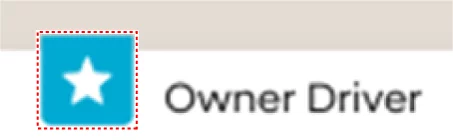
Open the app and check whether the vehicle is registered as a main use vehicle.
How to set up the main use vehicle
You can check it by pressing the star on the smart phone app as shown below.
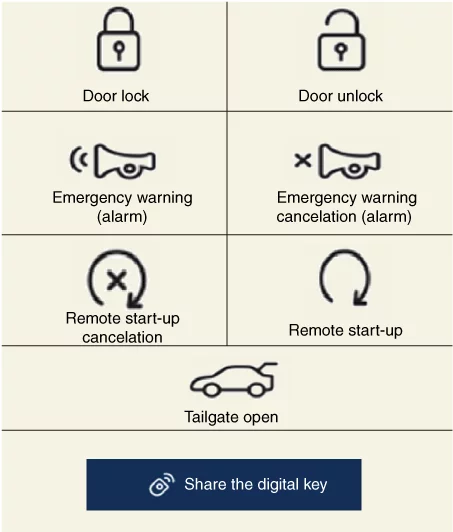
Bluetooth Low Energy (BLE) Unit Entry/Start Up Verification The button to operate the remote control appears on the digital key smart phone app screen when the connection between the vehicle and BLE is activated. With BLE remote control, the vehicle door lock/unlock, emergency warning and remote start-up are operable at long range. BLE connection with the vehicle allows 4 users at maximum including sharers who possess the remote control access simultaneously but when one of the users is operating the remote control, others cannot control the functions.
BLE remote control is operable only when a user has the remote control authority and designated the user’s vehicle as a main use vehicle and the vehicle is connected to the Bluetooth.
The communication may be limited if there is a person or an object between the smart phone and the vehicle.
On Vehicle Inspection
On Vehicle Inspection
Diagnosis with KDS
The digital key system can be more quickly diagnosed for problems with the KDS (Refer to "DTC guide").
Self diagnosis : Inspect the Diagnostic Trouble Code (DTC) with the KDS. (Refer to DTC guide when fault code is found.)
S/W Management : Controlling other features including system option setting and zero point adjustment. (S/W Management → Identity Authentication Unit → Status Information) (S/W Management → Identity Authentication Unit → Learning Mode) (S/W Management → Identity Authentication Unit → Neutralization Mode)
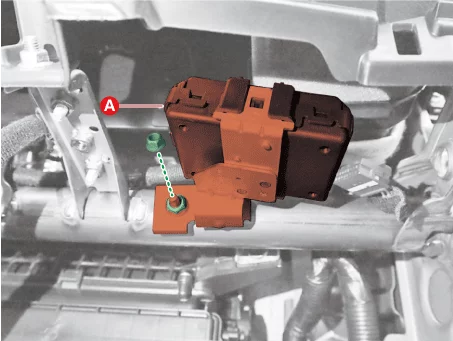
Identity Authentication Unit (IAU) Removal and Installation
Removal
Remove the crash pad center panel. (Refer to Body - "Crash Pad Panel")
Disconnect the Identity Authentication Unit (IAU) connector (A).
Remove the Identity Authentication Unit (IAU) (A) after removing the nut (B).
Tightening torque : 6.9 - 9,8 N·m
Installation
Install in reverse order of removal.
Perform the "IAU-IBU learning". (Refer to Digital Key System - "Digital Key System Diagnostic")
You should notify the following items to the customer after completing the vehicle repair.
If IAU-IBU learning is processed, the existing smartphone key and NFC key card are deleted. (In this case, smart key information is not deleted so only smart key can turn on the vehicle.)
You should notify that the smart phone key and NFC key card should be re-registered necessarily.
To re-register the smart phone key, the digital key initialization of the vehicle owner’s smart phone should be processed. After initializing the smart phone key, you should re-register the smart phone key.
NFC key card should be re-registered and the existing NFC can be re-registered immediately. (New card key can be registered and used.)
NFC Uint Removal and Installation
Removal
NFC Unit
[Wireless Power Charger (WPC)]
Remove the Wireless Power Charger (WPC). (Refer to Charging System - "Wireless Power Charger (WPC)")
[Door Outside Handle]
Remove the front door outside handle [Driver side]. (Refer to Body - "Front Door Handle")
The digital key system provides an NFC key card for emergency purposes, such as when a cell phone cannot be delivered directly, such as valet parking, or when the cell phone battery is off. The first time after the car was shipped from the shop or after replacing the IAU, the key card must be registered in the vehicle for use. NFC Key Card Registration Process You should follow the steps in the procedure below to register NFC key card.
Make the vehicle enable to register NFC key card.
The key can be registered with “key card Registration Mode Activation” mode on the diagnosis device.
It also can be registered digital key app available in the vehicle.
You should register the NFC key card on AVN or the cluster within 5 minutes after getting in the vehicle.
When there is a previously enrolled NFC key card, the “Enroll” button on the User’s Settings Menu (USM) is deactivated so press “Deletion” to delete the NFC key card and register new one. (You should have your smart key to delete in the vehicle.)
A NFC key card can be registered and deleted repeatedly but if you enroll a new NFC key card, the previously enrolled key is not available.
If you replace IAU, the used NFC key card is not available.
iPhone users and cellphone users except smart phones are allowed to enroll the NFC key card with “NFC Key Card Registration Mode Activation” on the KDS.
You should register the NFC key card in the vehicle within 5 minutes after proceeding authentication process.
If the enrollment process fails to be completed within 5 minutes, you should retry after re-processing the authentication.
Perform the "NFC Key Card Registration Mode Activation" with the KDS. (S/W Management → Identity Authentication Unit → NFC Key Card Registration Mode Activation)
If you input bad passwords over 5 times, key card registration is prevented for 1 hour.
Refer to the KDS screen for operating conditions and details
After placing a key card on NFC wireless charger, you should register the key card through the User’s Settings Menu (USM) on the AVN or instrument cluster.
After completing “NFC Key Card Registration Mode Activation”, you should get in the vehicle within 5 minutes and register the key card.
When you register a NFC key card, the smart key should be in the vehicle.
AVN (if equipped): Register as below. "AVN Set Up button - Vehicle – Digital key - NFC key card"
AVN (if not equipped): Register as below. "Menu on the cluster – Digital key - NFC key card "
Place the NFC key card that you want to register on the interior authentication pad (Wireless power charger) to complete the process.



 The key can be registered with “key card Registration Mode Activation” mode on the diagnosis device.
 It also can be registered digital key app available in the vehicle.