Cooling Fan
CHECK COOLING FAN FUNCTION
 With CONSULT
Turn ignition switch ON.
Perform “COOLING FAN” in “ACTIVE TEST” mode of “ENGINE” using CONSULT.
Touch “LOW”, “MID”, “HI” on the CONSULT screen.
Check that cooling fan operates.
 Without CONSULT
Activates IPDM E/R auto active test and check cooling fan motors operation, refer to Diagnosis Description.
Check that cooling fan operates.
Is the inspection result normal?
YES>>INSPECTION END
NO>>Proceed to Diagnosis Procedure.
CHECK COOLING FAN RELAY POWER SUPPLY CIRCUIT
Turn ignition switch OFF.
Disconnect cooling fan relays-2, -3.
Turn ignition switch ON.
Check the voltage between cooling fan relays-2, -3 harness connectors and ground.
+ − Voltage Cooling fan relay Connector Terminal E42
(cooling fan relay-2)2 Ground Battery voltage 5 E41
(cooling fan relay-3)2 5
Is the inspection result normal?
YES>>GO TO 2.
NO>>Perform trouble diagnosis for power supply circuit.
CHECK COOLING FAN RELAY OUTPUT SIGNAL CIRCUIT
Turn ignition switch OFF.
Disconnect IPDM E/R harness connectors.
Check the continuity between cooling fan relay-2, -3 harness connectors and IPDM E/R harness connector.
+ − Continuity Cooling fan relay IPDM E/R Connector Terminal Connector Terminal E42
(cooling fan relay-2)1 E119 27 Existed E41
(cooling fan relay-3)1 39 Also check harness for short to ground and to power.
Is the inspection result normal?
YES>>GO TO 3.
NO>>Repair or replace error-detected parts.
CHECK COOLING FAN MOTOR POWER SUPPLY CIRCUIT
Disconnect cooling fan motor-1 harness connector.
Check the voltage between cooling fan motor-1 harness connector and ground.
+ − Voltage Cooling fan motor-1 Connector Terminal E236 1 Ground Battery voltage 2
Is the inspection result normal?
YES>>GO TO 4.
NO>>Perform trouble diagnosis for power supply circuit.
CHECK COOLING FAN MOTOR CIRCUIT-1
Disconnect cooling fan motor-2 harness connector.
Check the continuity between cooling fan relay-2, -3 harness connectors and cooling fan motor-1, -2 harness connectors.
+ − Continuity Cooling fan relay Cooling fan motor Connector Terminal Connector Terminal E42
(cooling fan relay-2)3 E237
(Cooling fan motor-2)2 Existed 7 E236
(Cooling fan motor-1)3 E41
(cooling fan relay-3)3 E237
(Cooling fan motor-2)1 7 E236
(Cooling fan motor-1)4 Also check harness for short to ground and to power.
Is the inspection result normal?
YES>>GO TO 5.
NO>>Repair or replace error-detected parts.
CHECK COOLING FAN MOTOR CIRCUIT-2
Check the continuity between IPDM E/R harness connector and cooling fan motor-1, -2 harness connector.
+ − Continuity IPDM E/R Cooling fan motor Connector Terminal Connector Terminal E120 4 E236
(Cooling fan motor-1)4 Existed 6 E237
(Cooling fan motor-2)1 Also check harness for short to ground and to power.
Is the inspection result normal?
YES>>GO TO 6.
NO>>Repair or replace error-detected parts.
CHECK COOLING FAN MOTOR CIRCUIT-3
Check the continuity between cooling fan relay-2, -3 harness connectors and ground.
+ − Continuity Cooling fan relay Connector Terminal E42
(cooling fan relay-2)6 Ground Existed E41
(cooling fan relay-3)6 Also check harness for short to ground and to power.
Is the inspection result normal?
YES>>GO TO 7.
NO>>Repair or replace error-detected parts.
CHECK COOLING FAN MOTOR CIRCUIT-4
Check the continuity between cooling fan motor-2 harness connector and ground.
+ − Continuity Cooling fan motor-2 Connector Terminal E237 3 Ground Existed 4 Also check harness for short to ground and to power.
Is the inspection result normal?
YES>>GO TO 8.
NO>>Repair or replace error-detected parts.
CHECK COOLING FAN RELAY-2 AND -3
Refer to Component Inspection (Cooling Fan Relay).
Is the inspection result normal?
YES>>GO TO 9.
NO>>Replace malfunctioning cooling fan relay.
CHECK COOLING FAN MOTORS-1 AND -2
Refer to Component Inspection (Cooling Fan Motor).
Is the inspection result normal?
YES>>GO TO 10.
NO>>Replace malfunctioning cooling fan motor. Refer to Removal and Installation.
CHECK INTERMITTENT INCIDENT
Perform Intermittent Incident
Is the inspection result normal?
YES>>Replace IPDM E/R. Refer to Removal and Installation.
NO>>Repair or replace error-detected parts.
CHECK COOLING FAN MOTOR
Turn ignition switch OFF.
Disconnect cooling fan motor harness connector.
Supply cooling fan motor terminals with battery voltage and check operation.
Cooling fan motor Condition Terminal + – 1 3 and 4 A 2 3 and 4 1 and 2 3 1 and 2 4 1, 2 3, 4 B Check that cooling fan speed of condition B is higher than that of A.
Is the inspection result normal?
YES>>INSPECTION END
NO>>Replace cooling fan motor. Refer to Removal and Installation.
CHECK COOLING FAN RELAYS
Turn ignition switch OFF.
Remove cooling fan relay-2, -3.
Check the continuity between cooling fan relay-2, -3 terminals as per the following conditions.
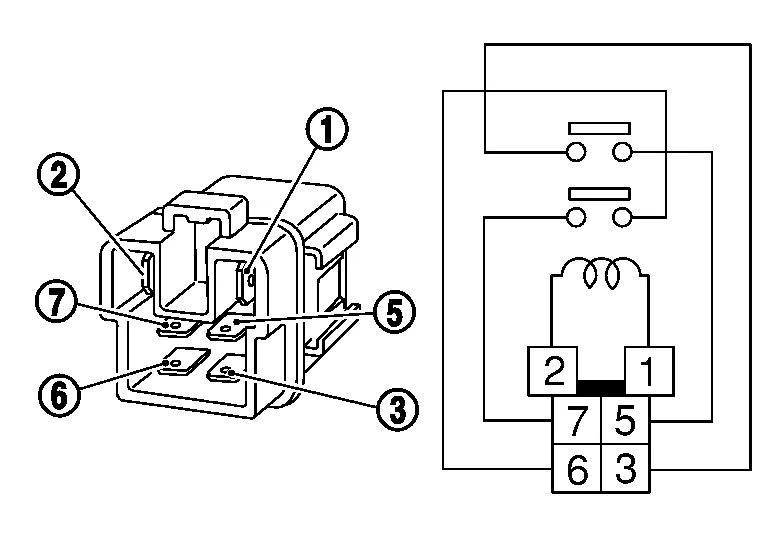
Cooling fan relay-2, -3 Conditions Continuity + − Terminal 5 3 12V direct current supply between terminals 1 and 2 Existed No current supply Not existed 7 6 12V direct current supply between terminals 1 and 2 Existed No current supply Not existed
Is the inspection result normal?
YES>>INSPECTION END
NO>>Replace cooling fan relay.