Audio System. General Information. Audio Unit - Vehicles Equipped with Premium AM/FM/CD. Digital Broadcasting
This section describes the operation and features of the audio system in the Ford Mustang VI generation. In addition to general information on CD and MP3 playback, it also describes the features of digital audio broadcasting (DAB). Functions such as manual and automatic station seek, station lists, radio text and presets are covered. The folder structure for MP3 files is also explained. The notes on proper CD use and possible reception interference are especially useful. Anyone who wants to make full use of the audio system will find a practical overview here.
General Information
Radio Frequencies and Reception Factors

CD and CD Player Information
Note: CD players only play commercially available audio CDs with a diameter of 12 centimeters (4.72 in). Due to technical incompatibility, some recordable and rewritable discs may not function correctly when used in Ford CD players.
Note: Do not insert CDs with homemade paper or adhesive labels into the CD player. The label may come loose and cause the CD to jam. For burned CDs, use a permanent marker instead of adhesive labels. Ballpoint pens can damage CDs. For more information, see any authorized dealer.
Note: Never insert discs with an irregular shape or with scratch-protection film.
Only handle discs by their edges.
Clean CDs only with a CD cleaner designed for this purpose. Wipe from the center of the CD outward.
Never clean with circular motions.
Do not expose CDs to direct sunlight or heat sources for extended periods.
MP3 and WMA Track and Folder Structure
Audio systems that can recognize and play back individual MP3 and WMA tracks and folder structures work as follows:
- There are two different modes for MP3 and WMA disc playback: MP3 and WMA Track Mode (system default) and MP3 and WMA Folder Mode.
- MP3 and WMA Track Mode ignores any folder structure on the MP3 and WMA disc. The player numbers each MP3 and WMA track (file extension MP3 or WMA) on the disc from T001 to a maximum of T255. The maximum number of playable MP3 and WMA files may be lower depending on the CD structure and the audio unit model.
- MP3 and WMA Folder Mode uses a folder structure that includes one folder level. The CD player numbers all MP3 and WMA tracks (file extension MP3 or WMA) on the disc and all folders containing MP3 and WMA files from F001 (folder) T001 (track) to F253 T255.
- Creating discs with only one folder level makes it easier to navigate through the disc files.
When you burn your own MP3 and WMA discs, it is important to understand how the system reads the structures you create. Although various files may be present (files with extensions other than MP3 and WMA), only files with the extensions MP3 and WMA are played; other files are ignored by the system. This allows you to use the same MP3 and WMA disc for a range of other tasks on your work computer, home PC and in your vehicle's system.
In Track Mode, the system displays the structure as if it had only one level.
The same applies to playback. (All MP3 and WMA files are played, regardless of whether they are in a special folder.) In Folder Mode, the system plays only the MP3 and WMA files in the current folder.
Audio Unit - Vehicles Equipped with Premium AM/FM/CD
WARNING
Distraction while driving can lead to loss of vehicle control, accidents and injuries.
We strongly recommend using these devices and their functions only with extreme caution, so that your attention is not diverted from the road. The safe operation of your vehicle is entirely your responsibility. We advise against using handheld devices while driving and recommend using voice-controlled systems where possible.
Make sure you are informed of all local laws that may affect the use of electronic devices while driving.
Note: Most audio functions can be operated using the touch-sensitive screen.
See SYNC Information.
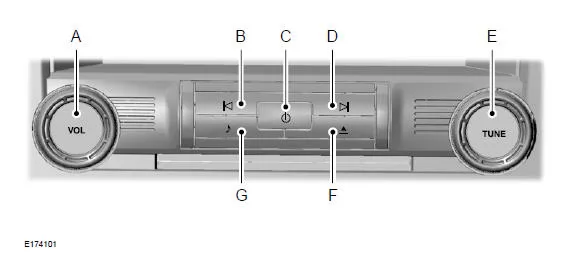
A VOL: Turn the knob to adjust the system volume.
B Seek and Fast Rewind: In Radio Mode, select a frequency band and press this button. The system stops at the first radio station found in the reverse direction in the frequency band. Press and hold the button to quickly move to the previous radio station with good reception or to a preset station.
In CD Mode, press this button to select the previous track. Press and hold the button to fast rewind through the current track.
C Power: Press this button to turn the system on or off.
D Seek and Fast Forward: In Radio Mode, select a frequency band and press this button. The system stops at the first radio station found in the forward direction in the frequency band. Press and hold the button to quickly move to the next radio station with good reception or to a preset station. In CD Mode, press this button to select the next track. Press and hold the button to fast forward through the current track.
E TUNE: After selecting a frequency band, turn the knob to find the desired station.
F Eject: Press this button to eject a CD.
G Sound: Press this button to access the settings for treble, midrange, bass, fader and balance.
Digital Broadcasting
General Information
The system allows playback of DAB (Digital Audio Broadcasting) radio stations.
Note: Station coverage depends on the region and affects reception quality. Broadcasts are available nationwide, regionally and locally. Station coverage may vary depending on weather and terrain.
The following formats are supported:
- DAB.
- DAB+.
- DMB audio (Digital Multimedia Broadcasting)
Ensembles
Ensembles consist of a group of radio stations. Each ensemble can consist of several different radio stations.
The station name is displayed below the ensemble name.
Note: When switching between two ensembles, synchronization to the next ensemble may take some time. The system is muted during synchronization.
Selecting the Frequency Band
DAB 1, DAB 2 and DAB 3 work in the same way. You can preset up to 10 different stations for each frequency band.
- Press the RADIO button.
- Alternatively, press the left arrow button to display the available frequency bands.
- 3. Select DAB 1, DAB 2 or DAB 3.
Note: When you reach the first or last radio station in an ensemble, moving to the next station selects the next ensemble. A delay may occur during this change, and the sound may be briefly muted.
Setting Radio Stations
Station Seek (Alternative 1)
1. Press a seek button. The system stops at the first radio station found in the selected seek direction.
Station List (Alternative 2)
This function displays all available radio stations in a list.
- Press the seek button.
- Press the left or right arrow to switch between ensembles. Press the up or down arrow to navigate to the desired radio station.
- Press OK to confirm your selection.
Note: The list only shows radio stations in the current ensemble.
Manual Station Search (Alternative 3)
1. Press the tune buttons.
Press and hold to scan the frequency band quickly.
Radio Station Buttons
This function lets you store up to 6 favorite radio stations from all ensembles in each preset memory bank.
- Select a radio station.
- Press and hold a station button. When the system stores a station, a message appears. The system briefly mutes as confirmation.
After storing, you can recall the desired radio station at any time by pressing a station button.
Note: Radio stations stored on preset buttons may not always be available if you leave the broadcast area. In this case, the system mutes. This may lead to unexpected changes to the station presets.
Radio Text
You can display additional information.
For example, the artist name.
To activate this option, select 'Radio Text On' in the 'Options' menu.
Note: Additional information may not always be available.
Station Retention
If you leave the reception range of a DAB radio station, the system automatically switches to the corresponding FM station.
You can turn this function on or off via the information display.
Note: If a DAB radio station has no corresponding FM station, the system mutes when it attempts to switch.
Note: The system displays the FM symbol when DAB and FM stations are linked.
Note: The sound quality changes when the system switches from DAB to the corresponding FM station.
The technical data for the Ford Mustang (VI Gen, 2014–2023) gives the driver a precise overview of dimensions, weights, tire sizes and fluid capacities. This ensures that maintenance and operation always follow manufacturer specifications and that the vehicle retains its full performance.
The information on tire size and speed rating combinations is especially helpful, allowing the driver to operate the vehicle safely and in compliance with regulations. The Ford Mustang VI Generation combines sporty performance with technical precision.
This information shows how the Ford Mustang (VI Gen, 2014–2023) combines responsibility and performance, supporting the driver in safe use.
Test yourself
A quick Ford Mustang quiz: every answer comes with an explanation and a link to the manual page.