Parking Assist. Rear View Camera
The rear view camera in the Ford Mustang (VI Gen) is an intelligent addition to the parking assist system. It shows the area behind the vehicle on a screen and provides various guide lines for orientation. These lines help the driver maneuver the vehicle safely into parking spaces or tight areas.
WARNINGS
The rear view camera is only a supplementary parking aid. The driver must still use the interior and exterior mirrors for the greatest possible field of view.
Due to the limited field of view of the camera system, you may not see objects near any of the bumper corners or below the bumper.
Reverse as slowly as possible, because at higher speeds the reaction time may not be sufficient to bring the vehicle to a stop.
Caution when using the rear view camera with the trunk open. If the trunk is open, the camera is not in the correct position, so an incorrect video image is transmitted. With the trunk open, all guide lines are hidden.
Caution when switching camera functions on or off. Make sure the vehicle is not moving.
The rear view camera displays a video image of the area behind the vehicle.
During operation, lines are shown on the display that indicate the path of the vehicle in relation to objects behind the vehicle.
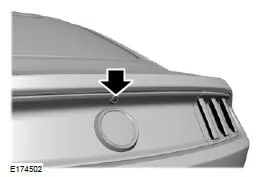
The camera is located on the trunk lid.
Using the Rear View Camera
The rear view camera shows what is behind the vehicle while reverse gear (R) is selected.
Note: The rear parking sensors are not active at speeds above 5 km/h and may not detect objects at an angle or in motion.
The system uses two types of markings to show objects behind the vehicle:
- Fixed guide lines – show the actual path of the vehicle as a straight line when reversing. This is helpful when backing into a parking space or aligning the vehicle with another object behind it.
- Center line – helps align the center of the vehicle with an object.
Note: When reverse (R) is selected and the trunk is open, no camera guide lines are displayed.
Under the following conditions, operation of the camera may be impaired:
- At night and in dark surroundings, if one of the reverse lights is not working.
- Mud, water or dust covers the field of view of the camera.
Camera Guide Lines
Note: The active guide lines are only displayed when reverse (R) is selected.
Note: After disconnecting the battery, the active guide lines may only work again after the vehicle has been driven a short distance at a speed above 20 km/h.

A Active guide lines
B Center line
C Fixed guide line: green zone
D Fixed guide line: yellow zone
E Fixed guide line: red zone
F Rear bumper
Active guidelines are only displayed together with the fixed guidelines. To use the active guidelines, turn the steering wheel until the guidelines match the desired path. If the steering wheel position is changed while reversing, the vehicle may deviate from the originally planned path.
The fixed and active guidelines are shown or hidden depending on the steering wheel position. The active guidelines are not displayed when the steering wheel is in the straight-ahead position.
Always proceed with caution when reversing. Objects in the red zone are closest to the vehicle, while objects in the green zone are farther away. Objects get closer to the vehicle when they move from the green zone into the yellow or red zone. The exterior and interior mirrors provide a better view of the sides and the area behind the vehicle.
Manual Zoom
WARNING
When manual zoom is activated, the entire area behind the vehicle is not displayed. When using manual zoom, check the surroundings.
Note: Manual zoom is only available when reverse (R) is selected.
Note: When manual zoom is activated, only the centerline is displayed.
For this feature, the settings Zoom In (+) and Zoom Out (-) can be selected. Press the icon on the camera screen to change the display. The default setting is Zoom OFF.
This feature provides an enlarged view of an object behind the vehicle.
The bumper is shown as a reference in the enlarged image. Zoom is only active when reverse (R) is selected. When reverse (R) is deselected, the feature is automatically deactivated and must be selected again for further use.
Rear View Camera System Settings
The rear view camera settings can be adjusted using the following options on the multifunction display when reverse (R) is not selected:
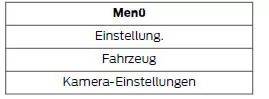
Enhanced Parking Aid or Parking Aid
For this feature, only ON and OFF can be selected as settings.
The system uses red, yellow and green markings on the video image to indicate when one of the sensor systems detects an object.
Vehicles with Touchscreen
The system displays an image of your vehicle and the sensor zones. The zones are highlighted in green, yellow and red when the parking aid sensors detect an object within the coverage area.
The detection range covers up to 1.8 m (6 ft) behind the rear bumper. The range is reduced at the outer corners of the bumper.
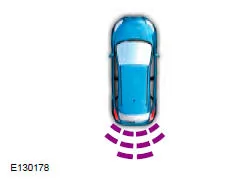
For more information on zone coverage and the parking aid sensors, see Rear Parking Aid.
Rear View Camera Delay
For this feature, only ON and OFF can be selected as settings.
The default setting for the rear view camera delay is OFF.
When shifting out of reverse (R) into any gear other than park (P), the camera image remains on the display until:
- the vehicle speed has increased sufficiently
- the shift lever is moved to park (P)
- you apply the parking brake for vehicles with manual transmission.
The rear view camera of the Ford Mustang (6th Gen, 2014–2023) provides valuable support to the driver when reversing. With fixed and active guidelines, the system helps you control the vehicle's path safely and judge obstacles more accurately. The 2014–2023 Ford Mustang combines modern technology with sporty functionality here.
The ability to individually adjust the camera settings and use the manual zoom function is particularly practical. In this way, the Ford Mustang 6th Generation shows how driving comfort and safety can be optimally combined.
Frequently Asked Questions
Why are no guidelines displayed when the trunk is open?
The camera is not correctly aligned in this case, so the guidelines are hidden to avoid misinterpretation.
How is manual zoom deactivated?
Zoom switches off automatically as soon as reverse is left and must be selected again when reversing again.
Test yourself
A quick Ford Mustang quiz: every answer comes with an explanation and a link to the manual page.