MyKey™
The MyKey™ system in the Ford Mustang offers a smart solution for driving control and safety, ideal for novice drivers or shared vehicles. Using programmable settings, parents or fleet managers can activate certain functions such as volume limiting or speed limits. This supports responsible use and increases road safety. MyKey™ combines technology with responsibility and ensures that the driving experience remains not only sporty but also safe.
Function Description
MyKey allows keys to be programmed with restricted driving modes to enforce safe driving behavior. All but one of the keys programmed for this vehicle can be activated with these restrictions.
Keys that have not yet been programmed are referred to as Admin keys. They can be used for the following operations:
- Creating a MyKey
- Programming configurable MyKey settings
- Erasing all MyKey functions
Once a MyKey is programmed, the following information can be accessed via the information display:
- Number of Admin keys and MyKeys programmed for the vehicle.
- Total distance the vehicle has been driven with a MyKey.
Note: All MyKeys are programmed with identical settings.
They cannot be programmed individually.
Note: If a vehicle with Intelligent Access with push-button start has both a MyKey and an Intelligent Access Admin key housing, the vehicle recognizes the Admin key housing when starting the vehicle using the ignition.
Non-Configurable Settings
The following settings cannot be changed with an Admin key:
- Seat belt reminder. This feature cannot be turned off. The audio system is muted if front seat occupants have not fastened their seat belts.
- Early low-fuel warning. The reserve fuel warning is activated earlier, giving the MyKey owner more time to refuel.
- If the vehicle is equipped with driver assistance features, the following are forced on: rear parking aid, Blind Spot Monitoring System, Cross-Traffic Alert, Lane Keeping Aid, Pre-Collision Assist, and limited operation of the touchscreen in some countries.
- The Track Mode, if the vehicle is equipped with this feature, is restricted.
- Adult content restrictions for satellite radio, where this feature is available in your country.
Note: The Lane Keeping Aid can be temporarily deactivated. This feature is automatically activated with each ignition cycle.
Configurable Settings
Using an administrator key, certain MyKey settings can be configured when first creating the MyKey, and before recycling the key or restarting the vehicle. These settings can also be changed afterward with an administrator key.
- A vehicle speed limit can be set. Once the vehicle reaches the set speed, warnings appear in the display, followed by a warning tone. The set speed cannot be exceeded by fully pressing the accelerator pedal or by setting the cruise control.
WARNING
Do not set the MyKey maximum speed to a limit that prevents the driver from maintaining a safe driving speed according to speed limits and prevailing road conditions. The driver is always responsible for complying with applicable laws and regulations and for taking prevailing conditions into account.
Failure to do so may result in accidents or injury.
- Several vehicle speed alerts can be set. Once a speed is selected, it is shown in the display, followed by a warning tone when the selected vehicle speed is exceeded.
- Maximum audio system volume 45%. When attempts are made to exceed the volume limit, a message appears in the display. Speed-sensitive or automatic volume compensation is also deactivated.
- "Always On" setting. When this setting is selected, Traction Control, Emergency Assist and Decline Call (if the vehicle is equipped with these features) cannot be switched off, and Sport Mode is not available to MyKey drivers.
Programming MyKey
Use the information display to create a MyKey:
- Insert the key to be programmed into the ignition. If your vehicle has a push-button start, place the remote control in the backup position.
The location of the backup position is described in another chapter.
See Starting the Gasoline Engine.
- Switch the ignition on.
- Use the controls on the information display to access the main menu. Use the arrow buttons to access the following menu items:

When prompted, press and hold the OK button until a message appears asking you to designate this key as a MyKey.
This key will be restricted at the next start.
The MyKey was created successfully. Mark the key so that you do not confuse it with administrator keys.
You can also program configurable settings for the key(s). See Programming/Changing the Configurable Settings.
Programming/Changing the Configurable Settings
Use the information display to access the configurable MyKey settings.
- Switch the ignition on with an administrator key or the remote control.
- Use the controls on the information display to access the main menu. Use the arrow buttons to access the following menu items:

Note: You can delete or change your MyKey settings at any time, as long as you do not switch the ignition off after creating the MyKey. Once the vehicle has been switched off, you need an administrator key to change or delete your MyKeys.
MyKey Keys - Delete All
You can delete or change the MyKey settings using the buttons on the steering wheel information display. See Information Displays.
Switch the ignition on with an administrator key.
To delete all MyKey settings, press the left arrow button to open the main menu, and go to:
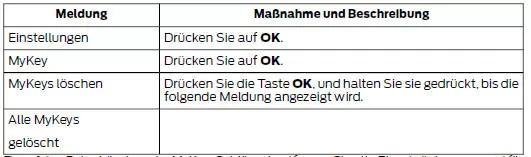
Note: When deleting the MyKeys, all restrictions are removed and the original administrator key status is restored for all keys.
Checking the MyKey System Status
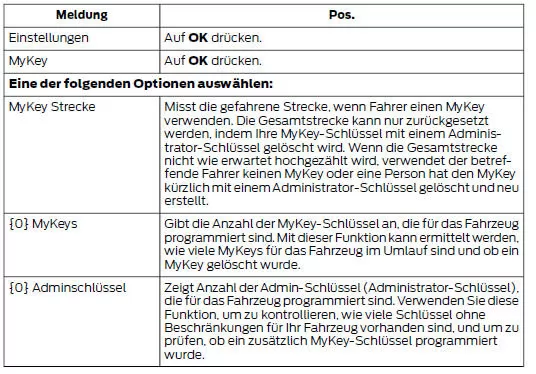
Information about programmed MyKeys can be found in the steering wheel information display. See Information Displays.
To obtain information about programmed MyKeys, press the left arrow button to open the main menu, and scroll to the following option:
Using MyKey with Remote Start Systems
MyKey is not compatible with aftermarket remote start systems that are not approved by Ford. If you want to install a remote start system, contact a Ford dealer to obtain a Ford-approved remote start system.
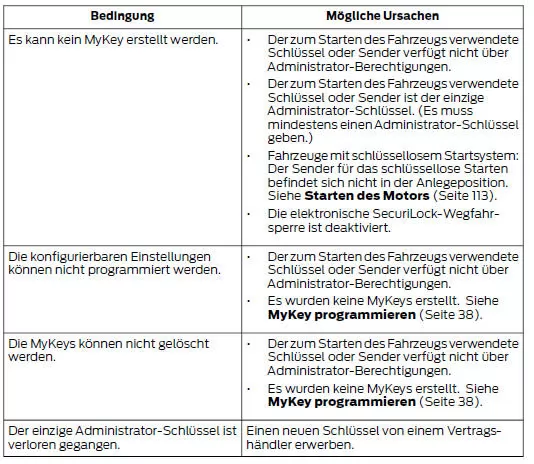
MyKey Troubleshooting

The MyKey system of the Ford Mustang (6th generation, 2014–2023) was designed to promote safety and responsible driving. With individually configurable settings, vehicle speed, volume and driver assistance systems can be adjusted as needed. In this way, the 2014–2023 Ford Mustang meets the needs of safety-conscious drivers.
With the ability to create and customize MyKey profiles, the Ford Mustang VI generation shows that sporty performance and safety do not have to be opposites. Parents and fleet operators benefit from this smart feature.
With MyKey, the Ford Mustang (VI Gen, 2014–2023) sets a benchmark for modern driver assistance systems that combine responsibility and technology.
Test yourself
A quick Ford Mustang quiz: every answer comes with an explanation and a link to the manual page.