Removal and Installation of Driver Side Pocket
REMOVAL
PROCEDURE
1. Disconnect and remove the side cover of the fuse box.
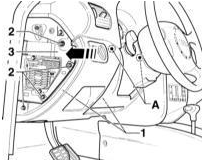
2. Remove the 4 mounting screws -2-.
3. Remove the 4 mounting screws -2- (refer to the accompanying illustration).
4. Lift the side mounting plate -3- approximately 1 cm in the direction of the arrow and release it.
5. Disconnect the pocket at points (A) shown in the illustration.
6. Disconnect the connector of the light switch and high beam range control.
7. Remove the pocket from the guides. INSTALLATION
PROCEDURE
1. Install the pocket in place and slide it into the guides.
2. Connect the light switch and high beam range control.
3. Secure the pocket at points (A).
4. Install the side mounting plate -3- in place and secure it.
5. Tighten the mounting screws -1- to 4 N·m.
6. Tighten the mounting screws -2- to 4 N·m.
7. Install the fuse box cover in place.
Test yourself
A quick Audi A3 quiz: every answer comes with an explanation and a link to the manual page.