Vehicle speed warning
As an exception, the speed alarm threshold can be set both while the vehicle is stopped and while it is moving. While driving, you can select either of two preset maximum speed values.
While the vehicle is stopped, you can set the maximum speed at which the speed warning will be displayed.
To set the speed alarm function while the vehicle is stopped:
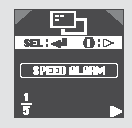
Press and hold the INFO button to enter the settings mode, then briefly press the same button as many times as needed to select SPEED ALARM. When the corresponding symbol appears on the display, press the SEL/RESET button. The display goes to the start of the setting procedure.
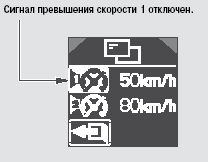
On left-hand drive vehicles, the speed is set in km/h. On right-hand drive vehicles, you can select km/h or mph, according to the speedometer setting. The multi-information display shows two speed settings at which the function is activated, as well as the on/off symbol.
Speed Alarm 1: You can turn the warning sound for the set speed on or off, or set the speed at which the alarm sounds to be above or below 50 km/h.
Speed Alarm 2: You can turn the warning sound for the set speed on or off, or set the speed at which the alarm sounds to be above or below 80 km/h.
Press the INFO button ( ) to switch from symbol 1: 50 km/h to symbol 2: 80 km/h.
To exit the settings mode, press the INFO button again.
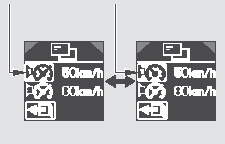
Select "Speed 1" or "Speed 2", then use the SEL/RESET button to turn the warning sound for that speed on or off.
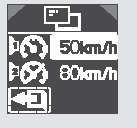
To adjust the selected speed value (1 or 2), press and hold the SEL/RESET (Select/Reset) button.
The speed selection screen will appear on the display.
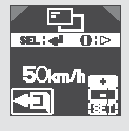
The value on the display shows the currently set maximum speed at which the warning signal sounds. To change this value, first select the "+" or "—" icon by repeatedly pressing the INFO (Information) button, then press the SEL/RESET (Select/Reset) button to change the speed value.
Each press of the SEL/RESET button changes the selected speed value by 5 km/h. You can set the speed at which the signal sounds, starting from 5 km/h, in steps of 5 km/h. Always observe the posted speed limit and never exceed a speed that is safe for the driving conditions.
To enter the correction into memory, first press the INFO button to select the SET (Set) icon, then press the SEL/RESET (Select/Reset) button.
After making your selection, press and release the INFO (Information) button to go to the exit screen. Press the SEL/RESET (Select/Reset) button to save your setting to the system memory. If you press the INFO button instead, the display will return to the setting mode. You can repeat the setting again.
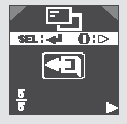
To exit the setting mode without changing the previously set value, select EXIT by pressing the INFO button, then press the SEL/RESET (Select/Reset) button. The display will return to normal operation.
Adjusting the overspeed warning signal while driving:
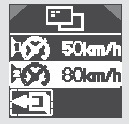
Press and hold the INFO (Information) button for approximately 1 second.
The multi-information display will show the screen for selecting the maximum speed at which the warning signal will sound.
On this screen you can select either speed 1 (50 km/h) or speed 2 (80 km/h). Each press of the INFO (Information) button changes the icon in the following sequence:
Speed 1, speed 2, exit, speed 1, etc.
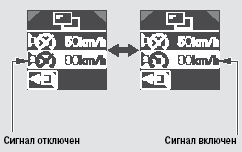
Select the desired speed (1 or 2), then press the SEL/RESET (Select/Reset) button.
Each press of the SEL/RESET button turns the warning signal at the selected driving speed on or off alternately. After making your selection, press and release the INFO (Information) button to go to the exit screen.
Press the SEL/RESET (Select/Reset) button to save your setting to the system memory. If you press the INFO button instead, the display will return to the setting mode. You can repeat the setting again.
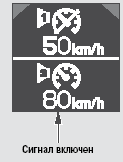
After you press the SEL/RESET (Select/Reset) button, your settings will be shown on the display for several seconds, then the display will return to normal operation.
If you do not press any button, the display will return to normal operation after 10 seconds.
Test yourself
A quick Honda Civic quiz: every answer comes with an explanation and a link to the manual page.