Default Settings
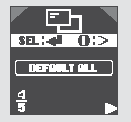
To return to the factory default settings, press the INFO (Information) button on the steering wheel repeatedly until the DEFAULT ALL (Reset All Settings to Default) screen appears, then press the SEL/RESET button.
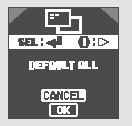
The display will then show two icons: OK (Confirm default settings) and CANCEL.
To cancel the default settings, select CANCEL using the INFO (Information) button, then press and hold the SEL/RESET button for at least three seconds. The display will return to normal operation.
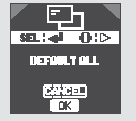
To confirm the default settings, select OK using the INFO (Information) button, then press and hold the SEL/RESET button for at least 3 seconds.

After the default settings are applied, the screen shown in the illustration will be displayed for a few seconds, and then the display will return to the text message language selection mode.

If the system cannot perform the DEFAULT ALL (Reset All Settings to Default) operation, the screen shown in the illustration will be displayed for a few seconds, and then the display will return to the setup screen.
The following are the factory default settings.
The speed warning beep function is off.
The warning message display function is off. Only warning icons are shown on the multi-information display.
The outside air temperature correction value is 0 °C.
The average fuel consumption reset function of trip meter A when refueling is off.
The elapsed trip time is reset when the ignition key is turned to the LOCK (0) position.
The units of values shown on the display by the on-board computer correspond to the value (mph or km/h) set by the setting button.
The tachometer indicator is on.
Vehicles with i-SHIFT transmission: If the transmission operates in automatic mode, the tachometer indicator is off.
The fuel economy indicator is on.
The i-VTEC indicator is off.
The text message display language is English.
The setting mode selected is the factory default setting.
Test yourself
A quick Honda Civic quiz: every answer comes with an explanation and a link to the manual page.