Multi-Information Display
With the ignition on, the multi-information display located in the instrument panel, in the middle of the tachometer, shows various information in the form of text messages and icons. Some messages assist you in operating the vehicle.
Other messages inform you about the vehicle condition so that you can avoid possible problems.
All symbols and text messages are divided into two types: general information messages and warning messages alerting the driver to a possible vehicle system malfunction.
You can select the language of the text messages and customize certain vehicle system settings using the multi-information display and the two buttons on the steering wheel (page 90).
Information Messages and Icons
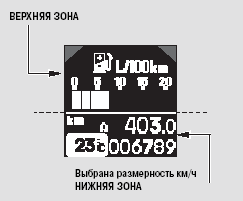
The multi-information display is divided into an upper area and a lower area. Each area can display two lines of messages.
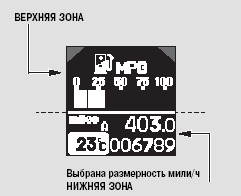
In normal mode, the upper area of the display shows trip computer messages, and the lower area shows the odometer, trip meter, and outside air temperature.
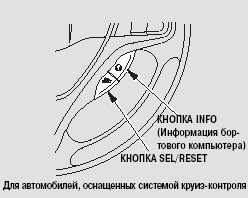
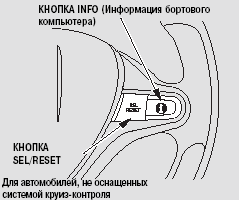
When the ignition switch is turned to the ON (II) position, fuel economy information appears first in the upper area of the display (page 91). Each time you press the INFO button, the trip computer changes from the current fuel economy display to the estimated driving range, travel time, average speed, average fuel economy, rear seat belt reminder system status, and a blank display, as shown on the following page.
If the system has a warning message, it is displayed immediately after the instantaneous fuel economy information. When the ignition switch is turned to the ON (II) position, messages with the highest priority are displayed first.
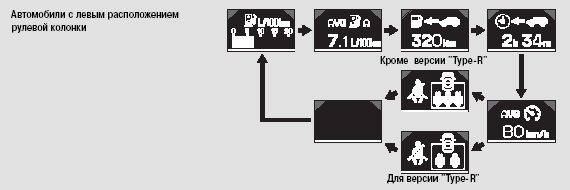
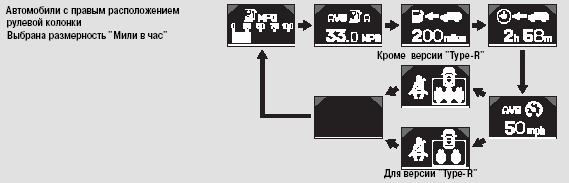
The trip computer display shows:

Instantaneous fuel economy, km/l or l/100 km

Instantaneous fuel economy, mph or mpg
For diesel engine versions equipped with a diesel particulate filter
If the diesel particulate filter has been regenerated recently, the displayed instantaneous fuel economy value may be higher than the actual value. For more information, refer to page 495.

Estimated driving range based on the amount of fuel in the tank.
The estimated range is calculated from fuel consumption over the last few kilometers (miles) and depends on changes in speed, road conditions, and other factors.

Travel time since the ignition switch was turned to the ON (II) position.

Average speed, km/h (or mph, depending on the display setting).

Average fuel economy since the last reset of the Trip A meter.

Average fuel economy since the last reset of the Trip B meter.
The average fuel economy display updates every 10 seconds. When you reset the trip meter, the average fuel economy meter is also reset.
To reset the meters, press and hold the SEL/RESET button until 0.0 appears on the display.
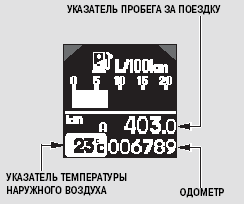
In normal mode, the lower area of the display always shows the odometer, trip meter, and outside air temperature.
Odometer
The odometer shows the total distance traveled (in kilometers or miles) over the life of the vehicle.
Trip Meters
The trip meter shows the distance (in kilometers or miles) traveled since the meter was last reset.
The vehicle has two trip meters: Trip A and Trip B. To switch the trip distance shown on the display between Trip A and Trip B, press the SEL/RESET button repeatedly. When the ignition switch is turned to the ON (II) position, the display shows the trip meter that was last displayed.
Each trip meter operates independently of the other, allowing you to record distances traveled on different trips.
To reset the meters, press and hold the SEL/RESET button until 0.0 appears on the display.
The “
” or “
” icon appears in the upper area of the display depending on which trip meter (A or B) is selected in the lower area of the display.
Outside Air Temperature Indicator
This indicator shows the driver the outside air temperature in degrees Celsius.
The outside temperature sensor is built into the front bumper. Therefore, the measured temperature value may be affected by thermal radiation from the road surface, heat emitted by the engine, and exhaust heat from vehicles in traffic. For this reason, when driving at speeds below 30 km/h, the measurement error may be significant.
The temperature values on the display are updated with a certain delay, which is necessary for the sensor to heat up or cool down to the outside air temperature. This delay may take several minutes.
If the indicator is inaccurate, you can adjust its readings within ± 3° in either direction (see page 120).
NOTE: Before adjusting the temperature indicator, wait for the value shown on the display to stabilize.
If the outside air temperature shown on the display is close to zero, this may in some cases indicate the formation of ice on the road surface. A warning symbol appears on the multi-information display (see page 102).
Test yourself
A quick Honda Civic quiz: every answer comes with an explanation and a link to the manual page.