Elapsed Time Reset
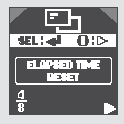
To have the elapsed time reset when the ignition key is turned to the LOCK (0) position, or when the Trip A or Trip B odometer is reset, perform the following steps.
As soon as the text ELAPSED TIME RESET (Elapsed Time Reset Setting) appears on the display, press the SEL/RESET button.
The display will go to the setting procedure.
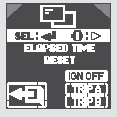
You can select the following options: IGN OFF, TRIP A, or TRIP B. Each time the INFO button is pressed, the selected mode will alternate. Confirm your selection by pressing the SEL/RESET button.
IGN OFF: The elapsed time will reset when the ignition key is turned to the LOCK (0) position.
TRIP A: The elapsed time will reset at the same time the Trip A odometer is reset.
TRIP B: The elapsed time will reset at the same time the Trip B odometer is reset.
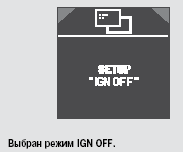
After the operation is completed successfully, the display will show one of the confirmations: SETTING IGN OFF, SETUP TRIP A, or SETUP TRIP B for a few seconds, and then return to the CHG SETTING (Change Setting) screen. Press the SEL/RESET button, and then press the INFO button repeatedly to access the mode for changing other settings.
If the system is unable to set the selected setting, the display will show the message INCOMPLETE (Setup Not Completed) for a few seconds.
The display will return to the beginning of the setting procedure. You will be able to repeat the setting procedure.
To exit the setting mode without changing the previously set value, select EXIT by pressing the INFO button, then press the SEL/RESET (Select/Reset) button. The display will return to normal operation.
Test yourself
A quick Honda Civic quiz: every answer comes with an explanation and a link to the manual page.