INSTRUMENT PANEL ILLUMINATION BRIGHTNESS
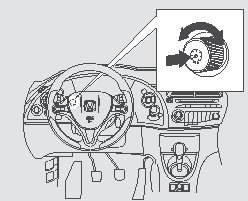
The illumination brightness control is located on the control panel. Press the button so that it extends, then turn it to adjust the brightness.
After adjusting, push the button back in to prevent accidental changes to the illumination brightness.
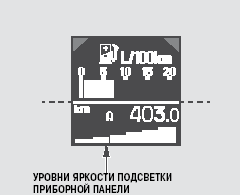
Six brightness levels for the instrument panel illumination are provided and shown on the multi-function information display.
When the knob is turned, a step scale is displayed in the lower area of the display, with the number of segments corresponding to the current brightness level. A sound signal is heard when the maximum or minimum brightness level is reached. Five seconds after adjustment is finished, the brightness level indication turns off.
So that the display glow does not reduce road visibility at night, the illumination brightness is reduced when the exterior lights are turned on (positions or
 of the switch).
You can adjust the control panel illumination brightness with the headlamps off, and then with the headlamps on. Both settings are stored and used until you adjust the instrument illumination brightness again.
The brightness of the instrument panel and upper display is reduced when you unlock and open the driver's door, but normal brightness is restored after the ignition key is turned to the ON (II) position.
If the key is inserted in the ignition lock but not turned to the ON (II) position, the instrument illumination turns off after approximately 10 seconds.
Test yourself
A quick Honda Civic quiz: every answer comes with an explanation and a link to the manual page.