Turn Signals and Headlights
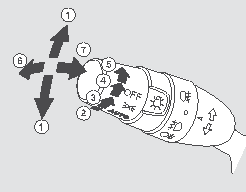
Turn Signals and Headlights
1. Turn signal
2. Exterior lights off
3. Parking lights on
4. AUTO mode (for some vehicle versions)
5. Headlights on
6. High beam
7. High beam flash
Turn signal switch: The left or right turn signal is activated by pressing the lever down or up, respectively. To signal a lane change, lightly press the lever up or down and hold it during the maneuver. When the lever is released or the turn is completed, the lever automatically returns to the neutral position.
Quick Lane Change Signal
For a quick lane change signal, briefly press the lever toward the right or left and release it.
The right or left turn signal and the turn signal indicator on the instrument panel will flash three times.
The turn signal remains on until the lever is released.
Headlights on: To turn on the exterior lights, turn the central switch knob to the position marked “
”. The front and rear parking lights, the rear license plate lights and the instrument panel illumination will turn on.
To turn on the headlights, turn the light switch to the position marked “
”. To prevent battery discharge, a warning chime sounds when the driver's door is opened if the ignition key is turned to LOCK (0) or removed from the ignition while the exterior lights remain on.
If the central light switch is in the “
” or “ ” position, the corresponding indicator on the instrument panel illuminates to remind the driver that the lights are still on.
In addition, the following icon appears on the multi-information display: "
”, which may be accompanied by the message "HEADLIGHTS ON".
High beam: Switch from low beam to high beam by pushing the lever forward until it clicks. When high beams are on, the blue indicator on the instrument panel will illuminate (see page 82). To switch back from high beam to low beam, pull the lever toward you.
To flash the high beams, lightly pull the lever toward you and release it. High beams remain on until the lever is released.
Daytime Running Lights (for some vehicle versions)
Daytime running lights turn on automatically when the ignition key is turned to ON (II). If the light switch is turned to ON, the daytime running light system switches off automatically.
AUTO mode (for some vehicle versions), automatic headlight activation: When natural light level decreases, the system automatically turns on the headlights, other exterior lights, and instrument panel illumination.
To activate the automatic headlamp mode, turn the light switch knob to the AUTO position. In this mode, the exterior lights will turn on automatically when the level of natural light decreases (at dusk, in tunnels, etc.).
The indicator lamp illuminates at the same time to show that the lights are on. As soon as the natural light conditions improve, the system will automatically turn off the exterior lights.
The exterior lights will turn on automatically when the ignition key is turned to the LOCK (0) position. To turn the lights on again, turn the ignition key to the ON (II) position or move the light switch to the "”.
If the automatic mode is active while driving in darkness, dense fog, a long tunnel or a poorly lit parking area, for greater safety it is recommended to turn on the lights manually.
Do not leave the AUTO mode on for an extended period (one week or longer).
It is also recommended to turn off the AUTO mode if the engine will run at idle for a long time or will be switched off.
If this system malfunctions, the " " warning symbol will be displayed on the multi-function display, which may be accompanied by the message "CHECK SYSTEM".
Take the vehicle to an authorized dealer service center for inspection immediately.
Test yourself
A quick Honda Civic quiz: every answer comes with an explanation and a link to the manual page.