Setting Mode
You can customize some of the vehicle system settings to suit your preference.
The following settings can be changed.
WARNING MESSAGE: Warning messages are displayed with or without an icon (see page 118).
ADJUST OUTSIDE TEMP DISPLAY (Outside Temperature Display Adjustment)
This mode allows you to adjust the current outside air temperature reading within a range of + or - 3 °C.
TRIP A RESET WITH REFUEL (Trip A Reset When Refueling):
Selects the mode in which the Trip A odometer is reset each time the fuel tank is refilled (see page 121).
ELAPSED TIME RESET (Elapsed Time Reset):
Selects the mode in which the elapsed trip time is reset when the ignition key is turned to the OFF (0) position, or when the Trip A or Trip B odometer is reset (see page 123).
DISPLAY UNIT (Display Units Selection):
You can select the speed units in which the readings are displayed: km/h or mph (see page 124).
This setting is available only on vehicles with right-hand steering wheel position.
REV INDICATOR (Tachometer Indicator):
This indicator can be turned on or off (see page 126). ECO INDICATOR (Fuel Economy Indicator):
This indicator can be turned on or off (see page 127). i-VTEC INDICATOR:
This indicator can be turned on or off (see page 129).
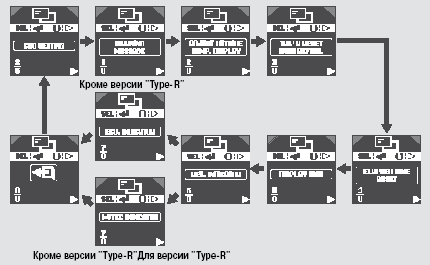
Press and hold the INFO (Information) button to enter the setting mode, then briefly press the same button as many times as needed to select the CHG SETTING (Change Settings) mode. Once the "CHG SETTING" icon appears on the display, press the SEL/RESET (Select/Reset) button. The display will go to the start of the setting procedure.
Press the INFO button until the desired setting is selected, then press the SEL/RESET button to confirm your selection.
Each press of the INFO (Information) button changes the setting mode as shown in the illustration. For individual settings, follow the procedures described on the following pages.
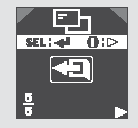
To exit the setting mode and enter the selected value, select EXIT by pressing the INFO button, then press the SEL/RESET (Select/Reset) button.
The display will return to normal operation.
Test yourself
A quick Honda Civic quiz: every answer comes with an explanation and a link to the manual page.