Navigation
Phone integration in the Ford Mustang VI Gen via Bluetooth enables convenient hands-free calling and media playback. This chapter explains pairing devices, synchronizing contacts and voice dialing. Conveniently, multiple devices can be managed and prioritized at the same time. Users learn how to answer, decline or transfer calls directly through the infotainment system. The text message read-aloud function and microphone settings are also explained. This turns the Mustang into a mobile communication hub, ideal for drivers who want to stay reachable on the road without compromising on safety.
Your navigation system can be displayed in three modes: Map Mode, Destination Mode and Map Search Mode.
Map Mode
Map mode appears in 2D or 3D view and shows the vehicle's current position on the map.
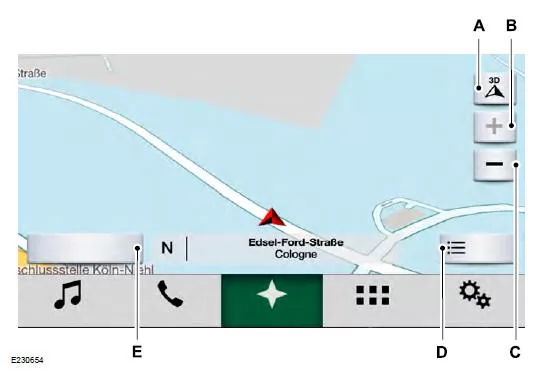
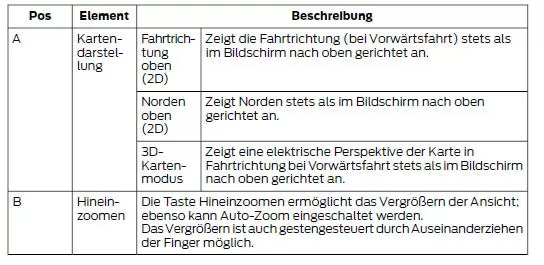
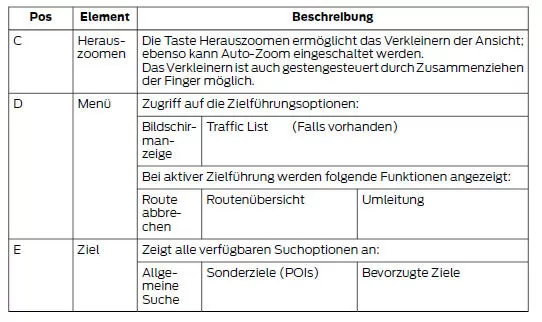
Destination Guidance Mode
To set a destination, press:
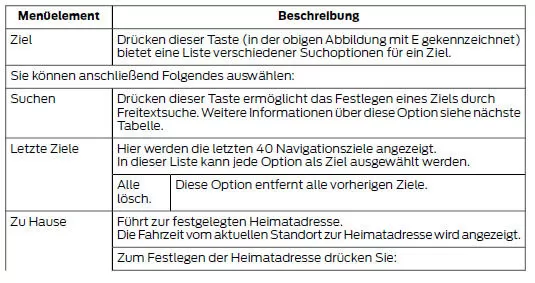
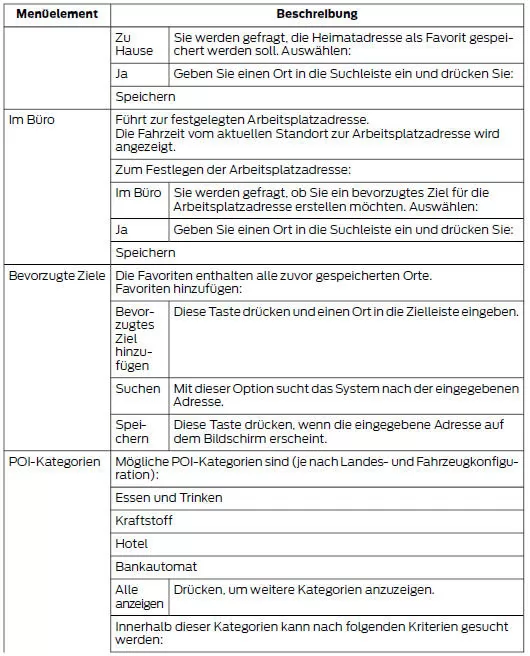
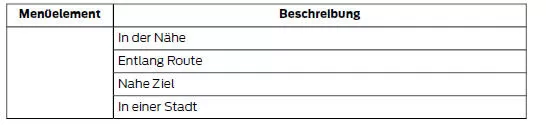
Free-Text Search
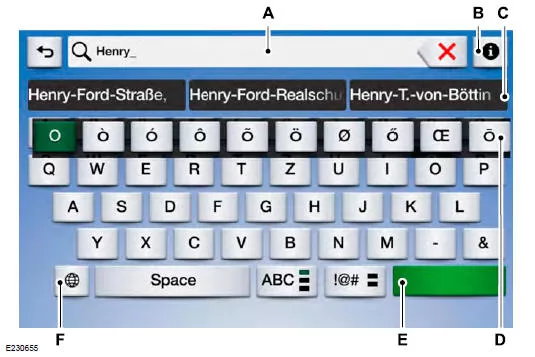
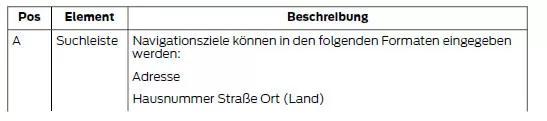
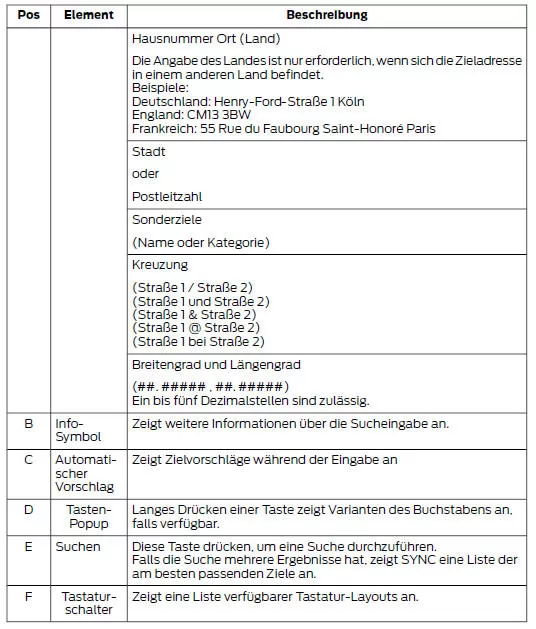
Destination Guidance Mode
After selecting a destination, it is shown on the map, and you can select the following:
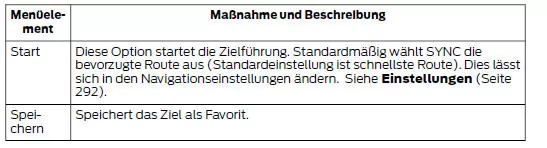


Note: To change the guidance volume, turn the volume knob while a voice prompt is playing.
Map Search Mode
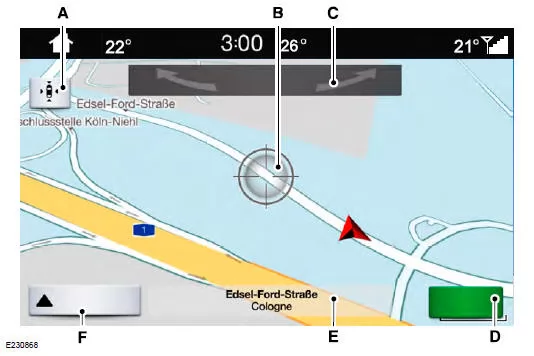
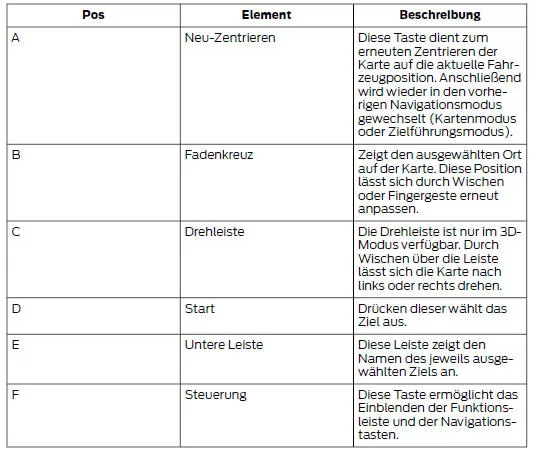
Navigation Menu
The navigation menu is available in map mode and during active navigation.
During active navigation, press the button at the bottom of the screen to display the menu button and other buttons.
To open the navigation menu, press:
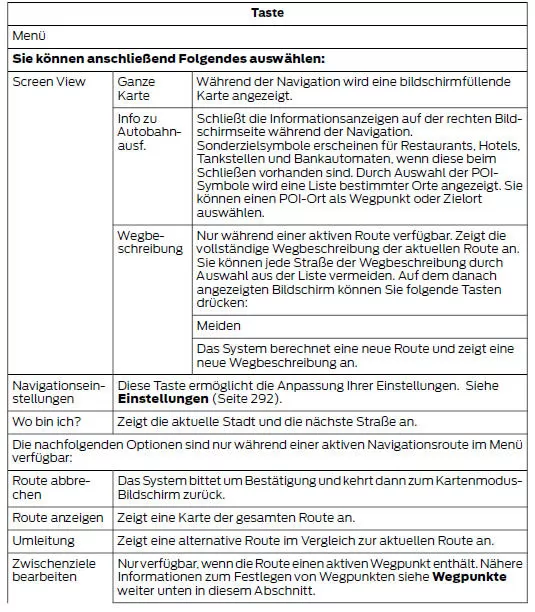

Waypoints
You can select a waypoint as a destination along your route. Repeat the following steps to add up to five waypoints.
Add a waypoint:
Select the search icon (magnifying glass) during an active route. The destination menu is displayed.
Enter the destination using any available method. After selecting the destination, set it as a waypoint by selecting the following:

Michelin Guide
The Michelin Guide is a service that provides additional information about certain POIs, such as restaurants, hotels and sights (where available).
POIs for which Michelin Guide information is available contain a button for displaying more information. Press this button to show additional information.
If you have paired your phone with the system, you can press the call button to establish a direct connection with the selected POI.
Note: Not all features are available in every language and in every country.
Updating the Navigation Maps
You can purchase annual map updates from your dealer.
The digital maps for the navigation application are provided by HERE. If you find map errors, you can report them directly to HERE at www.here.com. HERE evaluates all reported map errors and replies by email with the result of the evaluation.
The navigation system of the Ford Mustang (6th Gen, 2014–2023) is a prime example of precision and ease of use. With a clear map view in 2D or 3D, simple destination entry and intelligent route suggestions, it makes every journey easier and turns the way to the destination into a pleasure. The Ford Mustang 2014–2023 combines technology and comfort here in perfect harmony.
The addition of waypoints, the Michelin Guide and flexible route planning show how the Ford Mustang 6th Generation responds to individual needs and optimally supports the driver. The clearly structured menu also helps make the system easy to operate and gives an overview at all times.
With this navigation system, the Ford Mustang (6th Gen, 2014–2023) proves that sporty performance and state-of-the-art technology work together seamlessly.
Test yourself
A quick Ford Mustang quiz: every answer comes with an explanation and a link to the manual page.