General Information
This chapter provides important information on the safe use of the touchscreen and voice control. It strongly warns against distraction while driving and emphasizes the importance of voice-activated functions. It also includes tips on caring for and cleaning the display.
WARNING
Distraction while driving can lead to loss of vehicle control, accidents and injuries.
We strongly recommend using these devices and their functions only with extreme caution, so that your attention is not diverted from the road. The safe operation of your vehicle is entirely your responsibility. We advise against using handheld devices while driving and recommend using voice-controlled systems where possible.
Make sure you are informed of all local laws that may affect the use of electronic devices while driving.
Getting to Know Your System
The system lets you interact with various functions using the touchscreen or voice commands.
Using the Touchscreen
To operate the touchscreen, simply tap the items or options you want to select. A change in the button color indicates that it has been selected.
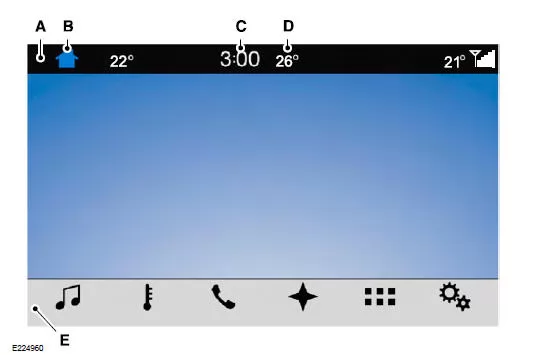
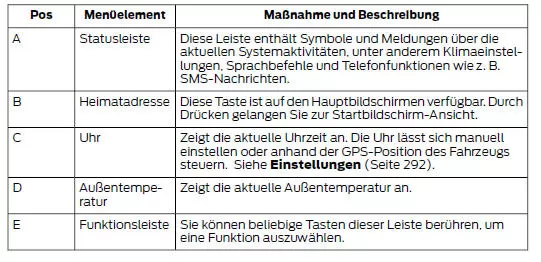
Note: Your system provides a feature that lets you access and control audio functions for up to 10 minutes after the ignition is switched off (all doors must be closed).
Status Bar
Additional symbols also appear in the status bar depending on country, vehicle options and the current operation. If a function is not active, its symbol is not displayed.
Certain symbols move to the left or right depending on the available options.
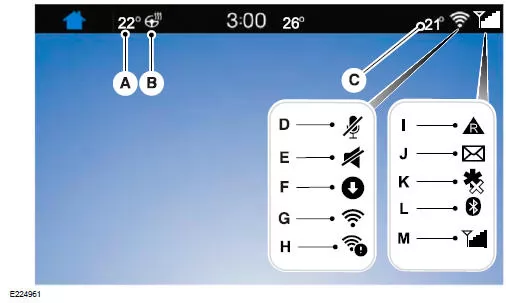
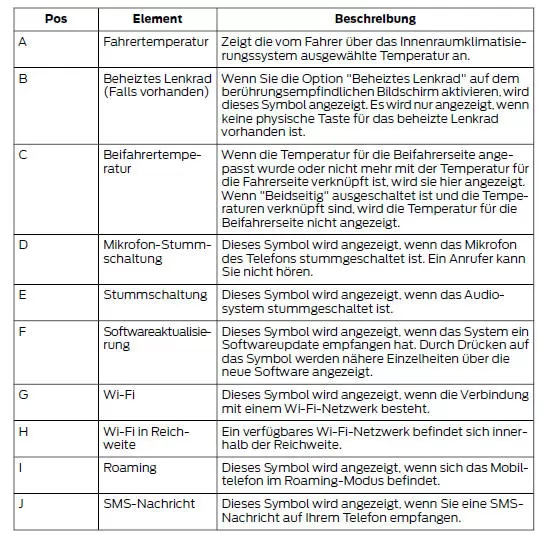
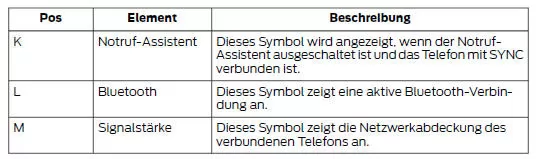
Messages will also appear in the status bar to provide notifications. You can select the message to display the related feature.
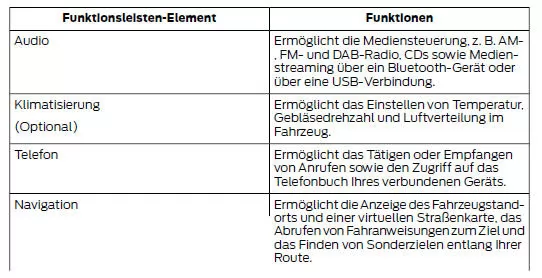
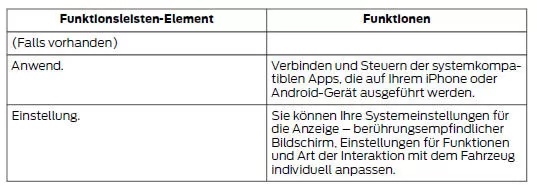
Function bar
Cleaning the Touchscreen
Fingerprints can be removed with a dry, clean, soft cloth.
If the screen is still dirty or has fingerprints, apply a small amount of alcohol to the cloth and repeat the cleaning.
Note: Do not use any cleaning agents or solvents of any kind to clean the touchscreen.
Note: Never pour or spray alcohol onto the touchscreen.
The general information on the operating and safety features of the Ford Mustang (VI Gen, 2014–2023) reflects a well-considered overall concept. The system combines the touchscreen, voice control and status displays into one unit that intuitively supports the driver. The 2014–2023 Ford Mustang offers state-of-the-art technology paired with a high level of ease of use.
The safety and distraction notices are particularly valuable, as they show how important it is to use digital features responsibly. The Ford Mustang VI Generation combines sporting performance with well-thought-out protective measures for driver and passengers.
With this concept, the Ford Mustang (VI Gen, 2014–2023) demonstrates that technological excellence and safety on the road go hand in hand.
Test yourself
A quick Ford Mustang quiz: every answer comes with an explanation and a link to the manual page.