Entertainment
Entertainment in the Ford Mustang is provided by a variety of audio sources such as DAB, Bluetooth, USB and CD. This chapter shows how to store stations, select tracks and manage media formats. The system for indexing large media libraries is also explained.
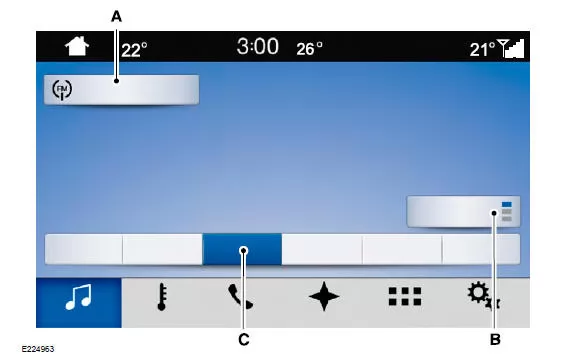
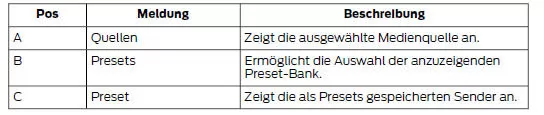
You can access these options via the touchscreen or by voice commands.
The available options may change depending on the selected source. These may include the following options:
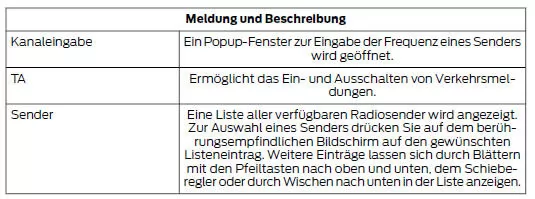
Sources
This button lets you select the media source you want to listen to.
AM/FM/DAB Radio
Station Selection
The station or seek controls on the radio bezel let you select a station.
To set a station using the touchscreen, select:
The backspace button deletes the previously entered number.
After entering the station's preset numbers, you can select the following:
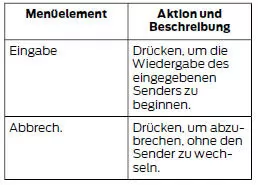
Presets
To store a new station, tune to it, then press and hold the desired
preset button. While the system stores the station, audio playback is briefly muted and then resumes.
Preset Banks
Two preset banks are available for AM, three for FM and three for DAB. To access preset stations, press the station button. The indicator on the station button shows which preset bank is currently displayed.
CD
After selecting this source, the system returns to the main audio screen.
The current audio information is shown on the screen.
The following buttons are also available:
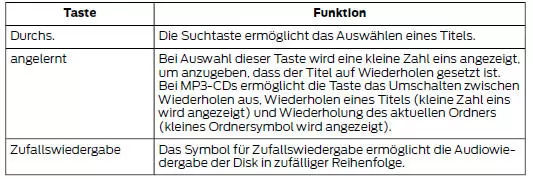
Playback can be controlled with the SEEK forward, SEEK back, Pause or Play buttons.
Bluetooth Audio
Bluetooth audio may allow you to play media stored on your Bluetooth device.
This feature depends on the phone.
For information on phone compatibility, see your regional Ford website.
To use Bluetooth audio, the phone must be paired. See Phone.
The following buttons are available for Bluetooth:
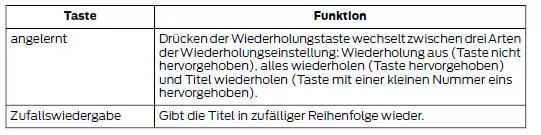
Playback can be controlled with the SEEK forward, SEEK back, Pause or Play buttons.
For more information about the currently playing track, press the album cover or the info button.
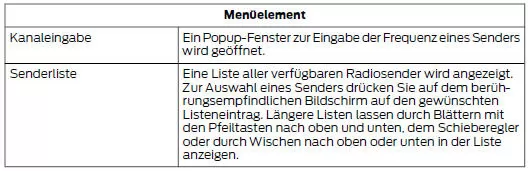
While playing audio from a Bluetooth device, you can search for more music by selecting the following items:
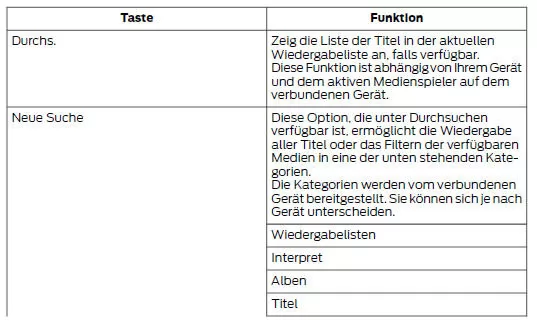
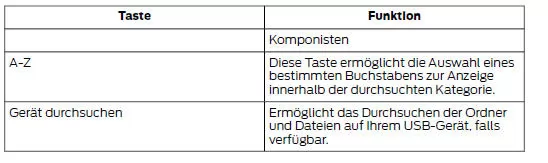
USB or iPod
USB provides access to media stored on your USB device, such as
music, audiobooks or podcasts.
The following buttons are available for USB and iPod:
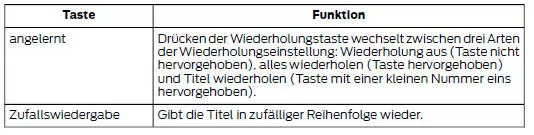
Playback can be controlled with the SEEK forward, SEEK back, Pause or Play buttons.
For more information about the currently playing track, press the album cover or the info button.
On some devices, when listening to audiobooks or podcasts, the system may provide buttons that skip forward or back 30 seconds. These buttons let you jump forward or back within a track.
While playing audio from a USB device, you can search for more music by selecting the following items:
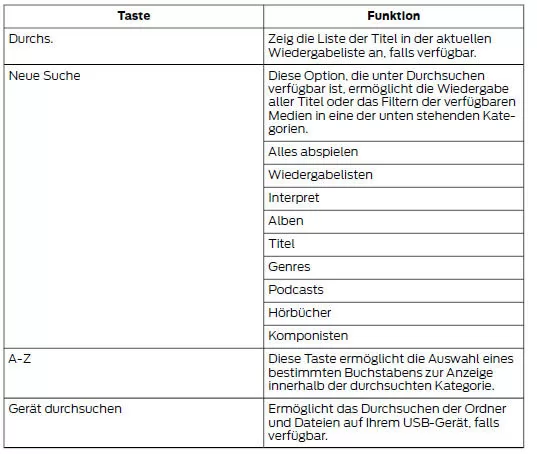
USB Ports
The USB ports are located in the center console or on the instrument panel.
This feature lets you connect USB media devices, memory sticks, flash drives or USB sticks and charge devices that support this function.
This option lets you play audio from your USB device.
Supported Media Players, Formats and Metadata
The system can connect to almost any digital media player, such as an iPod, iPhone and most USB storage media.
Supported audio formats include MP3, WMA, WAV, AAC and FLAC.
Supported audio file extensions include MP3, WMA, WAV, M4A, M4B, AAC and FLAC.
Supported USB file systems include: FAT, exFAT and NTFS.
The system can also use metadata tags to organize media from the playback device. Metadata tags are descriptive software identifiers embedded in media files that provide information about each file.
If these metadata tags contain no information about the indexed media files, the system may classify these empty metadata tags as unknown.
The system can index up to 50,000 songs per USB device for up to 10 devices.
The audio system of the Ford Mustang (6th Gen, 2014–2023) combines high-quality sound with intuitive operation. Whether radio, CD, USB or Bluetooth, the Ford Mustang 2014–2023 offers a wide range of ways to enjoy music on every drive. Control via touchscreen or voice command makes accessing media especially convenient.
The system's support for numerous formats and devices is particularly impressive, making it a true all-rounder. The Ford Mustang 6th Generation demonstrates its technical versatility and premium character in the sports car segment.
Frequently Asked Questions
How many tracks can the system index from a USB device?
Up to 50,000 tracks per device, for up to ten devices.
Does the system support FLAC files?
Yes, FLAC is supported, as are MP3, WMA, WAV and other formats.
Test yourself
A quick Ford Mustang quiz: every answer comes with an explanation and a link to the manual page.