On-Board Computer
 You can change the language of the messages from the automatic diagnosis system and the on-board computer readings.
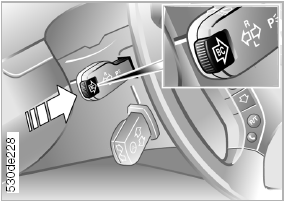
Displaying Information With the ignition key in position 1 or higher, you can use the "BC" button on the turn signal lever to display on-board computer information in the instrument cluster.
Each short press of the "BC" button displays the next reading.
Display sequence:
► outside temperature;
► average fuel consumption;
► range;
► average speed.
When the ignition key is turned to position 1, the reading that was selected last is displayed first.
The display design depends on the vehicle equipment.
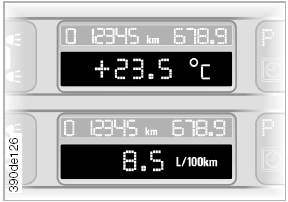
Outside Temperature and Average Fuel Consumption You can change the unit of measurement for the outside temperature (6/7):
1. With the ignition key in position 1, press and hold the trip odometer reset button.
2. Turn the ignition key to position 0.
The temperature unit on the air conditioning control display changes at the same time.
The average fuel consumption value is calculated over the entire time the engine is running.
Estimated driving range and average speed: The estimated driving range on the fuel remaining in the tank is displayed. The driving range is calculated based on the average fuel consumption over the last 30 km.
When calculating the average speed, stops with the engine switched off are not taken into account.
Clearing displayed values: If you press the button on the turn signal lever while the average speed is displayed, the trip computer values are cleared.
Recalculating a new average value: If you hold the "BC" button a little longer, the calculation of the corresponding average value (fuel consumption or speed) starts over, provided the engine is running at that time.
Trip computer with alphanumeric display: If your vehicle is equipped with an alphanumeric display of the self-diagnostic system, see the trip computer description starting on page 84 or the separate owner's manual for the onboard monitor.
Test yourself
A quick BMW X3 quiz: every answer comes with an explanation and a link to the manual page.