Trip Computer on MID - "BC" Button
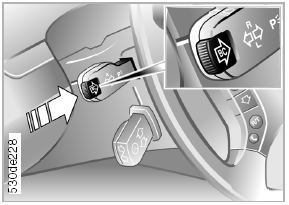
"BC" Button
Trip computer information can be shown in the display using the "BC" button built into the turn signal lever.
Programming the scope and sequence of information display:
► Press and hold the "BC" button until "PROG" appears in the display.
► Using the appropriate buttons on the MID, set the scope and sequence of the information display.
Each time a setting is saved, the program number appears in the display.
To finish entering,

press the right edge of the button.
Programming full information display:
► Press and hold the "BC" button until "PROG" appears in the display.
► Press the "SET" button.
Each press of the "BC" button displays the next set of information.
Test yourself
A quick BMW X3 quiz: every answer comes with an explanation and a link to the manual page.