Integrated universal remote control
Function: The integrated universal remote control replaces up to three hand transmitters for various devices (for example, garage or gate door openers or home alarm systems).
It recognizes and stores the signal of the corresponding original transmitter.
The signal of the transmitter can be programmed to one of the three buttons 1.
Afterwards, this button (1) can be used to control the corresponding device. Indicator lamp 2 confirms transmission of the signal.
Before selling the vehicle, for your own safety, erase the button settings as described on page 123.
 During programming and each time the programmed device is operated remotely, make sure that no persons, animals or objects are within the range of the device. Also observe safety precautions when handling the original transmitter.
 Compatibility check: If this symbol is on the packaging or in the manual of the original transmitter, the transmitter is compatible with the universal remote control.
A list of compatible transmitters can be ordered by fax at +49 (0)6838 907 283 3333. For further information, call the HomeLink hotline toll-free: 0800 0466 35465 (from Germany) or +49 (0)6838 907 277 (from abroad).
HomeLink is a registered trademark of Johnson Controls.
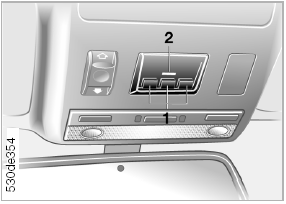
Programming
1 Memory buttons
2 Indicator lamp
Fixed-code transmitter 1. Switch the ignition on.
2. When using for the first time: press and hold the two outer buttons 1 for about 20 seconds until indicator lamp 2 starts flashing.
Now all previous settings of memory buttons 1 are erased.
3. Hold the original transmitter 5–20 cm from buttons 1.
 The distance between the transmitter and buttons 1 depends on the system controlled by this transmitter.
4. Simultaneously press the button of the original transmitter and one of buttons 1 of the integrated universal remote control. Indicator lamp 2 first flashes slowly. When indicator lamp 2 starts flashing rapidly, release both buttons. If the flashing of indicator lamp 2 does not speed up within 15 seconds, change the distance between the transmitter and the buttons.
5. To program other transmitters, repeat steps 3 and 4.
The corresponding button 1 is now programmed to the signal of the original transmitter.
The device can be operated with the ignition switched on.
If the device does not respond to control commands even after reprogramming, check whether the original transmitter is equipped with a rolling code system.
For this, refer to the owner's manual of the original transmitter or press and hold the programmed button 1 of the universal remote control.
If indicator lamp 2 of the universal remote control flashes rapidly for some time and then lights continuously for two seconds, the original transmitter is equipped with a rolling code system.
If a rolling code system is present, program memory buttons 1 as described below in the section “Rolling-code transmitter”.
Rolling-code transmitter: To program the integrated universal remote control, you will need the owner's manual of the device you intend to control from the vehicle. Read in it about synchronization.
When programming a rolling-code transmitter, note the following instructions:
Programming is easier if performed by two people.
1. Park the vehicle within the reception range of the device to be controlled.
2. Program the universal remote control as described in the section “Fixed-code transmitter”.
3. On the receiver of the device you intend to control from the vehicle, locate the button (often located on the motor).
4. Press this button. After completing step 4, you have 30 seconds to complete step 5.
5. Press button 1 of the integrated universal remote control three times.
The corresponding button 1 is now programmed to the signal of the original transmitter.
For any questions, contact a BMW service center.
Erasing memory button settings: Individual settings of memory buttons 1 cannot be erased. However, you can erase the settings of all buttons 1 at once.
Proceed as follows:
press and hold the two outer buttons 1 for about 20 seconds until indicator lamp 2 starts flashing.
Test yourself
A quick BMW X3 quiz: every answer comes with an explanation and a link to the manual page.