Speed-Dependent Feature Restrictions. Updating Your System. Privacy Information
This chapter describes speed-dependent system restrictions and the procedure for software updates. It also provides information on data storage and privacy in the Ford Mustang. It explains how media content and personal data are managed. The system stores profile information, call logs and music data to improve the user experience. A master reset is recommended when the vehicle is sold or passed on. Software updates can be installed via Wi-Fi or USB, without a visit to a dealer.
Speed-Dependent Feature Restrictions
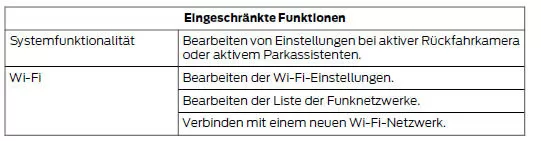
For safety reasons, some system functions depend on vehicle speed. These functions can only be used at speeds below 5 km/h. Be sure to read your device's manual before using it with the system.
Some features of this system may be too difficult to operate while the vehicle is moving. For this reason, they can only be used when the vehicle is stationary.
The following table provides more specific examples.
Updating Your System
You can download the update to a USB drive or receive automatic updates over Wi-Fi.
USB Updates
To use a USB update, visit the SYNC software update page on your regional Ford website.
The website will notify you when an update is available. You can then download the update.
You need an empty USB drive. The minimum requirements are listed on the website. After inserting the USB drive into your computer, select the option to start the download. Download the files to the USB drive following the provided instructions.
Most files are installed in the background without interrupting system use.
Navigation updates cannot be installed in the background because the files are too large.
Installing the system update in the vehicle:
- Disconnect all devices connected to the USB ports.
- Insert the USB drive containing the update into a USB port. The installation starts immediately.
Note: After a successful installation, the update is available the next time the vehicle is started.
The website contains information on further steps.
Updating via Wi-Fi
To update your system via Wi-Fi, the vehicle must be within range of a Wi-Fi access point. Data charges may apply.
To connect the system to Wi-Fi, select:
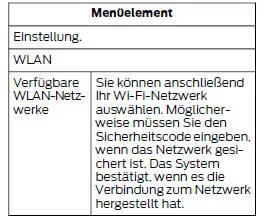
You must also give the system permission for automatic updates. After vehicle delivery, the system asks whether to use the automatic update feature.
If you agree to automatic updates, confirm by pressing OK.
If this prompt does not appear when the vehicle is delivered, you can access the feature through the general settings and turn on the automatic system updates option. See Settings.
If you later want to switch to automatic updates, select:
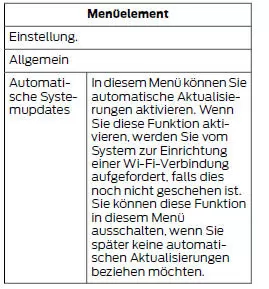
When Wi-Fi and automatic updates are enabled, the system regularly checks for software updates. If a new version is available, it is downloaded.
Software downloads may take up to 30 minutes to complete after the vehicle is switched off. Updates do not interrupt normal system use. If a download is not fully completed for any reason, it resumes from the point of interruption the next time a Wi-Fi connection is established.
After an update is activated, a message on the touchscreen indicates the system update. For more details, select the icon. This icon remains displayed for several ignition cycles.
Help
For further assistance, contact an authorized dealer. For more information, visit the Ford website for your country.
Privacy Information
When you pair a mobile phone with the system, the system creates a profile in the vehicle that is linked to that mobile phone. This profile enables a greater number of mobile phone functions and more efficient operation. This profile may contain data such as your phone book, text messages (read and unread), and a call log, including a list of calls made or received while your mobile phone was not connected to the system.
If you also connect a media device, the system creates and stores an index (register) of the supported media content. The system also stores a short diagnostic log of approximately 10 minutes with the most recent system activity. The log profile and other system data may be used to improve the system and to diagnose any malfunctions that occur.
The mobile phone profile, the media device index and the diagnostic log remain in the vehicle until they are deleted. They can usually only be accessed in the vehicle when a mobile phone or media player is connected.
If you no longer want to use the system or the vehicle, we recommend a master reset to delete all stored information.
For more information on the master reset, refer to the general settings. See Settings. Access to system data is only possible with special equipment and access to the vehicle's module. Ford Motor Company may only access the data without consent if ordered by a court or judicial decision, or on instruction from authorities or third parties with legal authority to give instructions. Third parties may request access to the information independently of Ford Motor Company.
The functional restrictions and update options of the infotainment system in the Ford Mustang (VI Gen, 2014–2023) highlight the interplay between safety and digital flexibility. The Ford Mustang 2014–2023 ensures that certain functions can only be used while stationary or at low speeds – a clear commitment to road safety.
At the same time, the system impresses with modern update options via USB or Wi-Fi, which allow continuous updates without a visit to the workshop. The Ford Mustang VI Generation combines technology and user-friendliness in an impressive way.
These features make the Ford Mustang (VI Gen, 2014–2023) a vehicle that thinks ahead and optimally supports the driver in everyday digital life.
Test yourself
A quick Ford Mustang quiz: every answer comes with an explanation and a link to the manual page.