Radio
Switching On
The audio system operates when the ignition key is in the "ACC" (I) or "ON" (II) position. In the first key position, power is supplied to the auxiliary electrical consumers; in the second position, the ignition and all electrical consumers are powered. To turn on the audio system, press the "PWR" knob or the band selection button. Adjust the volume by turning the "PWR" knob.
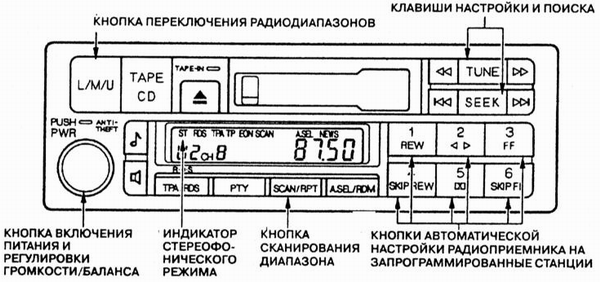
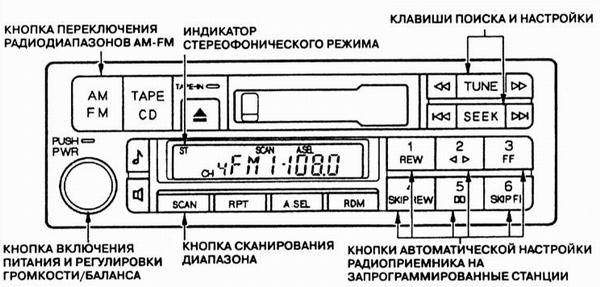
When the audio system is turned on, the control panel display shows the selected radio band and the radio frequency to which the radio was tuned before the power was switched off. To change to another radio band, press the band selection button. When the radio is switched on to the U/FM band and tuned to a station broadcasting in stereo, the "ST" (Stereo) indicator appears on the display. If the vehicle enters an area of unreliable stereo reception, the "ST" indicator starts flashing.
Stereo radio reception is not available on other bands.
Tuning
On any of the three bands, the radio allows tuning in four ways: manually (TUNE), semi-automatically (SEEK), automatically by scanning the band and tuning (SCAN), or automatically to preset stations whose frequencies are stored in the radio memory.
Manual tuning (TUNE function) is performed with the TUNE button. Press the right or left part of the TUNE button
 to decrease or increase the tuning frequency, respectively. When the button is pressed and held, the tuning frequency changes continuously. The current tuning frequency is shown on the control panel display. Release the TUNE button as soon as the radio is tuned to the desired frequency. To change the tuning frequency by one step, briefly press and release the TUNE button.
Semi-automatic tuning (SEEK function) is also available. When this function is activated, the radio searches the current band for a station with a strong signal and tunes to it automatically. To switch the radio to seek mode, press and hold the rightpart of the TUNE buttonpart of the SEEK button. The search for a station with a sufficiently strong signal will proceed in the lower or upper part of the band relative to the current tuning frequency, depending on which part of the button is pressed. The search stops as soon as the radio finds the first station with a strong signal.
When the automatic scan tuning function (SCAN function) is activated, the radio finds all stations with a sufficiently strong signal in the current band. To switch the radio to band scan mode, press and release the SCAN button. The search for stations with a strong signal proceeds across the entire selected band. When a signal of the required strength is detected, the search pauses and the radio receives that station for approximately five seconds. If no buttons are pressed during this time, the radio continues scanning the band and searching for the next station with a strong signal, which it will also receive for approximately five seconds. If the scan has found the station you want to listen to, press the SCAN button again.
Tuning to preset stations. Six buttons numbered 1 to 6 can be used to store the frequencies of favorite stations in the radio memory. On a type A radio, each button can store one station in each band. The type B radio design allows each of the six buttons to store one AM band frequency and two FM band frequencies (one each in the FM1 and FM2 sub-bands). To program the radio memory, perform the following operations:
a) Using the appropriate button, select the required radio band;
b) Using the TUNE, SEEK or SCAN function, tune the radio to the desired station;
c) Select one of the six memory preset buttons for this station, press and hold it until you hear a short beep;
d) Repeat steps a) through c) to store the frequencies of six stations in the radio memory;
e) Now simply press any of the six memory preset buttons to automatically tune the radio to the preset station whose frequency is stored in the corresponding memory location.
6 Preset station frequencies are erased from memory if the battery is discharged or disconnected, and also when the audio system fuse is removed.
Test yourself
A quick Honda Accord quiz: every answer comes with an explanation and a link to the manual page.