Radio Data System RDS (type A radio only)
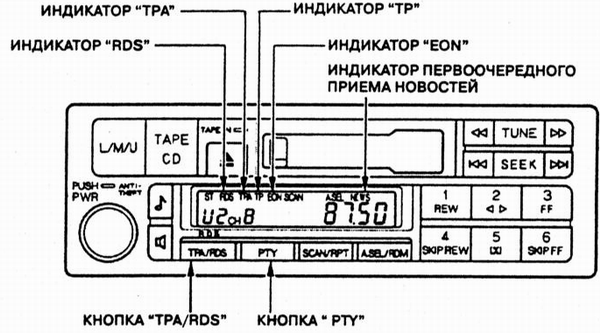
Type A car radios provide access to advanced service functions of the RDS (Radio Data System).
RDS button. If the radio is tuned to the FM band, it can automatically retune to the frequencies of various regional radio stations broadcasting the same program. On long trips, this frees you from periodically tuning the radio manually and ensures good reception quality.
RDS reception functions are activated automatically when the radio is turned on. If the radio station to which the receiver is tuned broadcasts in RDS standard, the name of the received station appears on the control panel display instead of the signal frequency. If the same program is broadcast on several frequencies, the radio automatically selects and tunes to the frequency that provides the best reception quality (strongest signal). These RDS functions eliminate the need to retune the radio when you are in an area with a well-developed RDS station network.
When the vehicle moves away from the RDS transmitting station to a distance where the signal can no longer be received reliably, the radio stores the last tuned frequency and displays its value instead of the station name.
To turn off the RDS function of the radio, press and hold the "TPA/RDS" button for at least two seconds. The "RDS" indicator on the control panel display will go out.
"TP" indicator. When the radio is tuned to an RDS station that broadcasts traffic messages, the "TP" indicator automatically illuminates on the display. Traffic messages are broadcast by these stations periodically or as needed, in gaps between or during the broadcast of other radio programs on the FM band. Therefore, if the "TP" indicator is lit on the control panel display, you may hear current traffic information.
TPA function. To find an RDS station that broadcasts traffic messages, briefly (for no more than two seconds) press the "TPA/RDS" button. The "TPA" indicator will illuminate on the control panel display. If the radio is already tuned to a station broadcasting traffic messages (the "TP" indicator is lit on the display), it will continue operating in the same mode. If the receiver is not tuned to a TP station, or the TP station signal is not strong enough, an audible warning signal will sound after 70 seconds. Then, every 30 seconds, the radio will sound the warning signal until the TPA function is turned off by briefly pressing the "TPA/RDS" button again. The warning buzzer will be canceled when the radio is tuned to another TP station using the "TUNE" knob, the "SEEK" buttons, or the preset buttons.
During playback of audio cassettes or compact discs, you will also be able to hear current traffic information. When the TPA function is on (the "TPA" indicator is lit on the display) and the radio is tuned to a TP station broadcasting traffic messages (the "TP" indicator is lit on the display), playback of the audio cassette or compact disc is automatically interrupted as soon as the traffic information broadcast begins. During reception of traffic messages, the "TRF-INFO" indicator is lit on the display. In addition, the volume is automatically set to a preset level, regardless of the current position of the volume control knob.
After the traffic information broadcast ends, the audio system automatically resumes playback of the audio cassette or compact disc.
PTY function. Briefly (less than two seconds) pressing the "PTY" button activates the PTY function. This function allows you to identify the type or genre of the program being broadcast by the radio station. For example, if a play is being broadcast, the "DRAMA" indicator appears on the control panel display. A discussion of a scientific topic is indicated by the "SCIENCE" indicator, and so on. If the RDS station does not transmit data on the genre of the program being broadcast, the "NONE" indicator appears on the display.
When the radio is not tuned to an RDS station, the "NO RDS" indicator lights on the display. In this case, the PTY function is automatically turned off and the display returns to its initial state (if no other commands are entered).
With the PTY function on, you can use the "TUNE" knob or the "SEEK" buttons to quickly find a radio station broadcasting a program of the desired genre. When the "TUNE" knob or "SEEK" buttons are pressed, the display shows messages indicating various program genres, for example, "NEWS", "AFFAIRS", "INFO", "SPORT", etc. As soon as the desired genre appears on the display, briefly (no longer than two seconds) press the "PTY" button. The radio will switch to automatic search mode for a program of the selected genre. If no station is currently broadcasting the selected genre, the message "NO PTY" appears on the display. After six seconds the "NO PTY" indicator goes out, and the automatic search mode for a station by program genre is turned off.
The automatic search mode for radio stations by program genre is also turned off if no button is pressed within five seconds after selecting the desired program genre (using the "TUNE" knob or "SEEK" buttons).
News priority indicator. Pressing and holding the PTY button for more than two seconds activates the news priority mode. The "NEWS" message appears on the display. In this mode, the radio gives priority to news bulletins from all radio stations, regardless of the previously selected program (only TP traffic message broadcasts are not interrupted).
EON indicator. If a news bulletin is being broadcast by a radio station other than the one to which your radio is tuned, the "EON" message is displayed.

Fader/Balance Adjustment. The audio control panel design allows separate adjustment of the volume of the left/right and front/rear speakers of the sound system. In the first case, stereo balance is adjusted; in the second, front/rear balance is adjusted.
Sound Adjustment
Stereo balance and front/rear balance are adjusted using the "BAL/FAD" button. Pressing the button changes the adjustment mode from stereo balance to front/rear balance. Then, turn the "PWR" knob to adjust the volume of the left/right and front/rear speakers of the sound system.
Tone Adjustment. Tone is adjusted using the "TREBLE/BASS" button. Press the button to switch between bass and treble adjustment modes. Then, turn the "PWR" knob to adjust the bass and treble tone as desired.
Test yourself
A quick Honda Accord quiz: every answer comes with an explanation and a link to the manual page.