Automatic Memory Programming of the Radio
When the vehicle is far away from the transmitting stations, the radio can no longer receive signals on the previously selected frequencies. In this case, it is possible to quickly reprogram the system memory automatically to local station signals.
To turn on the automatic memory programming function, press the "A.SEL" button. The "A.SEL" indicator will light up on the radio control panel display. The radio will scan all bands for several seconds and store the frequencies of the stations with the strongest signals in memory.

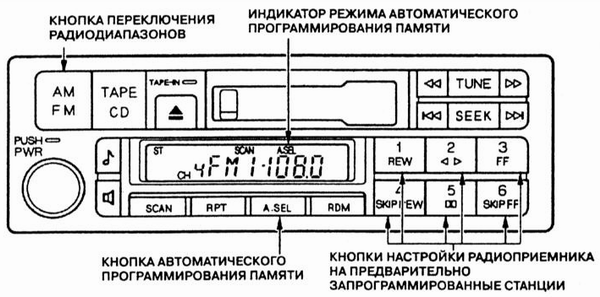
The radio can store up to six stations in the FM band (type A stereo radio) or six stations in the AM band and twelve stations in the FM band (type B stereo radio). Subsequent tuning of the radio to the preset stations is performed in the usual way using preset buttons 1 through 6.
If the vehicle is located far from a developed radio station network, the radio may not detect a sufficient number of local stations with strong signals to fill all available memory locations (12 or 18). In this case, when you press a preset button corresponding to an empty memory location, the "0" indicator will light up on the control panel display.
When automatic programming mode is turned on, some memory locations can be programmed manually using the tuning buttons.
Note that turning on automatic programming mode does not erase stations previously stored in the radio memory. After returning home, press the "A.SEL" button again to turn off automatic memory programming mode. Preset buttons then provide access to the frequencies that were originally programmed.
Test yourself
A quick Honda Accord quiz: every answer comes with an explanation and a link to the manual page.