Audio System Remote Control
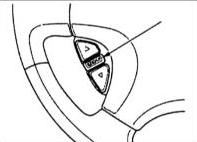
The remote control has three buttons and allows you to operate the audio system without taking your hands off the steering wheel.
The upper and lower buttons on the remote control are used to adjust the volume: press the upper button (tt) to increase the volume or the lower button (uu) to decrease it. Press and hold the appropriate button until the volume reaches the desired level.
The "AUDIO/CH" (Audio System Mode Selection) button performs three functions depending on what is currently playing: radio, tape recording, or compact disc.
When listening to the radio, the "AUDIO/CH" button allows you to switch to other radio stations. Each time the button is pressed, the radio switches to the next station stored in memory in the selected frequency band. The display on the audio system front panel shows the number of the selected station. To switch to another frequency band, press the band selection button located on the audio system front panel.
When playing a tape, pressing the "AUDIO/CH" button skips to the next recording on the tape. When the button is pressed, the flashing indication "FF" appears on the audio system front panel display. The pause on the tape will be skipped, and the system will proceed to play the next recording.
When playing a compact disc, the "AUDIO/CH" button allows you to skip to the next track. The display on the audio system front panel shows the disc number and the track being played.
Test yourself
A quick Honda Accord quiz: every answer comes with an explanation and a link to the manual page.