Basic Inspection. Check For Intermittent Problems. Check Mode Procedure
Basic Inspection
When a malfunction is not confirmed by the DTC check, troubleshooting should be carried out for all circuits considered to be possible causes of the problem. In many cases, by carrying out the basic engine check shown in the following procedure, the location of the problem can be found quickly and efficiently. Therefore, using this check is essential when troubleshooting the engine.
PROCEDURE
CHECK AUXILIARY BATTERY VOLTAGE
NOTICE:
Carry out this check with the engine stopped and the power switch off.
Result | Proceed to |
|---|---|
11 V or higher |
OK |
Below 11 V |
NG |
| NG |  |
CHARGE OR REPLACE AUXILIARY BATTERY |
|

CHECK WHETHER ENGINE CRANKS
| NG | |
PROCEED TO PROBLEM SYMPTOMS TABLE |
|
CHECK WHETHER ENGINE STARTS
| NG | |
GO TO STEP 6 |
|
CHECK AIR CLEANER FILTER ELEMENT SUB-ASSEMBLY
(a) Visually check that the air cleaner filter element sub-assembly is not excessively contaminated with dirt or oil.
| NG | |
REPLACE AIR CLEANER FILTER ELEMENT SUB-ASSEMBLY |
|
CHECK IDLE SPEED
(a) Check the engine idle speed.
Click here 
| NG | |
PROCEED TO PAGE AND CONTINUE TO TROUBLESHOOT |
|
CHECK FUEL PRESSURE
(a) Check the fuel pressure.
Click here
| NG | |
PROCEED TO PAGE AND CONTINUE TO TROUBLESHOOT |
|
CHECK FOR SPARK
(a) Perform a spark test.
Click here
| OK | |
PROCEED TO PROBLEM SYMPTOMS TABLE |
| NG | |
PROCEED TO PAGE AND CONTINUE TO TROUBLESHOOT |
Check For Intermittent Problems
CHECK FOR INTERMITTENT PROBLEMS
HINT:
Inspect the vehicle ECM using check mode. Intermittent problems are easier to detect with the Techstream when the ECM is in check mode. In check mode, the ECM uses 1 trip detection logic, which is more sensitive to malfunctions than normal mode (default), which uses 2 trip detection logic.
- Clear the DTCs.
Click here

- Change the ECM from normal mode to check mode using the Techstream.
Click here
- Perform a simulation test.
Click here
- Check and wiggle the harness(es), connector(s) and terminal(s).
Click here
Check Mode Procedure
CHECK MODE PROCEDURE
HINT:
Compared to normal mode, check mode is more sensitive to malfunctions. Therefore, check mode can detect malfunctions that cannot be detected in normal mode.
NOTICE:
All of the stored DTCs and Freeze Frame Data are cleared if: 1) the ECM is changed from normal mode to check mode or vice versa; or 2) the power switch is turned from on (IG) to on (ACC) or off while in check mode. Before changing modes, always check for and note any DTCs and Freeze Frame Data.
CHECK MODE PROCEDURE
(a) Check and ensure the following conditions:
(1) Auxiliary battery voltage is 11 V or higher.
(2) Accelerator pedal fully released.
(3) Shift lever is in P or N.
(4) A/C switch is off.
(b) Turn the power switch off.
(c) Connect the Techstream to the DLC3.
(d) Turn the power switch on (IG).
(e) Turn the Techstream on.
(f) Enter the following menus: Powertrain / Engine / Utility / Check Mode.
Powertrain > Engine > UtilityCheck Mode
(g) Change the ECM from normal mode to check mode.
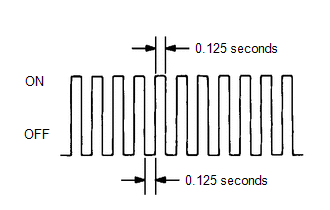
(h) Check that the MIL flashes as shown in the illustration.
(i) Turn the power switch on (READY).
(j) Check that the MIL turns off.
(k) Simulate the conditions of the malfunction described by the customer.
(l) Check for DTCs and Freeze Frame Data using the Techstream.