Camshaft Position "A" - Timing Over-Retarded Bank 1 (P001200)
DESCRIPTION
Refer to DTC P001001.
Click here 
DTC No. | Detection Item | DTC Detection Condition | Trouble Area | MIL | Memory | Note |
|---|---|---|---|---|---|---|
P001200 |
Camshaft Position "A" - Timing Over-Retarded Bank 1 |
With engine warmed up and while driving in urban area (engine speed 4000 rpm or less), intake side valve timing does not change in retarded position, and target and actual valve timing do not match (1 trip detection logic). |
|
Comes on |
DTC stored |
SAE Code: P0012 |
MONITOR DESCRIPTION
This DTC is output when a valve timing stuck condition is detected. With the engine speed at 4000 rpm or less in the retard angle position, if the valve timing does not vary, and there is a large difference in the target and actual valve timing, it is determined that a malfunction has occurred. When this malfunction is detected, the ECM will illuminate the MIL and store this DTC.
MONITOR STRATEGY
Related DTCs |
P0012: Retarded camshaft timing |
Required Sensors/Components (Main) |
Camshaft timing gear assembly Cam timing control motor with EDU assembly |
Required Sensors/Components (Related) |
Crankshaft position sensor Camshaft position sensor Engine coolant temperature sensor |
Frequency of Operation |
Continuous |
Duration |
Less than 10 seconds |
MIL Operation |
Immediate |
Sequence of Operation |
None |
TYPICAL ENABLING CONDITIONS
Monitor runs whenever the following DTCs are not stored |
P0010, P1360, P1362, P1364, P1366, P2614 (Motor drive VVT system control module) P0016 (VVT system - misalignment) P0101, P0102, P0103 (Mass air flow meter) P0107, P0108 (Manifold absolute pressure) P0117, P0118 (Engine coolant temperature sensor) P0125 (Insufficient engine coolant temperature for closed loop fuel control) P0335, P0337, P0338 (Crankshaft position sensor) P0340, P0342, P0343 (Camshaft position sensor) P0365, P0367, P0368 (Exhaust camshaft position sensor) |
Auxiliary battery voltage |
11 V or higher |
Engine speed |
500 to 4000 rpm |
Engine coolant temperature |
75 to 120 °C |
TYPICAL MALFUNCTION THRESHOLDS
Both of the following conditions are met |
- |
Deviation of actual valve timing and target valve timing |
More than 5°CA (Crankshaft Angle) for 5 seconds or more |
Valve timing |
No change at retarded valve timing |
MONITOR RESULT
Refer to detailed information in Checking Monitor Status.
Click here
Monitor ID | Test ID | Scaling | Unit | Description |
|---|---|---|---|---|
$35 |
$81 |
Multiply by 0.01 |
Second |
Forced movement of cam timing control motor time |
CONFIRMATION DRIVING PATTERN
HINT:
- After repair has been completed, clear the DTC and then check that the vehicle has returned to normal by performing the following All Readiness check procedure.
Click here
- When clearing the permanent DTCs, refer to the "CLEAR PERMANENT DTC" procedure.
Click here
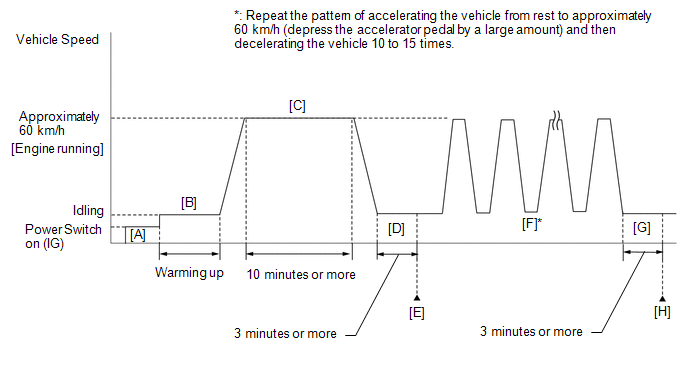
- Connect the Techstream to the DLC3.
- Turn the power switch on (IG).
- Turn the Techstream on.
- Clear the DTCs (even if no DTCs are stored, perform the clear DTC procedure).
- Turn the power switch off and wait for at least 30 seconds.
- Turn the power switch on (IG) [A].
- Turn the Techstream on.
- Put the engine in Inspection Mode (Maintenance Mode).
Click here
- Start the engine and warm it up until the engine coolant temperature reaches 75 °C or higher [B].
- With the engine running, drive the vehicle at approximately 60 km/h for 10 minutes or more [C].
CAUTION:
When performing the confirmation driving pattern, obey all speed limits and traffic laws.
HINT:
If the engine stops, further depress the accelerator pedal to restart the engine.
- Idle the engine for 3 minutes or more [D].
- Enter the following menus: Powertrain / Engine / Trouble Codes [E].
- Read the pending DTCs.
HINT:
- If a pending DTC is output, the system is malfunctioning.
- If a pending DTC is not output, perform the following procedure.
- Enter the following menus: Powertrain / Engine / Utility / All Readiness.
- Input the DTC: P001200.
- Check the DTC judgment result.
Techstream Display
Description
NORMAL
- DTC judgment completed
- System normal
ABNORMAL
- DTC judgment completed
- System abnormal
INCOMPLETE
- DTC judgment not completed
- Perform driving pattern after confirming DTC enabling conditions
HINT:
- If the judgment result is NORMAL, the system is normal.
- If the judgment result is ABNORMAL, the system has a malfunction.
- If the judgment result is INCOMPLETE, perform steps [F] through [H].
- [A] to [E]: Normal judgment procedure.
The normal judgment procedure is used to complete DTC judgment and also used when clearing permanent DTCs.
- When clearing the permanent DTCs, do not disconnect the cable from the auxiliary battery terminal or attempt to clear the DTCs during this procedure, as doing so will clear the universal trip and normal judgment histories.
- With the engine running, repeat the pattern of accelerating the vehicle from rest to approximately 60 km/h and then decelerating the vehicle 10 to 15 times [F].
CAUTION:
When performing the confirmation driving pattern, obey all speed limits and traffic laws.
HINT:
- If the engine stops, further depress the accelerator pedal to restart the engine.
- Depress the accelerator pedal by a large amount.
- Idle the engine for 3 minutes or more [G].
- Enter the following menus: Powertrain / Engine / Trouble Codes [H].
- Read the pending DTCs.
HINT:
- If a pending DTC is output, the system is malfunctioning.
- If a pending DTC is not output, perform the following procedure.
- Check the DTC judgment result again.
HINT:
- If the judgment result is NORMAL, the system is normal.
- If the judgment result is ABNORMAL, the system has a malfunction.
- [A] to [H]: Normal judgment procedure.
The normal judgment procedure is used to complete DTC judgment and also used when clearing permanent DTCs.
- When clearing the permanent DTCs, do not disconnect the cable from the auxiliary battery terminal or attempt to clear the DTCs during this procedure, as doing so will clear the universal trip and normal judgment histories.
NOTICE:
- Vehicle Control History may be stored in the hybrid vehicle control ECU assembly if the engine is malfunctioning. Certain vehicle condition information is recorded when Vehicle Control History is stored. Reading the vehicle conditions recorded in both the Freeze Frame Data and Vehicle Control History can be useful for troubleshooting.
Click here
(Select Powertrain in Health Check and then check the time stamp data.)
Click here
- If any "Engine Malfunction" Vehicle Control History item has been stored in the hybrid vehicle control ECU assembly, make sure to clear it. However, as all Vehicle Control History items are cleared simultaneously, if any Vehicle Control History items other than "Engine Malfunction" are stored, make sure to perform any troubleshooting for them before clearing Vehicle Control History.
Click here
HINT:
- The Techstream only:
By using the Control the VVT-iE Opening Angle Bank 1 Active Test, it can be determined if the VVT-iE system is malfunctioning.
- Connect the Techstream to the DLC3.
- Turn the power switch on (IG).
- Turn the Techstream on.
- Clear the DTCs.
- Turn the power switch off and wait for at least 30 seconds.
- Turn the power switch on (IG).
- Turn the Techstream on.
- Put the engine in Inspection Mode (Maintenance Mode).
Click here
- Start the engine and warm it up until the engine coolant temperature reaches 75 °C or higher.
- Enter the following menus: Powertrain / Engine / Active Test / Control the VVT-iE Opening Angle Bank 1 / Data List / Intake VVT Change Angle Bank 1 and Intake VVT Target Angle Bank 1.
- Read the Data List while performing the Active Test with the engine idling. OK:
Active Test Movement Order
Difference between "Intake VVT Change Angle Bank 1" and "Intake VVT Target Angle Bank 1"
0 deg → 10 deg → 20 deg → 40 deg → 0 deg → 10 deg → END
Within 4 DegFR
- Read Freeze Frame Data using the Techstream. The ECM records vehicle and driving condition information as Freeze Frame Data the moment a DTC is stored. When troubleshooting, Freeze Frame Data can help determine if the vehicle was moving or stationary, if the engine was warmed up or not, if the air fuel ratio was lean or rich, and other data from the time the malfunction occurred.
PROCEDURE
CHECK ANY OTHER DTCS OUTPUT (IN ADDITION TO DTC P001200)
(a) Connect the Techstream to the DLC3.
(b) Turn the power switch on (IG).
(c) Turn the Techstream on.
(d) Enter the following menus: Powertrain / Engine / Trouble Codes.
(e) Read the DTCs.
Powertrain > Engine > Trouble CodesResult | Proceed to |
|---|---|
DTC P001200 is output |
A |
DTC P001200 and other DTCs are output |
B |
HINT:
If any DTCs other than P001200 are output, troubleshoot those DTCs first.
| B |  |
GO TO DTC CHART |
|

INSPECT CAMSHAFT TIMING GEAR ASSEMBLY
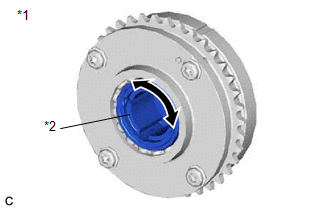
*1 |
Camshaft Timing Gear Assembly |
*2 |
Eccentric Shaft |
(a) Remove the cam timing control motor with EDU assembly.
Click here
(b) Check if the eccentric shaft of the camshaft timing gear assembly rotates smoothly.
NOTICE:
If the camshaft is at a position where a valve is about to open, the eccentric shaft may become difficult to rotate.
OK:
Rotates smoothly.
HINT:
Perform "Inspection After Repair" after replacing the camshaft timing gear assembly, or removing the cam timing control motor with EDU assembly.
Click here
| NG | |
REPLACE CAMSHAFT TIMING GEAR ASSEMBLY |
|
REPLACE CAM TIMING CONTROL MOTOR WITH EDU ASSEMBLY
(a) Replace the cam timing control motor with EDU assembly.
Click here
HINT:
Perform "Inspection After Repair" after replacing the cam timing control motor with EDU assembly.
Click here
|
CLEAR DTC
(a) Connect the Techstream to the DLC3.
(b) Turn the power switch on (IG).
(c) Turn the Techstream on.
(d) Clear the DTCs.
Powertrain > Engine > Clear DTCs(e) Turn the power switch off and wait for at least 30 seconds.
|
CONFIRM WHETHER MALFUNCTION HAS BEEN SUCCESSFULLY REPAIRED
(a) Drive the vehicle in accordance with the driving pattern described in Confirmation Driving Pattern.
(b) Enter the following menus: Powertrain / Engine / Trouble Codes.
(c) Read the DTCs.
Powertrain > Engine > Trouble CodesResult | Proceed to |
|---|---|
DTCs are not output |
A |
DTC P001200 is output |
B |
| A | |
END |
| B | |
REPLACE ECM |