Driver Assistance System - Basic Inspection
- Diagnosis and Repair Work Flow
- Additional Service When Replacing Distance Sensor
- Distance Sensor Alignment ➤
- Configuration (distance Sensor)
- Additional Service When Replacing Front Camera Unit
- Pre-Inspection for Diagnosis
- Camera Aiming Adjustment ➤
- Additional Service When Replacing Side Radar
- Side Radar Alignment
- Action Test ➤
Diagnosis and Repair Work Flow Nissan Pathfinder SUV
Work Flow
OVERALL SEQUENCE
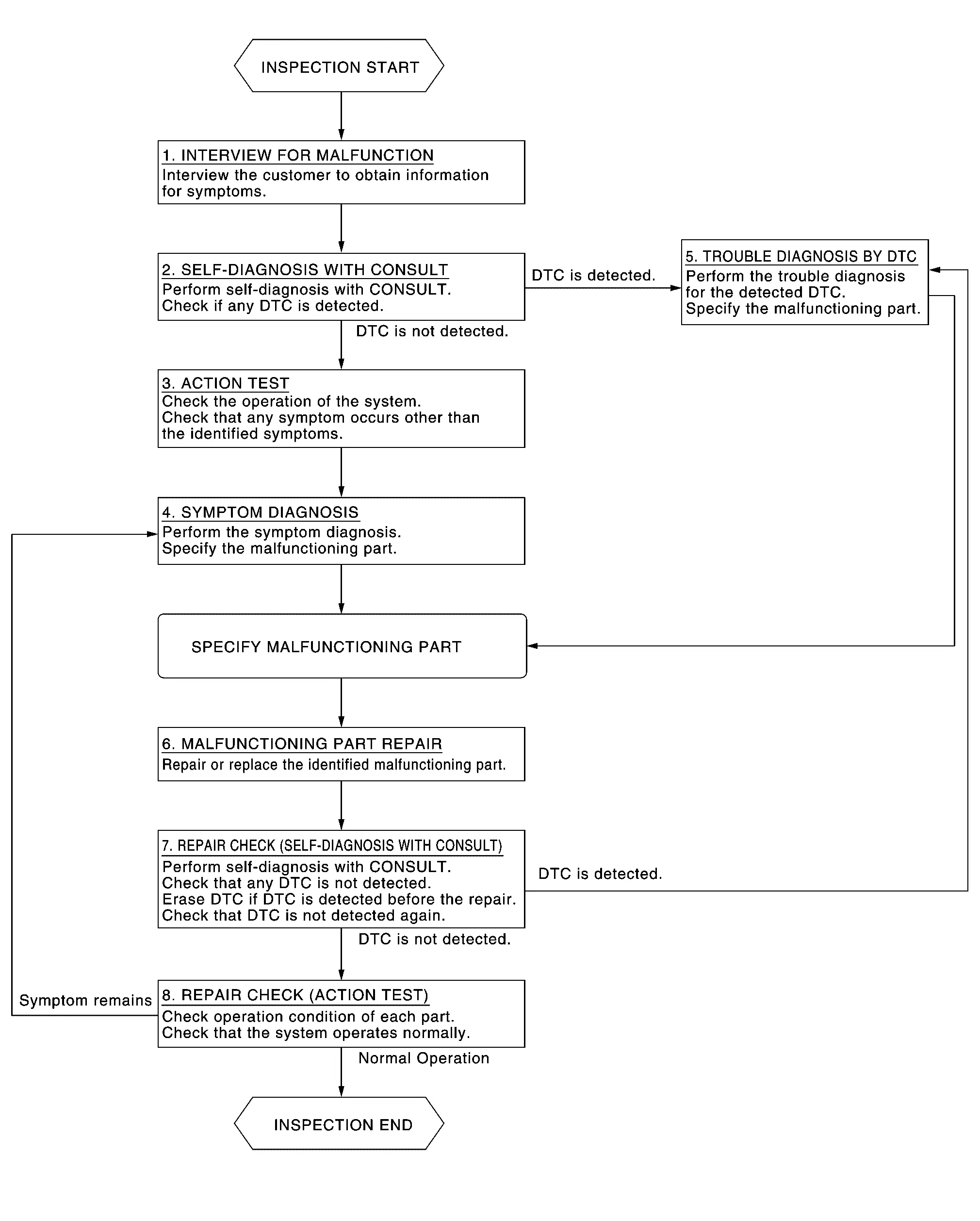
DETAILED FLOW
INTERVIEW FOR MALFUNCTION
It is important to clarify the customer’s concerns before starting the inspection. Interview the customer about the concerns carefully and understand the symptoms fully.
>>GO TO 2.
SELF-DIAGNOSIS WITH CONSULT
 CONSULT
Perform “All DTC Reading” mode.
Check if the DTC is detected in the “Self Diagnostic Result” of the following:
“ICC/ADAS 2”
“LASER/RADAR”
“LANE CAMERA”
“Side radar (Rear left)”
“Side radar (Rear right)”
Is any DTC detected?
YES>>Record or print self-diagnosis results and freeze frame data (FFD). GO TO 5.
NO>>GO TO 3.
ACTION TEST
Perform the system action test to check the operation status of the following:
LDW: Refer to Work Procedure.
I-LI: Refer to Work Procedure.
BSW: Refer to Work Procedure.
I-BSI: Refer to Work Procedure.
TSR: Refer to Work Procedure.
RCTA: Refer to Work Procedure.
I-DA: Refer to Work Procedure.
Check if any other malfunctions occur.
GO TO 4.
SYMPTOM DIAGNOSIS
Perform the applicable diagnosis according to the diagnosis chart by symptom. Refer to Symptom Table.
>>GO TO 6.
TROUBLE DIAGNOSIS BY DTC
 CONSULT
Erase self-diagnostic results.
Ignition switch OFF → ON.
Check the DTC in the “Self Diagnostic Result”.
Perform trouble diagnosis for the following detected DTC:
“ICC/ADAS 2”: Refer to DTC Index.
“LASER/RADAR”: Refer to DTC Index.
“LANE CAMERA”: Refer to DTC Index.
“Side radar (Rear left)”: Refer to DTC Index.
“Side radar (Rear right)”: Refer to DTC Index.
GO TO 6.
MALFUNCTIONING PART REPAIR
Repair or replace the identified malfunctioning parts.
>>GO TO 7.
REPAIR CHECK (SELF-DIAGNOSIS WITH CONSULT)
Erase “Self Diagnostic Result”.
Perform “All DTC Reading” mode after repairing or replacing the specific items.
Check if any DTC is detected in self-diagnosis results of the following:
“ICC/ADAS 2”
“LASER/RADAR”
“LANE CAMERA”
“Side radar (Rear left)”
“Side radar (Rear right)”
Is any DTC detected?
YES>>GO TO 5.
NO>>GO TO 8.
REPAIR CHECK (ACTION TEST)
Perform the following system action test. Check that the malfunction symptom is solved or no other symptoms occur.
LDW: Refer to Work Procedure.
I-LI: Refer to Work Procedure.
BSW: Refer to Work Procedure.
I-BSI: Refer to Work Procedure.
TSR: Refer to Work Procedure.
RCTA: Refer to Work Procedure.
I-DA: Refer to Work Procedure.
Is there a malfunction symptom?
YES>>GO TO 4.
NO>>Inspection End.
Additional Service When Replacing Distance Sensor Nissan Pathfinder R53
Work Procedure
Always perform the distance sensor configuration after replacing the distance sensor.
Always perform the radar alignment after removing and installing or replacing the distance sensor.
Perform the AEB system action test to check that the AEB system operates normally.
DISTANCE SENSOR CONFIGURATION
Perform the distance sensor configuration with CONSULT. Refer to Work Procedure.
>>GO TO 2.
PERFORM RADAR ALIGNMENT
Perform the radar alignment. Refer to Work Procedure.
>>GO TO 3.
AEB SYSTEM ACTION TEST
Perform the following system action test.
LDW: Refer to Work Procedure.
I-LI: Refer to Work Procedure.
BSW: Refer to Work Procedure.
I-BSI: Refer to Work Procedure.
TSR: Refer to Work Procedure.
RCTA: Refer to Work Procedure.
I-DA: Refer to Work Procedure.
ICC: Refer to Work Procedure.
Check that the each system operates normally.
INSPECTION END
Distance Sensor Alignment ➤ Nissan Pathfinder 2026
Configuration (distance Sensor) Nissan Pathfinder 2022
Work Procedure
Vehicle specification needs to be written with CONSULT because it is not written after replacing the distance sensor.
The configuration requires network connection. CONSULT connects to network and then it downloads the configuration data from the server. Then CONSULT writes the Nissan Pathfinder vehicle specification to the distance sensor.
The configuration no need to “save” configuration data from the distance sensor. The configuration data is always generated freshly at the server and then downloaded to the CONSULT.
WRITING VEHICLE SPECIFICATION
 With CONSULT
Perform writing Nissan Pathfinder vehicle specification to distance sensor following "Automatic Configuration" procedure of "Configuration" according to CONSULT Operation Manual.
>>WORK END
Additional Service When Replacing Front Camera Unit Nissan Pathfinder 5th Gen
Work Procedure
Always perform the front camera unit configuration after replacing the front camera unit.
Always perform the camera aiming after removing and installing or replacing the front camera unit.
FRONT CAMERA UNIT CONFIGURATION
Perform the front camera unit configuration with CONSULT. Refer to Work Procedure.
>>GO TO 2.
CAMERA AIMING ADJUSTMENT
Perform the camera aiming adjustment with CONSULT. Refer to Work Procedure.
>>GO TO 3.
PERFORM SELF-DIAGNOSIS
Perform the self-diagnosis of front camera unit with CONSULT. Check if any DTC is detected.
Is any DTC detected?
YES>>Perform the trouble diagnosis for the detected DTC. Refer to DTC Index.
NO>>GO TO 4.
ACTION TEST
Perform the following system action test.
LDW: Refer to Work Procedure.
I-LI: Refer to Work Procedure.
I-BSI: Refer to Work Procedure.
TSR: Refer to Work Procedure.
ProPILOT Assist: Refer to Work Procedure(7 inch information display) or Work Procedure(FULL TFT METER).
Check that the each system operates normally.
WORK END
Pre-Inspection for Diagnosis Nissan Pathfinder SUV
Work Procedure
CHECK CAMERA LENS AND WINDSHIELD
Are camera lens and windshield contaminated with foreign materials?
YES (When the camera lens is contaminated with foreign materials.)>>Replace front camera unit (Refer to Removal and Installation.) and GO TO 2.
YES (When the windshield is contaminated with foreign materials.)>>Clean windshield.
NO>>GO TO 2.
CHECK FRONT CAMERA UNIT INSTALLATION CONDITION
Check front camera unit installation condition (installation position, properly tightened, a bent bracket).
Is it properly installed?
YES>>GO TO 3.
NO>>Install front camera unit properly, and perform camera aiming.
CHECK Nissan Pathfinder Vehicle HEIGHT
Check vehicle height. Refer to Wheelarch Height.
Is vehicle height appropriate?
YES>>INSPECTION END
NO>>Repair Nissan Pathfinder vehicle to appropriate height.
Camera Aiming Adjustment ➤ Nissan Pathfinder 2026
Additional Service When Replacing Side Radar Nissan Pathfinder Fifth generation
Work Procedure
Always perform the side radar configuration after replacing the side radar.
SIDE RADAR CONFIGURATION
Perform the side radar configuration with CONSULT. Refer to Work Procedure.
>>GO TO 2.
SIDE RADAR ALIGNMENT
Perform the side radar alignment with CONSULT. Refer to Work Procedure.
YES>>GO TO 3.
PERFORM SELF-DIAGNOSIS
Perform the self-diagnosis of side radar with CONSULT. Check if any DTC is detected.
Is any DTC detected?
YES>>Perform the trouble diagnosis for the detected DTC.
Side radar LH: Refer to DTC Index
Side radar RH: Refer to DTC Index
INSPECTION END
Side Radar Alignment Nissan Pathfinder 2022
Work Procedure
Always perform the side radar alignment after performing the following work.
After removing and installing or replacing the side radar.
After removing and installing, replacing or repainting the rear bumper.
Side radar alignment conditions are following;
The Nissan Pathfinder vehicle speed is 30 km/h or higher.
The objects which reflect the wave of radar is located 8 m or more away from the Nissan Pathfinder vehicle.
The steering wheel is straight.
SELECT WORK SUPPORT ITEM
Stop the vehicle.
Select “Work support” of “Side radar (Rear left)” or “Side radar (Rear right)”.
Select “Side radar alignment”.
Is the screen to select the target side radar displayed?
YES>>GO TO 2.
NO>>When error message is displayed: GO TO 4.
START SIDE RADAR ALIGNMENT
Select “Start”.
Is “Ready to start the side radar alignment.” displayed?
YES>>GO TO 3.
NO-1>>When “Abnormal side radar installation.” is displayed: GO TO 5.
NO-2>>When “Detecting DTC.” is displayed: GO TO 6.
NO-3>>When “Stopped” is displayed: Perform side radar alignment again.
PERFORM SIDE RADAR ALIGNMENT
Drive the Nissan Pathfinder vehicle.
Confirm that “Side radars alignment are completed.” is displayed and select "End".
WORK END.
CONFIRMATION OF UNDETECTED RADAR
Confirm undetected radar and repair the defective part.
Perform the side radar alignment again.
WORK END.
CHECK THE CONNECTORS OF SIDE RADAR LH/RH
Confirm the description on CONSULT, check the concerned radar installing condition (installed location, tightening torque, bend of bracket etc.) and repair the defective part.
Perform the side radar alignment again.
WORK END.
CHECK SELF-DIAGNOSIS RESULTS OF SIDE RADAR
Perform "All DTC Reading".
Check if the DTC is detected on the self-diagnosis results of following.
“Side radar (Rear left)”: Refer to DTC Index.
“Side radar (Rear right)”: Refer to DTC Index.
Perform trouble diagnosis for the detected DTC, and repair or replace the identified malfunctioning parts.
Ignition switch OFF to ON, and perform the side radar alignment again.
WORK END.