Audio, Visual & Navigation System - System Description
- Component Parts
- System
- Diagnosis System (ivc)
Component Parts Nissan Pathfinder
Telematics System
Component Parts Location
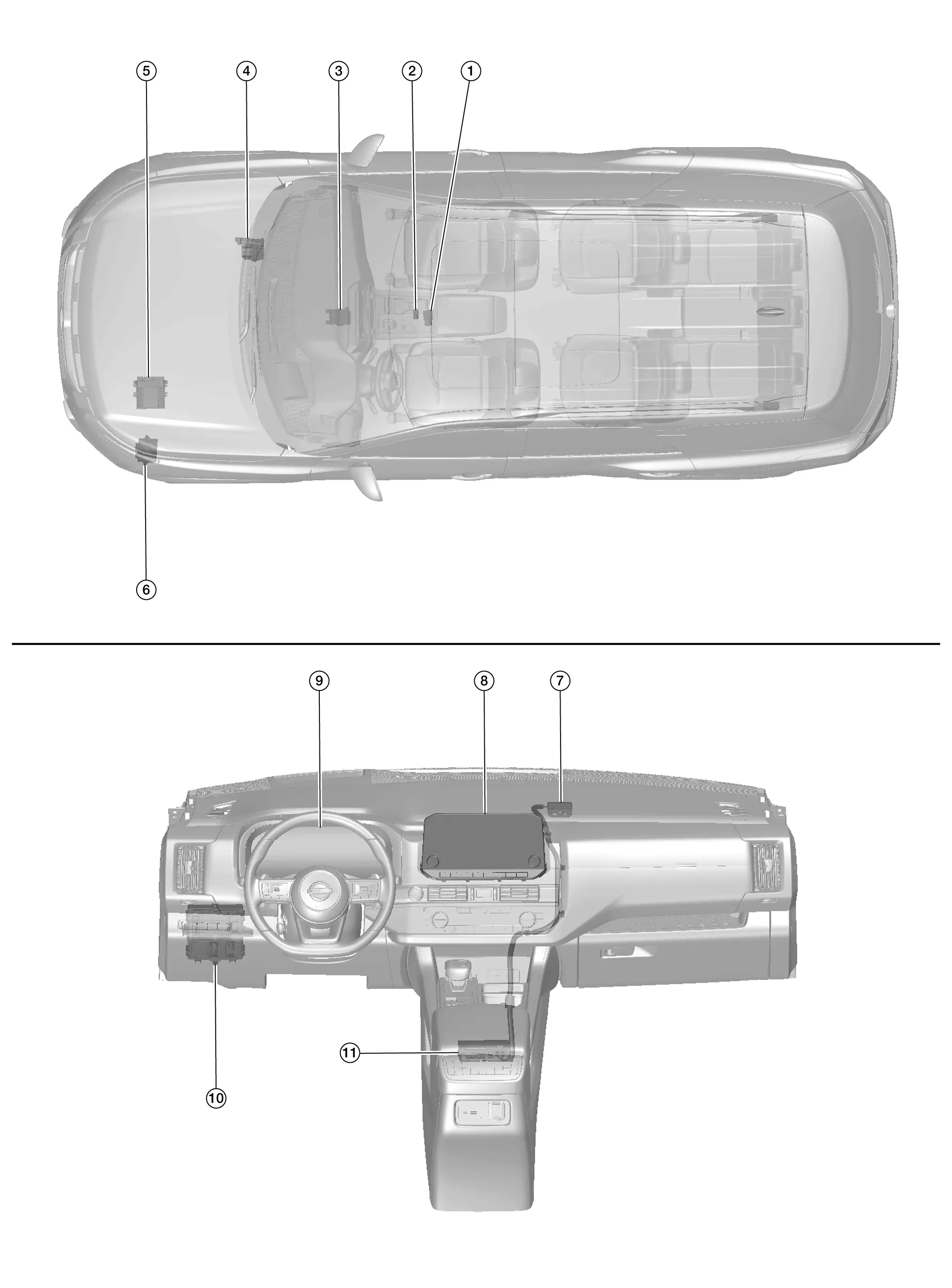
| No. | Component | Function |
|---|---|---|
| 1. | Telematics switch | Refer to Telematics Switch. |
| 2. | Microphone | Refer to Microphone. |
| 3. | Air bag diagnosis sensor unit | Provides TCU with the Nissan Pathfinder vehicle crash information signal via CAN communication. |
| 4. | ABS (Anti-lock Braking System) actuator and electric unit (control unit) | Provides TCU with the following signals via CAN communication:
|
| 5. | ECM (Engine Control Module) | Provides TCU with the following signals via CAN communication:
|
| 6. | TCM (Transmission Control Module) | Provides TCU with the shift position signal via CAN communication. |
| 7. | Telematics antenna | Refer to Telematics Antenna. |
| 8. | AV control unit | Refer to AV Control Unit. |
| 9. | Combination meter | Provides TCU with the following signals via CAN communication:
|
| 10. | BCM (Body Control Module) | Provides TCU with the following signals via CAN communication:
|
| 11. | TCU (Telematics Communication Unit) | Refer to TCU. |
AV Control Unit
An 8-inch (without navigation) or 9-inch (with navigation) color display with multi-touch control, an AM/FM electronic tuner radio with RDS and camera controller are integrated into the AV Control unit.

The color display is a high resolution monitor that includes touch panel functions.
TCU
Telematics Communication Unit (TCU) is installed under the instrument panel, in front of the center console.

A radio communication terminal and SIM card are built into the unit and data is sent and received in SMS*, DTMF tone signal with the NissanConnect® center through the TEL antenna.
It is connected to the AV control unit with the USB harness for sound signal input/output and USB communication.
It is connected to the air bag diagnosis sensor unit via CAN communication. TCU performs an emergency report when the air bag is inflated.
VIN information necessary for the Telematics service is memorized.
Audio signals received during SOS/Operator call are transmitted from TCU to each speaker via the AV control unit.
During the communication with NissanConnect center, TCU transmits a TEL ON signal to the AV control unit to prohibit the use of Bluetooth® hands-free phone.
Telematics Antenna
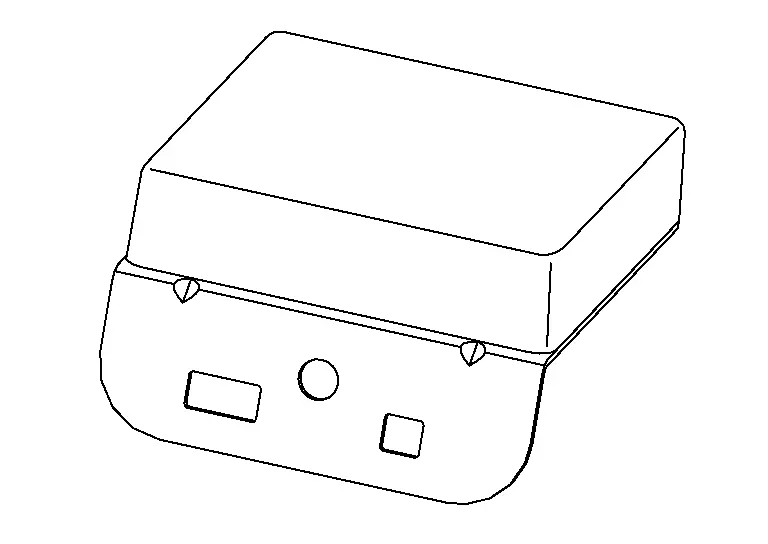
The telematics antenna consists of TEL antenna and GPS antenna.
It is installed in the instrument panel.
Microphone
Microphone is installed on the map lamp assembly.
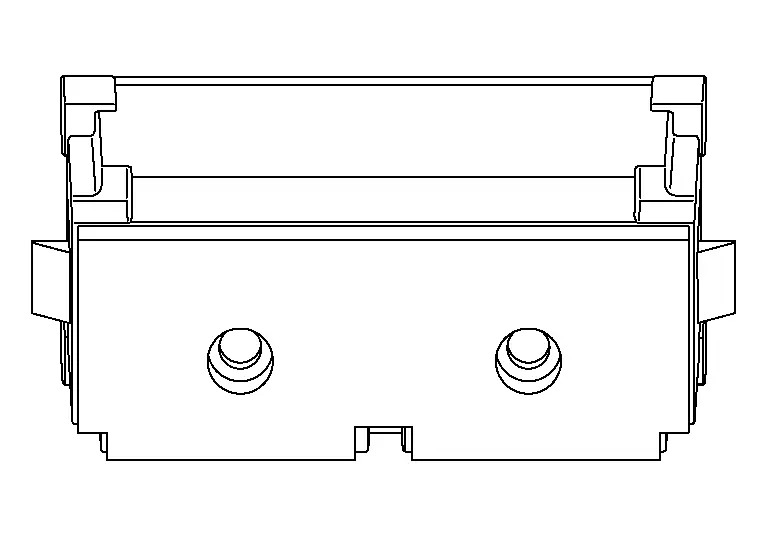
The microphone is used for the operation of the NissanConnect, hands-free phone system, voice recognition function.
The power is supplied from the TCU to the microphone, transmitting sound signals to the TCU during operation of the NissanConnect system, hands-free phone communication, and voice recognition.
Telematics Switch
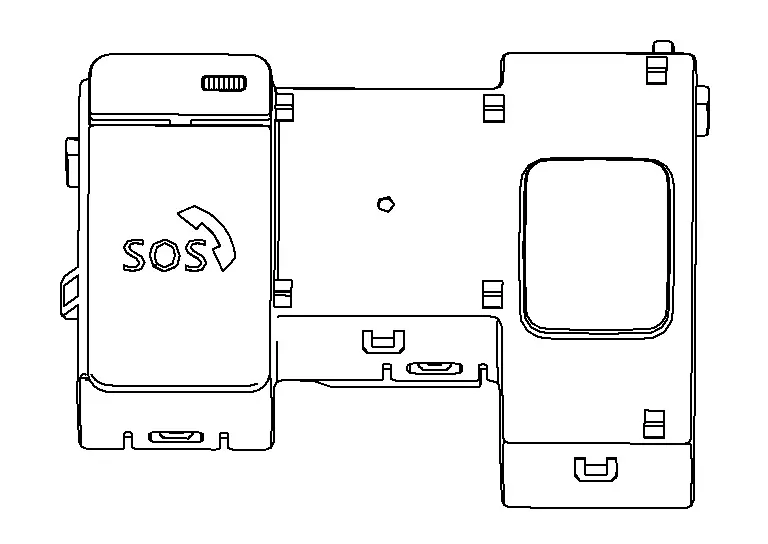
The Telematics switch is located on the map lamp assembly.
Telematics Switch (Without Moonroof)
Moonroof Switch Assembly [Telematics Switch (With Moonroof)]
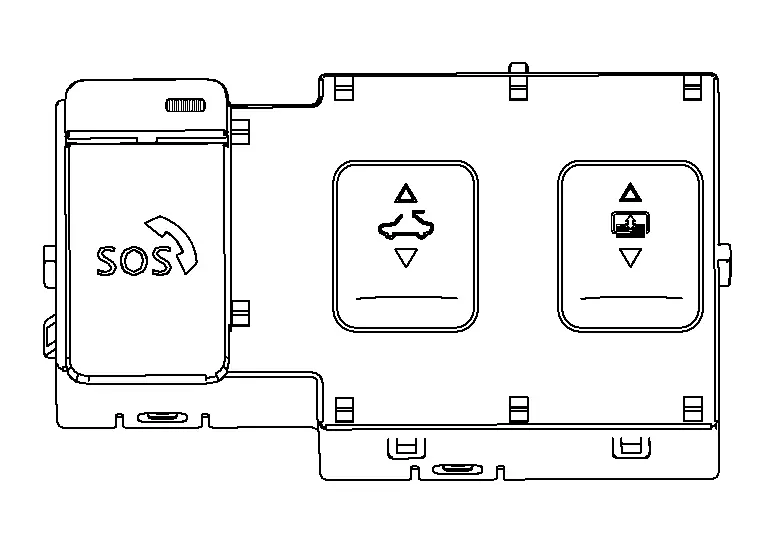
The Telematics switch is connected to TCU and transmits an operation signal.
The state of LED (ON/Blink/OFF) shows the status of SOS call.
LED ON :SOS Call available LED Blink :SOS Call in communication LED OFF :Out of service area or system error
System Nissan Pathfinder R53
System Description
SYSTEM DIAGRAM
Without Bose Audio System 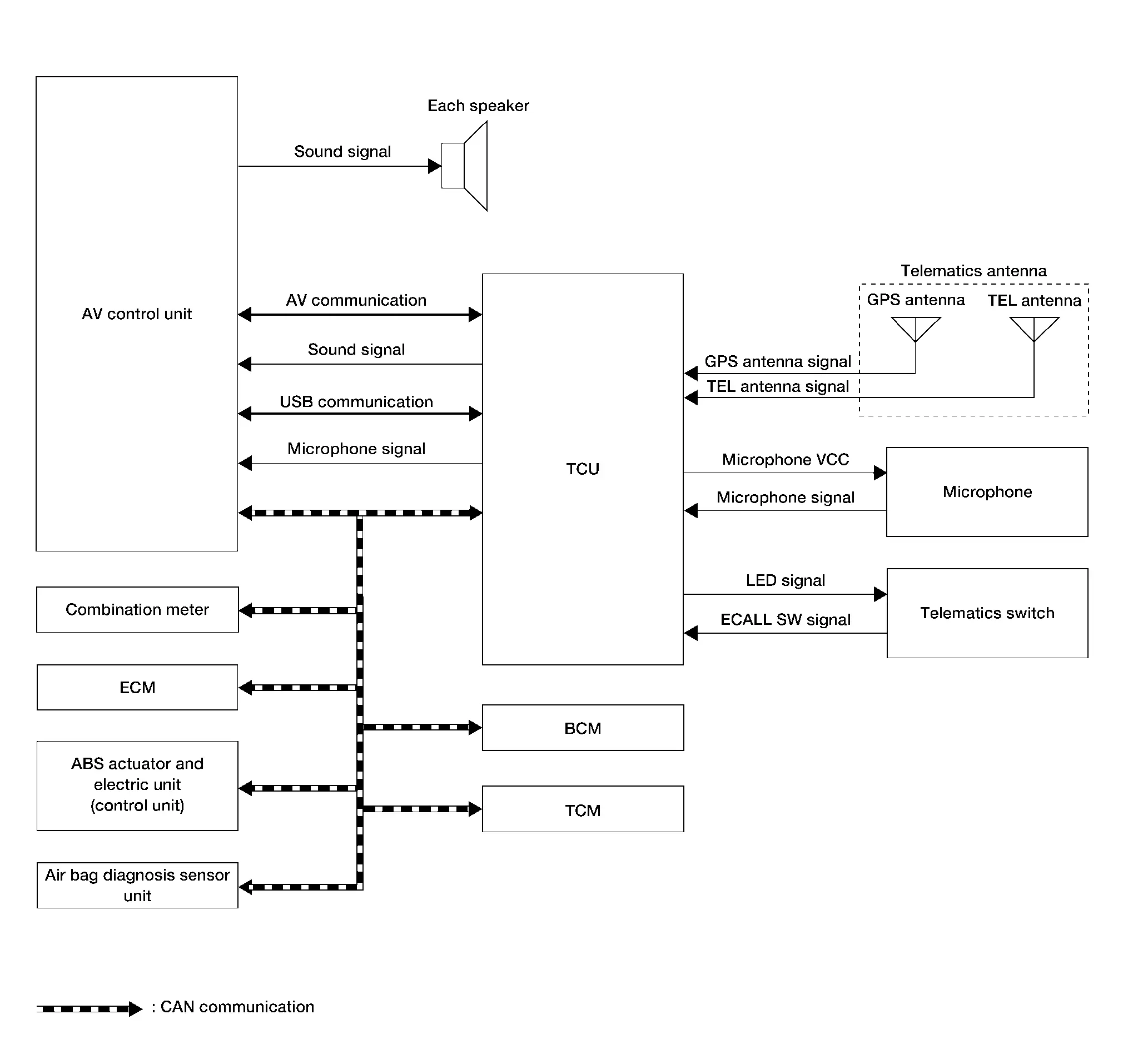
With Bose Audio System 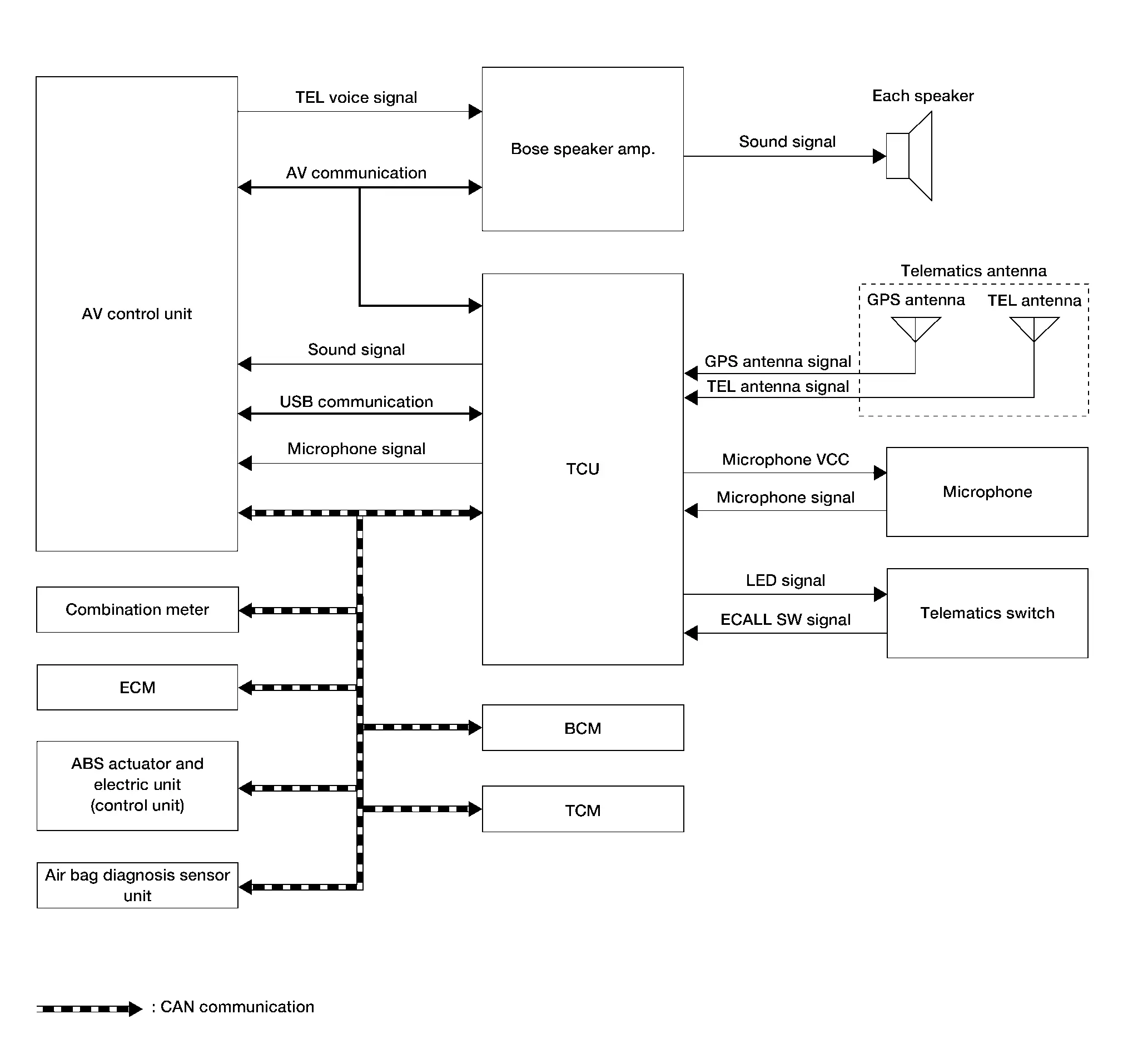
TCU Input Signal (CAN Communication)
| Transmit unit | Signal name |
|---|---|
| Air bag diagnosis sensor unit | Nissan Pathfinder Vehicle crash information signal. |
| ABS actuator and electrical unit (Control unit) |
|
| BCM |
|
| Combination meter |
|
| ECM |
|
| TCM | Shift position signal. |
DESCRIPTION
The Telematics system is a system for providing information by connecting the vehicle and the user to the NissanConnect center.
Telematics Communication Unit (TCU) equipped with a radio communication terminal communicates with the information center (NissanConnect center) via radio waves for receiving NissanConnect services.
With the equipment of the radio communication terminal, TCU communicates with NissanConnect center by Packet communication*1 and SMS*2 via TEL antenna.
While communicating with the operator, data (e.g. transmission of own Nissan Pathfinder vehicle location) is transmitted to the NissanConnect Service Center by using DTMF tone signals and SMS via the radio communication module included in TCU.
Audio signals transmitted and received while communicating with the operator are input by microphone connected to TCU.
Audio signals are output from TCU via the audio data circuit connected to the AV control unit.
Diagnosis System (ivc) Nissan Pathfinder 5th Gen
CONSULT Function
APPLICABLE ITEM
CONSULT performs the following items by communication with TCU.
| Diagnosis mode | Description |
|---|---|
| Self Diagnostic Result | Display non-network DTC which TCU memorizes |
| Data Monitor | The diagnosis of the Nissan Pathfinder vehicle signal that is input to the TCU can be performed. |
| Work Support | Performs TCU activation setting, VIN data saving/writing, center connection setting, network initial settings and automatic report prevention release. |
| ECU Identification | Checks TCU part number. |
| Configuration* |
|
*: Displays when performing "Diagnosis (All System)".
Self-Diagnosis Results
The self-diagnosis results and error history are displayed collectively.
The current malfunction indicates "0". The counter increases by 1 if the condition is normal at the next ignition switch ON cycle.
Refer to DTC Index.
Data Monitor
All Items
Displays the status of the following vehicle signals input to TCU.
For each signal, the actual signal can be compared with the condition recognized on the system.
Display item [Unit] Condition USB
[No con/Con/No dete]Status of USB connection in the Nissan Pathfinder vehicle. SIM status
[Lock/Unlock]Backup battery age
[day(s)]Set value for continued operation time to control back up battery consumption.
eUICC STATUS PIN used
[Enable/Disable]SOS switch
[On/Off]Status of SOS switch if available on Nissan Pathfinder vehicle. Radio wave
[On/Off]Network Access Device on Nissan Pathfinder vehicle is ON/OFF setting. Zone
[U.S.A]Regional setting of Nissan Pathfinder vehicle. Power type
[Engine/EV/HEV/PHEV]Type of Nissan Pathfinder vehicle. Brand
[Renault/Nissan/Infinity]Brand Name.
Work support
Performs TCU activation setting, VIN data saving/writing and center connection setting.
| Item name | Description |
|---|---|
| SAVE VIN DATA | The VIN data saved in TCU is stored in CONSULT. |
| WRITE VIN (SAVED DATA) | Write VIN data stored by “SAVE VIN DATA” in work support mode to TCU. |
| VIN REGISTRATION | Allows the writing of the VIN to the AV control unit. |
| TCU ACTIVATE SETTING | TCU ON/OFF setting is available. |
| Network initial settings | Perform TCU communication initialization. |
| Automatic report prevention release | Unlock automatic report protection. |
If network initial settings are not completed, refer to the following for details of displayed numbers.
| Item | Value | Description |
|---|---|---|
| Network initial setting state | 1 | Network initial settings (Step 1, download certificate transmission) |
| 3 | Network initial settings (step 3, automatic declaration transmission) | |
| 5 | Network initial settings (step 5, send regional settings) | |
| 7 | Network initial settings (step 7, partition settings) | |
| 12 | Initial settings (step 12, send installation certificate) | |
| Http error code | — | Display error code |
| Data Channel | 1 | 2G line open state |
| 2 | 3G line open state | |
| 3 | 4G line open state | |
| 4 | Unknown | |
| 14 | No connection | |
| IP address | 1 | Unavailable |
| 2 | IPv4 address available | |
| 3 | IPv6 address available |
ECU Identification
Displays TCU part number and various ID numbers.
| Display items | Description |
|---|---|
| ECU PART NUMBER | Displays TCU part number. |
Configuration
Writes the vehicle specification when replacing TCU.