Propilot/propilot Assist :: System Description
- Component Parts
- System ➤
- Operation ➤
- Handling Precaution
Component Parts Nissan Pathfinder 2022
Propilot/propilot Assist System
Component Parts Location
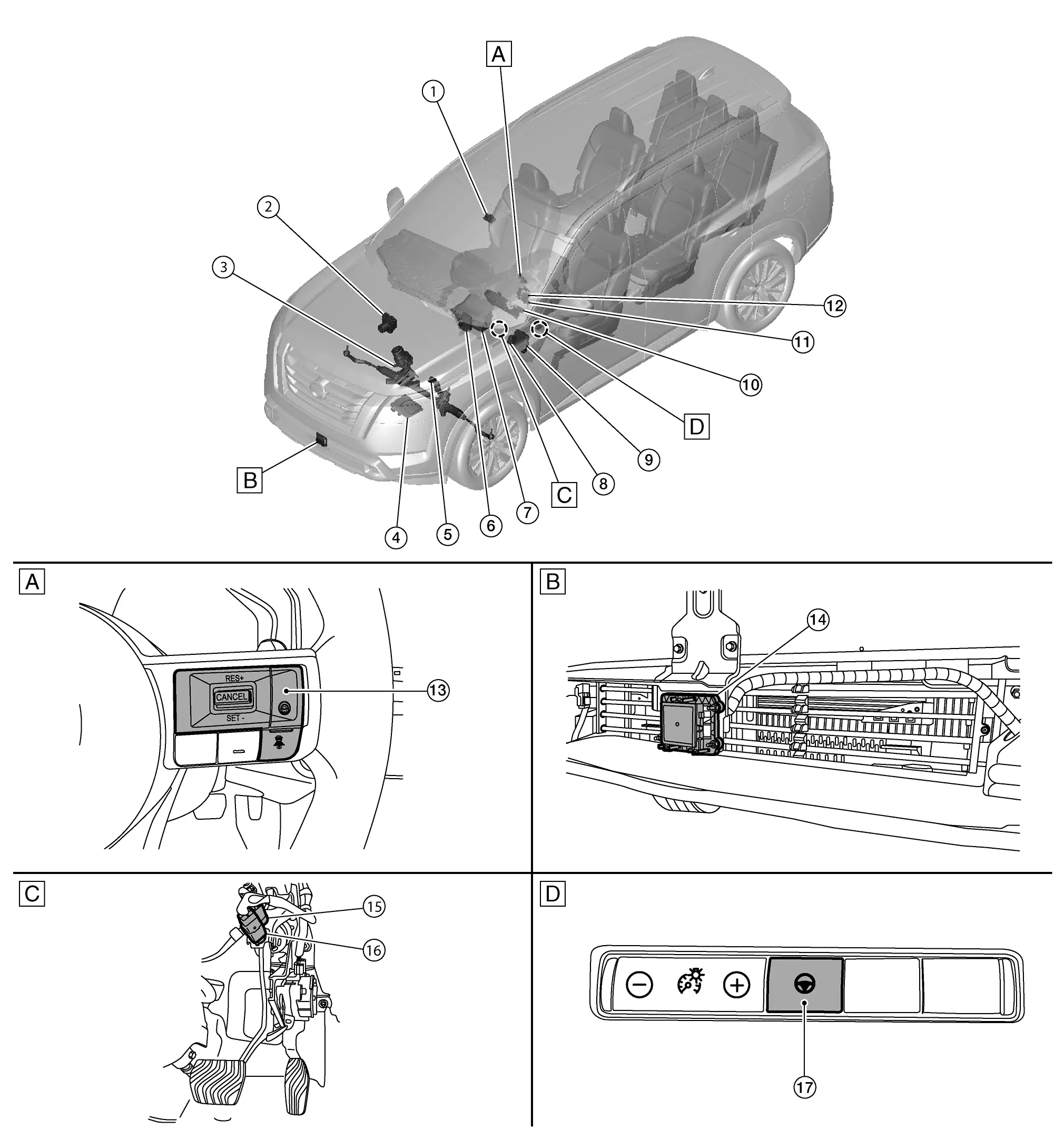
| A. | Steering wheel | B. | Front of Nissan Pathfinder vehicle (view with front bumper fascia removed) |
| C. | Upper side of brake pedal (view with instrument lower panel LH removed) |
D. | Left side of instrument panel |
| No. | Component | Function | Function | |
|---|---|---|---|---|
| Nissan Pathfinder Vehicle-to-vehicle distance control mode | Conventional (fixed speed) cruise control mode | |||
| 1. | Front camera unit | × | Transmits the detected information to ADAS control unit 2 via CAN communication. Refer to Front Camera Unit. |
|
| 2. | ABS (Anti-lock Braking System) actuator and electric unit (control unit) | × | × |
|
| 3. | EPS (Electric Power Steering) control unit | × | Refer to System Description. Refer to Component Parts Location for detailed component location. |
|
| 4. | ECM (Engine Control Module) | × | × |
|
| 5. | TCM (Transmission Control Module) | × | × | TCM transmits the signal related to A/T control to ADAS control unit 2 via CAN communication. Refer to Component Parts Location for detailed component location. |
| 6. | ADAS (Advanced Driver Assistance System) control unit 2 | × | × | Refer to ADAS Control Unit 2. Refer to Component Parts Location for detailed component location. |
| 7. | HUD (Head Up Display) unit (if equipped) | × | Refer to System Description. Refer to Component Parts Location (full TFT type) or Component Parts Location (7 inch information display meter) for detailed component location. |
|
| 8. | Chassis control module | × | × | Refer to Chassis Control Module. Refer to Component Parts Location for detailed component location. |
| 9. | BCM (Body Control Module) | × | Transmits the stop lamp signal to ADAS control unit 2 via CAN communication. Refer to Component Part Location for detailed component location. |
|
| 10. | Combination meter (Information display) |
× | × | Refer to System Description. Refer to Component Parts Location (7-inch information display) or Component Parts Location (Full TFT meter) for detailed component location. |
| 11. | Steering angle sensor | × | Measures the rotation amount, rotation speed, and rotation direction of steering wheel, and then transmits them to ADAS control unit 2 via CAN communication. Refer to Component Parts Location for detailed component location. |
|
| 12. | Combination switch (spiral cable) | × | × | Provides a pass-through for the ProPILOT/ProPILOT assist steering switch signal from the steering switch to the ECM. |
| 13. | ProPILOT/ProPILOT assist steering switch | × | Refer to ProPILOT/ProPILOT Assist Steering Switch. | |
| 14. | Distance sensor | × | × | Transmits the presence/absence of Nissan Pathfinder vehicle ahead and the distance from the vehicle to ADAS control unit 2 via CAN communication. Refer to Distance Sensor. |
| 15. | Brake pedal position switch | × | × | Refer to Brake Pedal Position Switch/Stop Lamp Switch. |
| 16. | Stop lamp switch | × | × | |
| 17. | Steering assist switch | × | Refer to Steering Assist Switch. | |
ProPILOT Assist Steering Switch
FUNCTIONS WITHIN THE SYSTEM
ProPILOT Assist steering switch allows the ON/OFF of the Intelligent Cruise Control and the settings of a Nissan Pathfinder vehicle speed and distance between vehicles.
ProPILOT Assist steering switch signal is transmitted to ECM. ECM transmits the signal to the ADAS control unit 2 via CAN communication.
INDIVIDUAL FUNCTIONS WITHIN THE SYSTEM
ProPILOT Assist steering switch detects a switch operation by the driver.
INDIVIDUAL OPERATION
The steering switch is composed of a combination of a normal open switch and a resistor.

When each switch is pressed, the ECM detects which switch is operated according to input voltage.
PARTS LOCATION
Refer to Component Parts Location.
Steering Assist Switch
FUNCTIONS WITHIN THE SYSTEM
Steering assist switch allows the ON/OFF of steering assistance function.
INDIVIDUAL FUNCTIONS WITHIN THE SYSTEM
Transmits a steering assist switch signal to ADAS control unit 2.
INDIVIDUAL OPERATION
Steering assist switch changes the switch operation of driver to the voltage change (ON: 0V / OFF: 12V)
ECU reads the state of the switch by the voltage change.
PARTS LOCATION
Refer to Component Parts Location.
System ➤ Nissan Pathfinder
Operation ➤ Nissan Pathfinder 2026
Handling Precaution Nissan Pathfinder
Precautions for ProPILOT Assist
DISTANCE SENSOR HANDLING
Refer to Precautions for Intelligent Forward Collision Warning.
FRONT CAMERA UNIT HANDLING
Refer to Precautions for Lane Departure Warning.
PRECAUTIONS FOR USING ProPILOT ASSIST
Failure to follow the warnings and instructions for proper use of the ProPILOT Assist system could result in serious injury or death.
ProPILOT Assist is not a self-driving system. Within the limits of its capabilities, as described in this manual, it helps the driver with certain driving activities.
The ProPILOT Assist system is not a replacement for proper driving procedures and is not designed to correct careless, inattentive or absent-minded driving. ProPILOT Assist does not always steer the Nissan Pathfinder vehicle to keep it in the lane. The ProPILOT Assist system is not designed to prevent loss of control. It is the driver’s responsibility to stay alert, drive safely, keep the Nissan Pathfinder vehicle in the traveling lane, and be in control of the vehicle at all times.
There are limitations to the ProPILOT Assist system capability. The ProPILOT Assist system does not function in all driving, traffic, weather, and road conditions. It is the driver’s responsibility to stay alert, drive safely, keep the Nissan Pathfinder vehicle in the traveling lane, and be in control of the vehicle at all times.
The ProPILOT Assist system is only an aid to assist the driver and is not a collision warning or avoidance device.
The ProPILOT Assist system is for highway use only and is not intended for city driving. Failure to apply the brakes or steer the Nissan Pathfinder vehicle when necessary may result in a serious accident.
Always observe posted speed limits and do not set the speed over them.
Never take hands off the steering wheel when driving. Always keep hands on the steering wheel and drive the Nissan Pathfinder vehicle safely.
Never unfasten the safety belt when using ProPILOT Assist. Doing so automatically cancels the ProPILOT Assist system.
The ProPILOT Assist system does not react when approaching stationary and slow moving Nissan Pathfinder vehicles.
Always drive carefully and attentively when using the ProPILOT Assist system. Read and understand the Owner’s Manual thoroughly before using the ProPILOT Assist system. To avoid serious injury or death, do not rely on the system to prevent accidents or to control the Nissan Pathfinder vehicle’s speed in emergency situations. Do not use the ProPILOT Assist system except in appropriate road and traffic conditions.
When the accelerator pedal is depressed and the vehicle approaches the vehicle ahead, the ICC system neither controls the brake nor warn the driver with the chime and display. The driver must manually control the Nissan Pathfinder vehicle speed to maintain a safe distance to the vehicle ahead. Failure to do so could result in severe personal injury or death.
To prevent the vehicle from moving or rolling unexpectedly, which could result in serious personal injury or property damage, before exiting the Nissan Pathfinder vehicle make sure to push the ProPILOT Assist switch to turn the system off, push the park button to shift to the P (Park) position, and turn the engine off.
Failure to follow the warnings and instructions for proper use of the ICC system could result in serious injury or death.
The ICC system is only an aid to assist the driver and is not a collision warning or avoidance device. It is recommended for highway use only and it is not intended for city driving. It is the driver’s responsibility to stay alert, drive safely, and be in control of the Nissan Pathfinder vehicle at all times.
There are limitations to the ICC system capability. The ICC system does not function in all driving, traffic, weather, and road conditions. It is the driver’s responsibility to stay alert, drive safely, keep the Nissan Pathfinder vehicle in the traveling lane, and be in control of the vehicle at all times.
Always observe posted speed limits and do not set the speed over them.
The ICC system does not react to stationary and slow moving Nissan Pathfinder vehicles.
Always drive carefully and attentively when using the ICC system. Read and understand the Owner’s Manual thoroughly before using the ICC system. To avoid serious injury or death, do not rely on the system to prevent accidents or to control the Nissan Pathfinder vehicle’s speed in emergency situations. Do not use the ICC system except in appropriate road and traffic conditions.
In order to reduce the risk of a collision that may result in serious injury or death, please be aware of the following:
This function is only activated with the left turn signal and briefly accelerates the vehicle even if a lane change is not initiated. This can include non-passing situations such as left side exits.
Ensure that when passing another Nissan Pathfinder vehicle, the adjacent lane is clear before initiating the pass. Sudden changes in traffic may occur while passing. Always manually steer or brake as needed. Never solely rely on the system.
Listed below are the system limitations for the Speed Limit Assist. Failure to operate the vehicle in accordance with these system limitations could result in serious injury or death:
It is the driver’s responsibility to select the proper speed, follow all traffic regulations and observe other road users.
In the following situations, the Speed Limit Assist may not operate properly and the actual speed limit sign may not be applied to the Nissan Pathfinder vehicle set speed properly. The driver must manually control the vehicle speed.
When the Traffic Recognition Sign (TSR) system is not functioning properly or turned off.
When driving in countries or areas not covered by the navigation system.
When crossing national boundaries.
When driving on the exit of the limited access freeway as identified in the navigation map data.
When driving in an area with nearby parallel roads (for example, freeway with a parallel service drive).
When driving in an area where each lane has a different speed limit sign.
When driving on a road under construction or in a construction zone.
Listed below are the system limitations for the Speed Adjust by Route. Failure to operate the vehicle in accordance with these system limitations could result in serious injury or death:
There are limitations to the Speed Adjust by Route system capability. The system does not function in all driving, traffic, weather and road conditions. It is the driver’s responsibility to stay alert, drive safely, and be in control of the Nissan Pathfinder vehicle at all times.
The Speed Adjust by Route system does not brake the vehicle to a stop. Whenever necessary, the driver must apply appropriate braking.
It is the driver’s responsibility to select the proper speed, follow all traffic regulations and observe other road users.
The Speed Adjust by Route system does not function in Hawaii or US island territories.
In the following situations, the Speed Adjust by Route may not operate properly. (In some road and traffic conditions, the system may unexpectedly change the speed. The driver must manually control the Nissan Pathfinder vehicle speed.)
When the data from the navigation system is not up-to-date or is unavailable.
When not driving along the route suggested by the navigation system.
When the navigation system is recalculating the route.
When driving in countries or areas not covered by the navigation system.
When driving on a road under construction or newly constructed road.
When driving near a road split or junction.
When driving in bad weather or poor road conditions.
Listed below are the system limitations for the ICC system. Failure to operate the vehicle in accordance with these system limitations could result in serious injury or death:
The ICC system is primarily intended for use on highways and freeways. It is not advisable to use the ICC system in city/urban traffic.
The ICC system does not adapt automatically to road conditions. This system should be used in evenly flowing traffic. Do not use the system on roads with sharp curves or on icy roads, in heavy rain or in fog.
As there is a performance limit to the distance control function, never rely solely on the ICC system. This system does not correct careless, inattentive or absentminded driving or overcome poor visibility in rain, fog, or other bad weather. Decelerate the Nissan Pathfinder vehicle speed by depressing the brake pedal, depending on the distance to the vehicle ahead and the surrounding circumstances in order to maintain a safe distance between Nissan Pathfinder vehicles.
When the ICC system automatically brings the vehicle to a stop, the vehicle can automatically accelerate if the Nissan Pathfinder vehicle is stopped for less than approximately 3 seconds. Be prepared to stop the vehicle if necessary.
For Nissan Pathfinder vehicles equipped with ProPILOT Assist with Navi-link and only when on a limited access freeway (as identified in the navigation map data):
The time the Nissan Pathfinder vehicle can remain stopped and automatically restart is extended from 3 seconds to 30 seconds.
If a Nissan Pathfinder vehicle ahead cuts in or out of the lane ahead, the vehicle may not automatically start when the traffic ahead begins to move. The driver need to push up the RES+ switch or lightly depress the accelerator pedal to follow the Nissan Pathfinder vehicle directly ahead when it is safe to do so.
Always check surroundings before restarting the Nissan Pathfinder vehicle.
Always pay attention to the operation of the vehicle and be ready to manually control the proper following distance. The ICC system may not be able to maintain the selected distance between Nissan Pathfinder vehicles (following distance) or selected vehicle speed under some circumstances.
The ICC system does not detect the following objects:
Stationary or slow moving Nissan Pathfinder vehicles (when the vehicle is approaching them)
Pedestrians or objects in the roadway
Oncoming Nissan Pathfinder vehicles in the same lane
Motorcycles traveling offset in the travel lane
The ICC system may not detect a Nissan Pathfinder vehicle ahead in certain road, weather or driving conditions. To avoid accidents, never use the ICC system under the following conditions:
On roads with heavy, high-speed traffic or sharp curves
On slippery road surfaces such as on ice or snow, etc.
On a bumpy road surface, such as an uneven dirt road
On steep downhill roads (the Nissan Pathfinder vehicle may go beyond the vehicle set speed and frequent braking may result in overheating the brakes)
On repeated uphill and downhill roads
During bad weather (rain, fog, snow, etc.)
When the sensor detection is reduced (conditions such as rain, snow, fog, dust storms, sandstorms, and road spray from other Nissan Pathfinder vehicles)
When dirt, ice, snow or other material adhere to the radar sensor area
When traffic conditions make it difficult to keep a proper distance between Nissan Pathfinder vehicles because of frequent acceleration or deceleration
When a complicated-shaped vehicle such as a car carrier trailer or flatbed truck/trailer is near the Nissan Pathfinder vehicle ahead
When there is interference by other radar sources
When excessively heavy baggage is loaded in the rear seat or cargo area of the Nissan Pathfinder vehicle
When towing a trailer or other vehicle
In some road or traffic conditions, a Nissan Pathfinder vehicle or object can unexpectedly come into the sensor detection zone and cause automatic braking. Always stay alert and avoid using the ICC system where not recommended in this warning section.
The ICC system also uses a multi-sensing front camera. The following are some conditions in which the camera may not properly detect a Nissan Pathfinder vehicle and detection of a vehicle ahead may be delayed:
Poor visibility (conditions such as rain, snow, fog, dust storms, sandstorms, and road spray from other Nissan Pathfinder vehicles)
The camera area of the windshield is fogged up or covered with dirt, water drops, ice, snow, etc.
Strong light (for example, sunlight or high beams from oncoming Nissan Pathfinder vehicles) enters the front camera
A sudden change in brightness occurs (for example, when the Nissan Pathfinder vehicle enters or exits a tunnel or shaded area or lightning flashes)
Failure to follow the warnings and instructions for proper use of the Steering Assist could result in serious injury or death.
The Steering Assist is not a replacement for proper driving procedures and is not designed to correct careless, inattentive or absent-minded driving. The Steering Assist does not always steer the Nissan Pathfinder vehicle to keep it in the lane. It is not designed to prevent loss of control. It is the driver’s responsibility to stay alert, drive safely, keep the Nissan Pathfinder vehicle in the traveling lane, and be in control of the vehicle at all times.
As there is a performance limit to the Steering Assist’s capability, never rely solely on the system. The Steering Assist does not function in all driving, traffic, weather, and road conditions. Always drive safely, pay attention to the operation of the Nissan Pathfinder vehicle, and manually control the vehicle appropriately.
The Steering Assist is intended for use on well-developed highways with gentle (moderate) curves. To avoid risk of an accident, do not use this system on local or non-highway roads.
The Steering Assist only steers the Nissan Pathfinder vehicle to maintain its position in the center of a lane. The vehicle does not steer to avoid objects in the road in front of the Nissan Pathfinder vehicle or to avoid a vehicle moving into the lane.
It is the driver’s responsibility to stay alert, drive safely, keep the Nissan Pathfinder vehicle in the traveling lane, and be in control of the vehicle at all times. Never take hands off the steering wheel when driving. Always keep hands on the steering wheel and drive the Nissan Pathfinder vehicle safely.
Always drive carefully and attentively when using the Steering Assist. Read and understand the Owner’s Manual thoroughly before using the Steering Assist. To avoid serious injury or death, do not rely on the system to prevent accidents or to control the Nissan Pathfinder vehicle’s speed in emergency situations. Do not use the Steering Assist except in appropriate road and traffic conditions.
Steering Assist is not a system for a hands-free driving. Always keep hands on the steering wheel and drive the Nissan Pathfinder vehicle safely. Failure to do so could cause a collision resulting in serious personal injury or death.
In the following situations, the camera may not detect lane markers correctly or may detect lane markers incorrectly and the Steering Assist may not operate properly:
When driving on roads where there are multiple parallel lane markers, lane markers that are faded or not painted clearly, non-standard lane markers, or lane markers covered with water, dirt, snow, etc.
When driving on roads with discontinued lane markers
When driving on roads with a widening or narrowing lane width
When driving on roads where there are multiple lanes or unclear lane markers due to road construction
When driving on roads where there are sharply contrasting objects, such as shadows, snow, water, wheel ruts, seams, or lines remaining after road repairs (the Steering Assist could detect these items as lane markers)
When driving on roads where the traveling lane merges or separates
Do not use the Steering Assist under the following conditions because the system may not properly detect lane markers. Doing so could cause a loss of Nissan Pathfinder vehicle control and result in an accident.
During bad weather (rain, fog, snow, dust, etc.)
When rain, snow, sand, etc., is thrown up by the wheels of other Nissan Pathfinder vehicles
When dirt, oil, ice, snow, water, or another object adheres to the camera unit
When the lens of the camera unit is foggy
When strong light (for example, sunlight or high beams from oncoming Nissan Pathfinder vehicles) shines on the camera
When the headlights are not bright due to dirt on the lens or the headlights are off in tunnels or darkness
When a sudden change in brightness occurs (for example, when the Nissan Pathfinder vehicle enters or exits a tunnel or is under a bridge)
When driving on roads where the traveling lane merges or separates or where there are temporary lane markers because of road construction
When there is a lane closure due to road repairs
When driving on a bumpy road surface, such as an uneven dirt road
When driving on sharp curves or winding roads
When driving on repeated uphill and downhill roads
Do not use the Steering Assist under the following conditions because the system does not operate properly:
When driving with a tire that is not within normal tire conditions (for example, tire wear, abnormal tire pressure, installation of a spare tire, tire chains, non-standard wheels)
When the Nissan Pathfinder vehicle is equipped with non-original brake or suspension parts
When an object such as a sticker or cargo obstructs the camera
When excessively heavy baggage is loaded in the rear seat or luggage area of the Nissan Pathfinder vehicle
When the vehicle load capacity is exceeded
When towing a trailer or other Nissan Pathfinder vehicle
Excessive noise interferes with the warning chime sound, and the beep may not be heard.
For the ProPILOT Assist system to operate properly, the windshield in front of the camera must be clean. Replace worn wiper blades. The correct size wiper blades must be used to help make sure the windshield is kept clean. Only use Genuine NISSAN wiper blades, or equivalent wiper blades, that are specifically designed for use on the Nissan Pathfinder vehicle model and model year.
In the conventional (fixed speed) cruise control mode, a warning chime does not sound to warn the driver if you are too close to the Nissan Pathfinder vehicle ahead, as neither the presence of the vehicle ahead nor the vehicle-to-vehicle distance is detected.
Pay special attention to the distance between the Nissan Pathfinder vehicle and the vehicle ahead or a collision could occur.
Always confirm the setting in the ICC system display.
Do not use the conventional (fixed speed) cruise control mode when driving under the following conditions:
When it is not possible to keep the Nissan Pathfinder vehicle at a set speed
In heavy traffic or in traffic that varies in speed
On winding or hilly roads
On slippery roads (rain, snow, ice, etc.)
In very windy areas
Doing so could cause a loss of Nissan Pathfinder vehicle control and result in an accident.
To avoid accidentally engaging cruise control, make sure to turn the ProPILOT Assist switch off when not using the ICC system.