Cruise Control System - Propilot/propilot Assist
- Precautions
- Symptom Diagnosis. Propilot Assist
Precautions Nissan Pathfinder R53
Precaution for Supplemental Restraint System (SRS) "AIR BAG" and "SEAT BELT PRE-TENSIONER"
The Supplemental Restraint System such as “AIR BAG” and “SEAT BELT PRE-TENSIONER”, used along with a front seat belt, helps to reduce the risk or severity of injury to the driver and front passenger for certain types of collisions.
Information necessary to service the system safely is included in the “SRS AIR BAG” and “SEAT BELT” sections of this Service Manual.
To avoid rendering the SRS inoperative, which could increase the risk of personal injury or death in the event of a collision that would result in air bag inflation, it is recommended that all maintenance and repair be performed by an authorized NISSAN/INFINITI dealer.
Improper repair, including incorrect removal and installation of the SRS, can lead to personal injury caused by unintentional activation of the system. For removal of Spiral Cable and Air Bag Module, see “SRS AIR BAG”.
Never use electrical test equipment on any circuit related to the SRS unless instructed to in this Service Manual. SRS wiring harnesses can be identified by yellow and/or orange harnesses or harness connectors.
PRECAUTIONS WHEN USING POWER TOOLS (AIR OR ELECTRIC) AND HAMMERS
When working near the Air Bag Diagnosis Sensor Unit or other Air Bag System sensors with the ignition/power switch ON or engine running, never use air or electric power tools or strike near the sensor(s) with a hammer. Heavy vibration could activate the sensor(s) and deploy the air bag(s), possibly causing serious injury.
When using air or electric power tools or hammers, always switch the ignition/power switch OFF, disconnect the 12V battery or batteries, and wait at least 3 minutes before performing any service.
Precautions for Removing Battery Terminal
With the adoption of Auto ACC function, ACC power is automatically supplied by operating the Intelligent Key or remote keyless entry or by opening/closing the driver side door. In addition, ACC power is supplied even after the ignition switch is turned to the OFF position, i.e. ACC power is supplied for a certain fixed time.
When disconnecting the 12V battery terminal, turn off the ACC power before disconnecting the 12V battery terminal, observing “How to disconnect 12V battery terminal” described below.
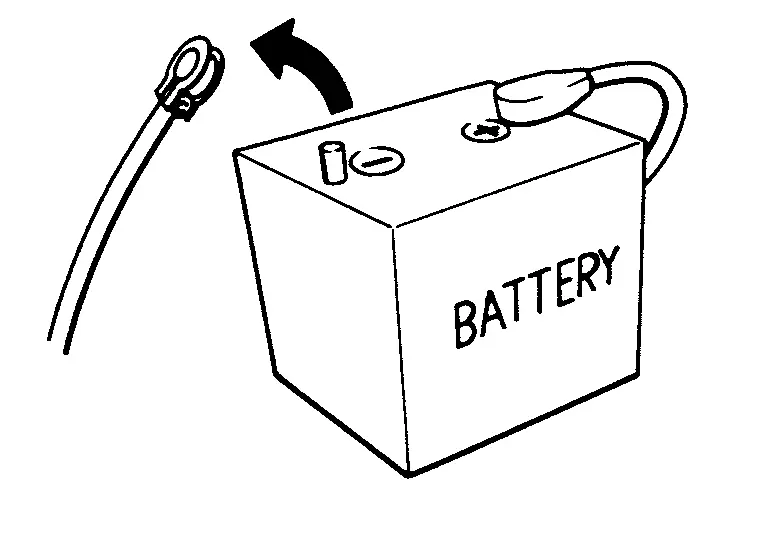
For Nissan Pathfinder vehicles with the 2-batteries, be sure to connect the main battery and the sub battery before turning ON the ignition switch.
After installing the 12V battery, always check "Self Diagnosis Result" of all ECUs and erase DTC.
HOW TO DISCONNECT 12V BATTERY TERMINAL
Disconnect 12V battery terminal according to instruction described below.
Open the hood.
Turn ignition switch to the ON position.
Turn ignition switch to the OFF position with the driver side door opened.
Get out of the Nissan Pathfinder vehicle and close the driver side door.
Wait at least 3 minutes.
Remove 12V battery terminal.
Precaution for ProPILOT Assist System Service
Symptom Diagnosis. Propilot Assist Nissan Pathfinder SUV
Propilot Assist System Symptoms
Symptom Table
| Symptoms | Inspection item/Reference page | |
|---|---|---|
| Operation | System setting cannot be turned ON/OFF | Refer to Diagnosis Procedure |
| System cannot be set (ProPILOT Assist switch turns ON/OFF) | Refer to Diagnosis Procedure | |
| CANCEL switch does not function | ECM Refer to DTC Index. |
|
| Resume does not function | ||
| Set speed does not increase | ||
| Set distance to a Nissan Pathfinder vehicle ahead cannot be changed | ||
| System does not cancel when selector lever sets ON "N" | TCM Refer to DTC Index. |
|
| Chime | Chime does not sound | Combination meter
|
| Control | Driving force is hunting | Refer to Diagnosis Procedure |
| Function to detect a Nissan Pathfinder vehicle ahead | System frequently cannot detect a vehicle ahead | Refer to Diagnosis Procedure |
| Distance to detect a Nissan Pathfinder vehicle ahead is short | ||
| System misidentifies a vehicle even though there is no Nissan Pathfinder vehicle ahead |
|
|
| System misidentifies a Nissan Pathfinder vehicle in the next lane | ||
| The system does not detect the vehicle ahead at all | Refer to Diagnosis Procedure | |
| Operation | Turn signal operates even using turn signal | Refer to Diagnosis Procedure |
System Settings Cannot Be Turned On/off
Diagnosis Procedure
The ProPILOT Assist display does not appear on the vehicle information display when the ProPILOT Assist switch is pressed.
When the ProPILOT Assist display is displayed on the Nissan Pathfinder vehicle information display, the display does not disappear when the ProPILOT Assist switch is pressed.
ProPILOT ASSIST SWITCH INSPECTION
Start the engine.
Check that “MAIN SW” operate normally in “DATA MONITOR” of “ICC/ADAS 2” with CONSULT.
Is the inspection result normal?
YES>>Check combination meter self-diagnosis results ans perform diagnosis on the detected DTC. Refer to DTC Index(FULL TFT METER) or DTC Index(7 inch information display models).
NO>>Check ECM self-diagnosis results ans perform diagnosis on the detected DTC. Refer to DTC Index.
System Cannot Be Set (propilot Assist Switch Turns On/off)
Diagnosis Procedure
The ProPILOT Assist switch can be turned ON/OFF; however, ProPILOT Assist cannot be set by pressing the SET- switch.
When traveling below 30 km/h and a Nissan Pathfinder vehicle ahead is not detected
When the shift lever is moved out of the D (Drive) position or into the manual shift mode
When the parking brake is applied
When the brakes are operated by the driver
When the VDC system is OFF
When the VDC system (including the traction control system) is activated
When the SNOW mode is selected
When the SAND mode is selected (AWD models)
When the MUD/RUT mode is selected (AWD models)
When a wheel is slipping
When any door is open
When the driver’s seat belt is not fastened
CHECK EACH SWITCH AND VEHICLE SPEED SIGNAL
Start the engine.
Check that the following items operate normally in “DATA MONITOR” of “ICC/ADAS 2”.
“Nissan Pathfinder Vehicle speed”
"BRAKE SW"
Is there a malfunctioning item?
“Nissan Pathfinder Vehicle speed”>>Refer to DTC Diagnosis Procedure.
“BRAKE SW”>>Refer to Diagnosis Procedure.
Driving Force Is Hunting
Diagnosis Procedure
The vehicle causes hunting when the ProPILOT Assist system is active.
PERFORM SELF-DIAGNOSIS OF ECM
Perform “All DTC Reading” with CONSULT.
Check if the DTC is detected in self-diagnosis results of “ENGINE”. Refer to DTC Index.
Is any DTC detected?
YES>>GO TO 4.
NO>>GO TO 2.
CHECK DISTANCE SENSOR
Check the Nissan Pathfinder vehicle driving conditions. Refer to Diagnosis Procedure.
Check the distance sensor for contamination, foreign materials, or cracks.
GO TO 3.
CHECK FRONT CAMERA UNIT
Check the Nissan Pathfinder vehicle driving conditions. Refer to Diagnosis Procedure.
Check the front camera unit or contamination, foreign materials, or cracks.
INSPECTION END
REPAIR OR REPLACE MALFUNCTIONING PARTS
Repair or replace malfunctioning parts identified by the self-diagnosis result.
>>GO TO 5.
CHECK ProPILOT ASSIST SYSTEM
Erase the self-diagnosis results, and then perform “All DTC Reading” again after performing the action test. Refer to Work Procedure.
Check that the ProPILOT Assist system is normal.
INSPECTION END
Frequently Cannot Detect the Vehicle Ahead / Detection Zone Is Short
Diagnosis Procedure
The detection function may become unstable in the following cases.
When radar reflections from the vehicle ahead is interrupted.
When driving a road with extremely sharp corners.
When the sensor cannot detect a Nissan Pathfinder vehicle ahead while the vehicle ahead passes a hill or valley.
DISTANCE SENSOR VISUAL CHECK (1)
Check the contamination and foreign matter on the distance sensor area of the front grill.
Do foreign matter adhere?
YES>>GO TO 3.
NO>>GO TO 2.
DISTANCE SENSOR VISUAL CHECK (2)
Remove the front grill. Refer to Removal and Installation.
Check distance sensor for contamination and foreign matter.
Do foreign matter adhere?
YES>>GO TO 3.
NO>>GO TO 4.
WIPE OUT DIRT AND FOREIGN MATERIALS (1)
Wipe out the contamination and foreign matter in the area around the distance sensor.
>>GO TO 8.
DISTANCE SENSOR VISUAL CHECK (3)
Check distance sensor for cracks and scratches.
Are there any cracks or scratches?
YES>>GO TO 6 .
NO>>GO TO 5.
PERFORM RADAR ALIGNMENT
Install the front grill. Refer to Removal and Installation.
Perform the radar alignment. Refer to Work Procedure.
Perform ProPILOT Assist system action test. Refer to Work Procedure.
Check that the Nissan Pathfinder vehicle ahead detection performance improves.
Does it improve?
YES>>INSPECTION END
NO>>GO TO 6.
REPLACE DISTANCE SENSOR
Replace the distance sensor. Refer to Removal and Installation.
Install the front grill. Refer to Removal and Installation.
Perform the radar alignment. Refer to Work Procedure.
Perform ProPILOT Assist system action test. Refer to Work Procedure.
Check that the Nissan Pathfinder vehicle ahead detection performance improves.
Does it improve?
YES>>INSPECTION END
NO>>GO TO 7.
REPLACE ADAS CONTROL UNIT 2
Replace ADAS control unit 2. Refer to Removal and Installation.
>>GO TO 8.
CHECK ProPILOT ASSIST SYSTEM
Erase the self-diagnosis results, and then perform “All DTC Reading” again after performing the action test. Refer to Work Procedure.
Check that the ProPILOT Assist system is normal.
INSPECTION END
The System Does Not Detect the Vehicle Ahead at All
Diagnosis Procedure
When ProPILOT Assist system is active, the ProPILOT Assist system does not perform any control even through there is a Nissan Pathfinder vehicle ahead.
CHECK ProPILOT ASSIST SYSTEM DISPLAY ON INFORMATION DISPLAY
Start the self-diagnosis mode of combination meter. Refer to On Board Diagnosis Function(FULL TFT METER) or On Board Diagnosis Function(7 inch information display models).
Check that the information display turns ON normally.
Is the inspection result normal?
YES>>GO TO 2.
NO>>Replace the combination meter.
VISUAL CHECK (1)
Check the contamination and foreign matter on the distance sensor area of the front grill.
Do foreign materials adhere?
YES>>GO TO 4.
NO>>GO TO 3.
VISUAL CHECK (2)
Remove the front grill. Refer to Removal and Installation.
Check distance sensor for contamination and foreign matter.
Do foreign matter adhere?
YES>>GO TO 4.
NO>>GO TO 5.
WIPE OUT DIRT AND FOREIGN MATERIALS
Wipe out the contamination and foreign matter in the area around the distance sensor.
>>GO TO 9.
VISUAL CHECK (3)
Check distance sensor for cracks and/or scratches.
Are there cracks?
YES>>GO TO 7.
NO>>GO TO 6.
PERFORM RADAR ALIGNMENT
Install the front grill. Refer to Removal and Installation.
Perform the radar alignment. Refer to Work Procedure.
Perform ProPILOT Assist system action test. Refer to Work Procedure.
Check that the Nissan Pathfinder vehicle ahead detection performance improves.
Does it improve?
YES>>INSPECTION END
NO>>GO TO 8.
REPLACE DISTANCE SENSOR
Replace the distance sensor. Refer to Removal and Installation.
Install the front grill. Refer to Removal and Installation.
Perform the radar alignment. Refer to Work Procedure.
Perform ProPILOT Assist system action test. Refer to Work Procedure.
Check that the Nissan Pathfinder vehicle ahead detection performance improves.
Does it improve?
YES>>INSPECTION END
NO>>GO TO 8.
REPLACE ADAS CONTROL UNIT 2
Replace ADAS control unit 2. Refer to Removal and Installation.
>>GO TO 9.
CHECK ProPILOT ASSIST SYSTEM
Erase the self-diagnosis results, and then perform “All DTC Reading” again after performing the action test. Refer to Work Procedure.
Check that the ProPILOT Assist system is normal.
INSPECTION END
The System Operates Even When Using Turn Signal
Diagnosis Procedure
ProPILOT Assist steering assist function operates even when the turn signals are active.
CHECK TURN SIGNAL OPERATION
Check that both right and left turn signals are normal.
Is the inspection result normal?
YES>>Replace the ADAS control unit 2. Refer to Removal and Installation.
NO>>Repair or replace malfunctioning parts. Refer to Symptom Table.
Normal Operating Condition
Symptom Description
PRECAUTIONS FOR ProPILOT ASSIST
Refer to Precautions for ProPILOT Assist.